LTI TruPulse 360R User’s Manual Page 54
Copyright (c) [2017] Laser Technology, Inc. All Rights Reserved. Unauthorized duplication, in whole or in part, is strictly prohibited.
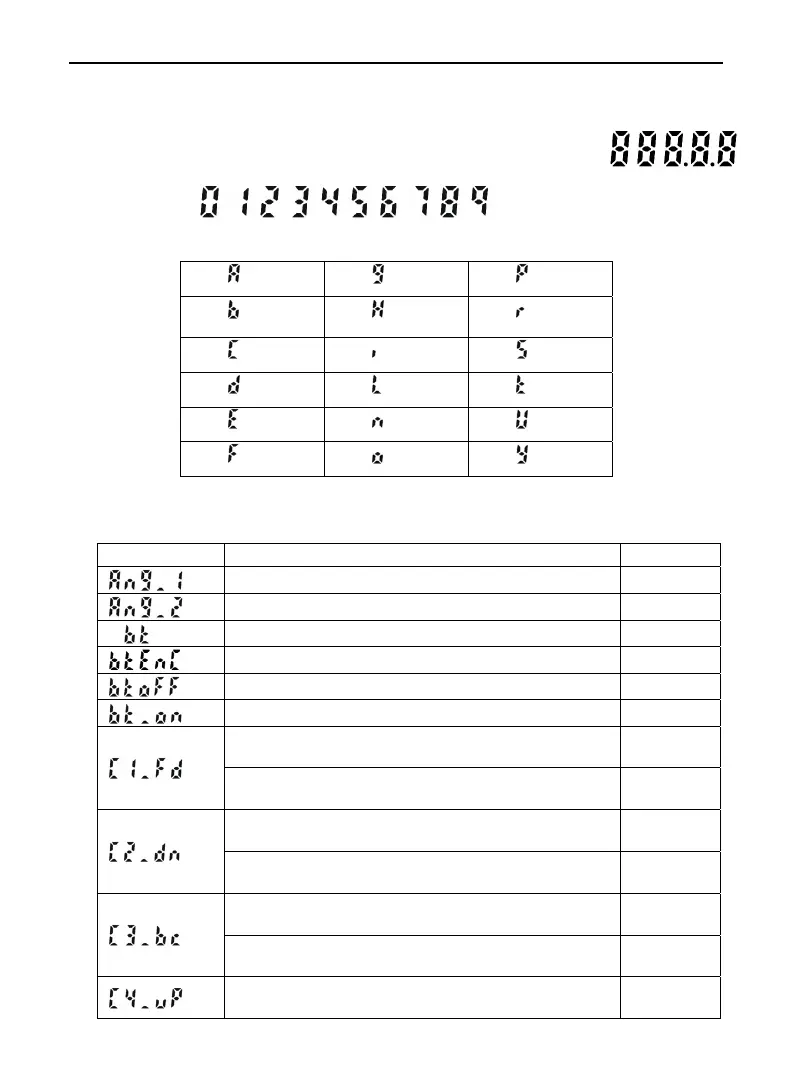
Section 12 – Main Display LCD Characters
The LCD Main Display is used to convey messages and measurement results.
When all of the indicators are active the Main Display looks like:
Numbers 0-9:
Alpha Characters:
= a
= g
= p
= b
= h
= r
= c
= i
= s
= d
= l
= t
= e
= n
= u
= f
= o
= y
Due to the limited number of characters available, many messages have to be abbreviated. The table
below lists the messages that appear in the Main Display.
Message Explanation
Page #
Angle 1. Height Routine.
36
Angle 2. Height Routine.
36
Bluetooth option.
20
Bluetooth loop function for MapStar TruAngle.
20
Bluetooth option off.
20
Bluetooth option on.
20
Calibration point #1 facing forward
Tilt Sensor Calibration Routine.
23
Calibration point #1 facing forward
Horizontal Angle Compass Calibration Routine.
31
Calibration point #2 facing down
Tilt Sensor Calibration Routine.
23
Calibration point #2 facing down
Horizontal Angle Compass Calibration Routine.
31
Calibration point #3 facing back
Tilt Sensor Calibration Routine.
23
Calibration point #3 facing back
Horizontal Angle Compass Calibration Routine.
31
Calibration point #4 facing up
Tilt Sensor Calibration Routine.
23












 To Next Page