Rev: 03.19.21 Page 20 CCD-0004319
Programming the Auto-Program 700156 or 697096 with Rocker Switch
NOTE: When retracting or extending the slide-out, the rocker switch must be depressed and held for two
seconds after the slide-out stops moving. Failure to do so will cause the stops to NOT be set.
Setting the Retracted Stop Point
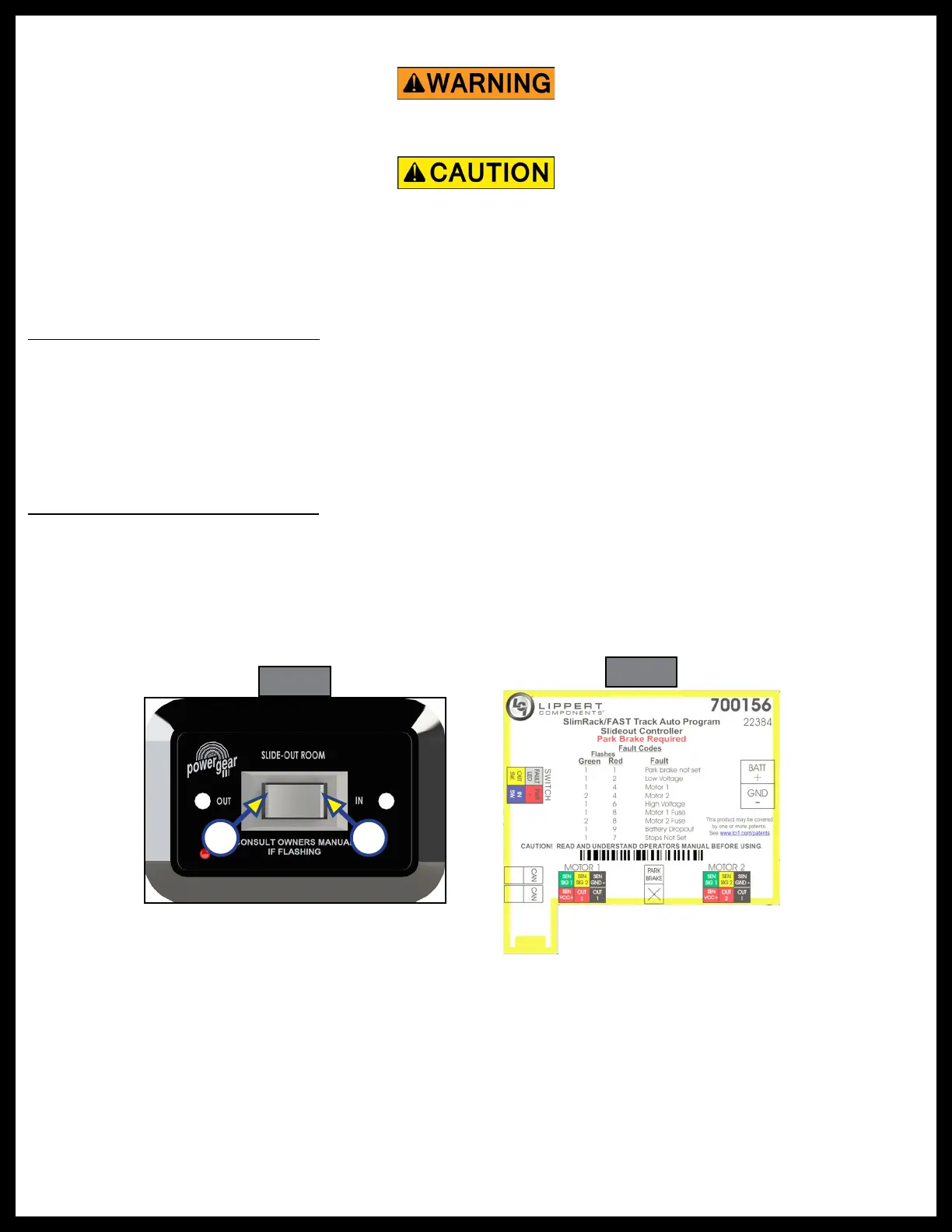
1. Press and hold the IN button on the rocker switch (Fig. 25A).
2. Move the slide-out to the fully retracted position. Press and hold the IN button for three seconds after
the slide-out stops moving. Release the rocker switch.
3. Visually inspect the slide-out's seal to make certain the slide-out is fully retracted. If not, press and hold
the IN button until the slide-out is fully retracted. This procedure may need to be repeated until both
sides of the slide-out are fully retracted.
Setting the Extended Stop Point
1. Press and hold the OUT button on the rocker switch (Fig. 25B).
2. Move the slide-out to the fully extended position. Press and hold the OUT switch for three seconds
after the slide-out stops moving. Release the rocker switch.
3. Visually inspect the slide-out's seal to make certain the slide-out is fully extended. If not, press and hold
the OUT button until fully extended. This procedure may need to be repeated until both sides of the
slide-out are fully extended.
Pre-Operation Check
The Slimrack controllers are equipped to help troubleshoot the system during installation. It is important
that the slide-out motors be plugged in to the proper receptacles on the controller. See figure 26 for proper
slide-out motor designations. Failure to properly connect the motors to the controller will result in problems
for future troubleshooting. The controller will identify the incorrect motor during a fault. Count the number
of flashes and refer to the chart in the Troubleshooting section. The controller label also provides some
brief information (Fig. 26). If difficulties continue while programming the system, and prior to replacing the
controller, verify that the system has been wired correctly and that the IN stop location was programmed
before the OUT stop location. See Wiring Diagram for the auto-program controller (Fig. 40) for proper
connection of the motors to the slide-out controller.
Always make sure that the slide-out path is clear of people and objects before and during operation
of the slide-out. Always keep away from the gear racks when the slide-out is being operated.
Moving parts can pinch, crush or cut. Keep clear and use caution.
Fig. 25
B A
Fig. 26



 To Next Page