Rev: 03.19.21 Page 24 CCD-0004319
Electrical Override Mode
Auto-Program Motorized or Towable Controller
For major faults, the auto-program controller will automatically enter "Emergency Jog" mode when motor
movement is not detected by the controller, in either direction, during slide-out activation. When in
Emergency Jog mode, the controller will jog both motors in the direction the switch is pressed (IN or OUT).
The switch may need to be pressed multiple times to fully retract or extend the slide-out. Take the unit to an
OEM- authorized dealer for service.
NOTE: At any time during the override procedure, the unit will exit override mode if the slide-out has not
been moved for five minutes. The controller will return to normal operation mode after five minute
of inactivity or by cycling power to the controller.
Manual Override Mode - Auto-Program Controllers
In the event that power is lost to the slide-out motor(s) or when the Electrical Override Mode does not work,
the slide-out room can be manually retracted by following these steps.
1. Gain access from either the inside or outside of the unit, whichever is more convenient, to the vertical
channel assembly by removing the OEM trim and flange pieces on the slide-out room box. The motors
are currently located at the top of the channel.
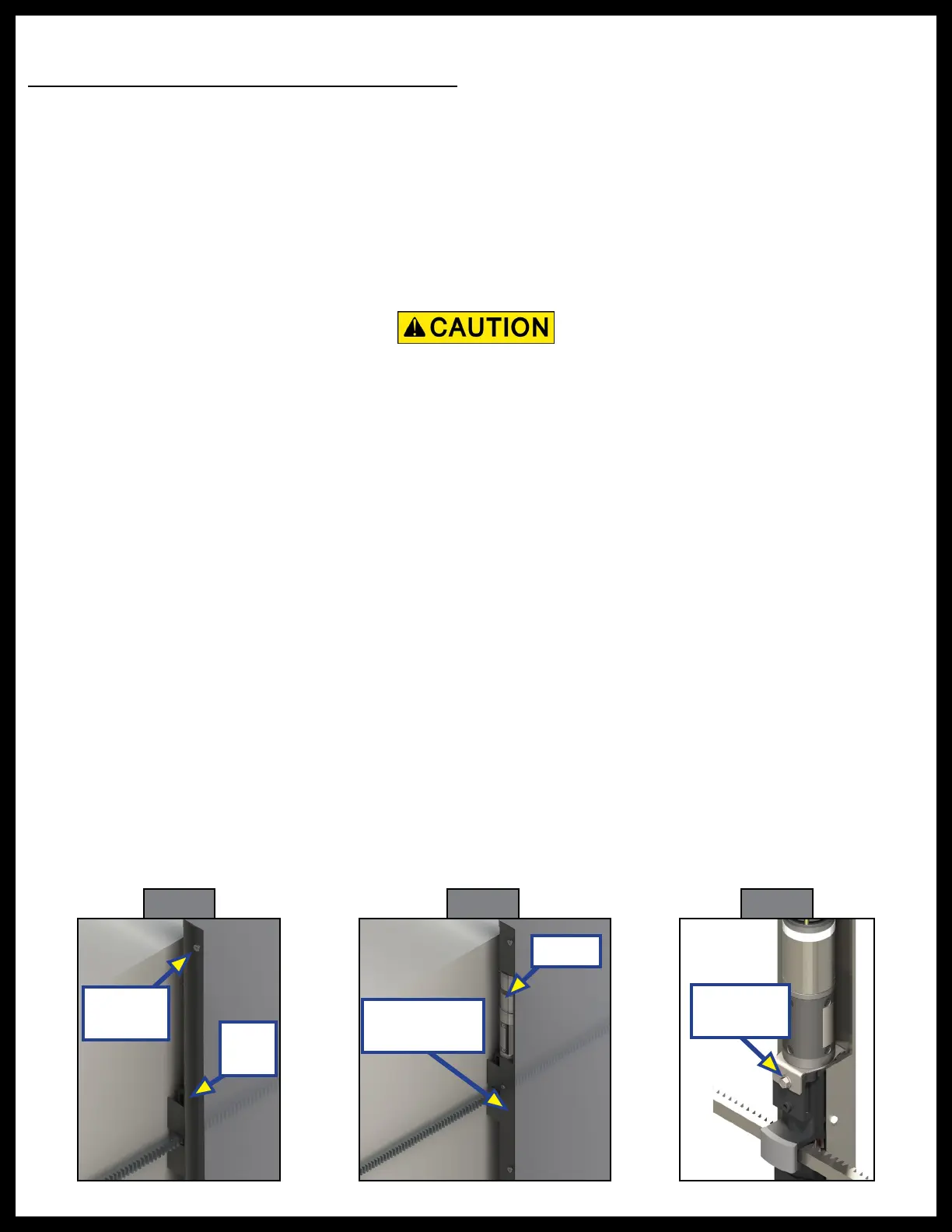
2. If applicable, use a Phillips head screwdriver to remove the top screw from the bulb seal at the top of
the vertical channel (Fig. 30).
3. Pull down the bulb seal and remove the motor cover (Fig. 31). The motor cover may stick to the bulb
seal.
4. Using a
⁄"
open-ended wrench or ratcheting box wrench, loosen the motor retaining screw from the
block by turning
½
-
¾
turn, (Fig. 32) . Do not remove the motor retaining screw.
5. Unplug the motor from the harness and remove the motor by lifting it up and out of the column.
6. Repeat steps 1-6 for the other side.
7. Push the slide-out room uniformly into the retracted position.
8. Once the slide-out room is retracted, secure the slide-out room in place by:
A. Re-installing the motors.
NOTE: Make sure the motor is properly seated on the block with no gap between the mounting bracket
and block.
Fig. 30
Remove
Screws
Bulb
Seal
Fig. 31
Motor
Motor Cover
Removed
Retaining
Screw
Fig. 32
When manually retracting the slide-out room, make sure that both sides of the slide-out room move
together. Damage to the slide-out room may result if movement is not uniform.



 To Next Page