Hardware installation manual of the ES-DH series drives
10
Configuring ES drive by the on-board HMI
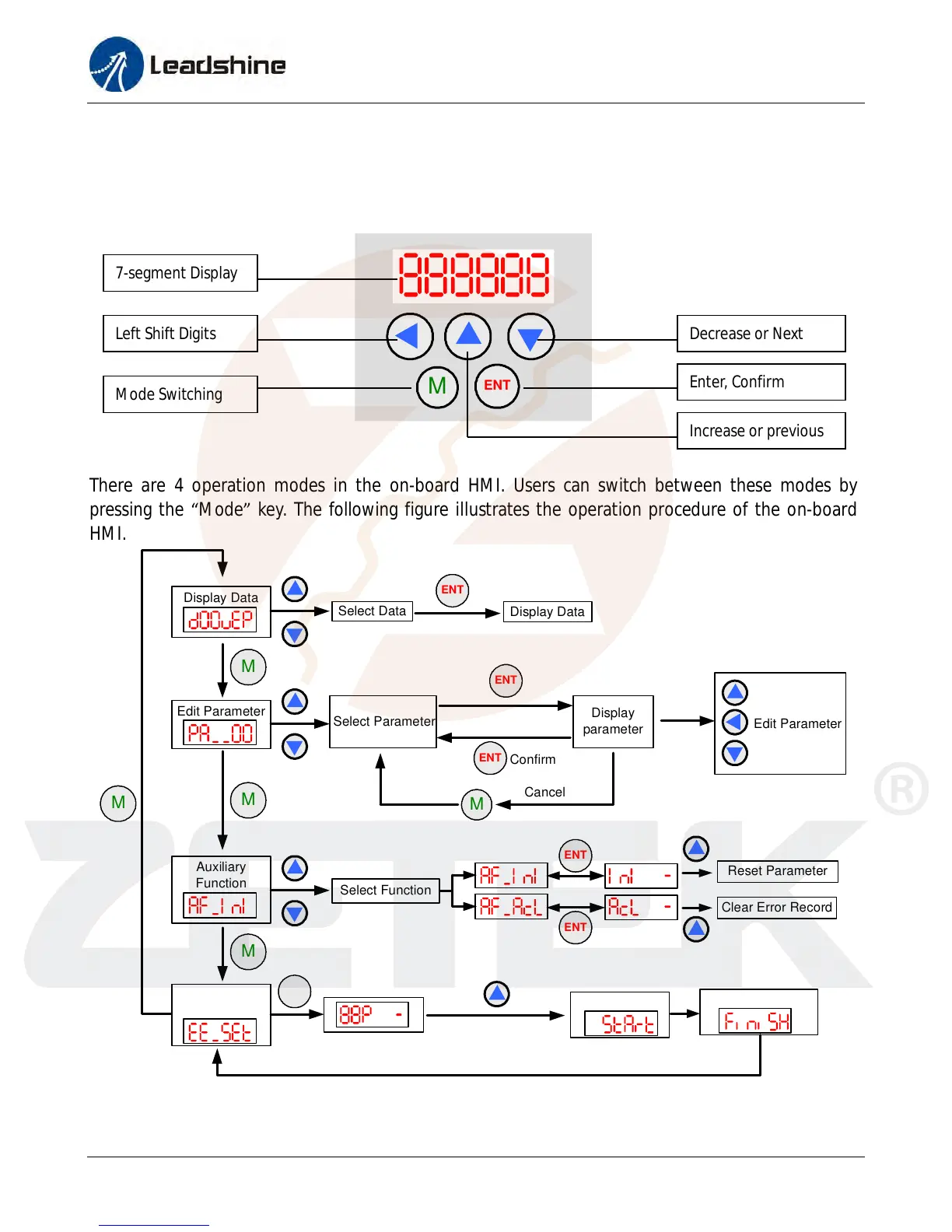
Users can configure the drive via the on-board HMI in the front panel. This HMI includes six
7-segment digits and five keys for users operation as follows:
M
ENT
There are 4 operation modes in the on-board HMI. Users can switch between these modes by
pressing the “Mode” key. The following figure illustrates the operation procedure of the on-board
HMI.
M
Display Data
Edit Parameter
Select Data
ENT
Display Data
Select Parameter
Display
parameter
Edit Parameter
Confirm
M
Cancel
ENT
ENT
Select Function
Hold on 3 seconds
Reset Parameter
Clear Error Record
ENT
ENT
Auxiliary
Function
Write to
EEPROM
Start Writing
Writing Completes
ENT
M
M
M
Operation Procedure of the on-board HMI
7-segment Display
Left Shift Digits Decrease or Next
Increase or previous
Enter, Confirm
Mode Switching
www.servosystem.ru +7(495) 407-01-02



 To Next Page