Hybrid Servo Hardware Installation Manual
5
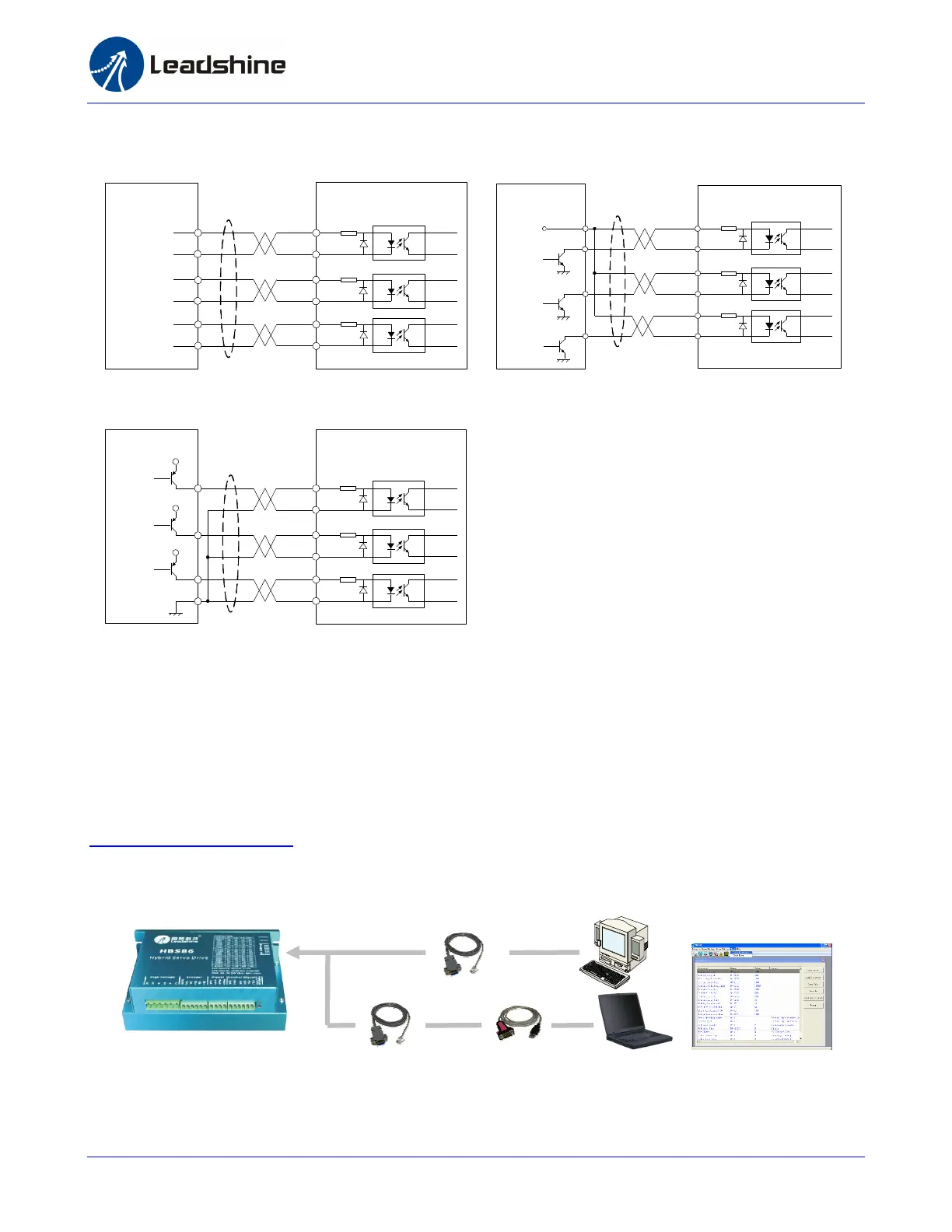
Connecting to PC Software
There is a RS232 communication port in the HBS drive. It is used to communicate with the tuning
software in PC and configured the drive. You can even rotate the motor in the software if you don’t
have a motion controller.
To connect HBS drive to PC software, first download the software from our website:
http://www.leadshine.com. You may also get it from our CD however it is recommended to get it
from the website because it is always the latest one. Install this software in your PC and make it ready
for use later.
The second thing is the RS232 communication cable. It should be shipped with the kit if you include it
in the order. It is still possible to make this cable by yourself. One end of this cable is a RJ-11 header
and the other end of cable is a 9 pin D-Sub female connector.
Or
RS232 Cable
USB-232 Converter
ProTuner
Drive
Controller
VCC
PUL-
PUL+
ENA-
PUL
DIR
ENABLE
DIR-
DIR+
ENA+
Connecting to Differential Control Signal
Connecting to PNP (sourcing) Control
Connecting to NPN (sinking) Control Signal
Drive
Controller
VCC
PUL-
PUL+
ENA-
PUL
DIR
ENABLE
DIR-
DIR+
ENA+
DriveController
PUL-
PUL+
ENA-
DIR-
DIR+
ENA+
PUL-
PUL+
ENA-
DIR-
DIR+
ENA+



 To Next Page