EasyManua.ls Logo

LEGRAND ALPTEC 8.2 - User Manual

LEGRAND ALPTEC 8.2
18 pages
Print Icon
To Next Page IconTo Next Page
Loading...
LE10537AA_01
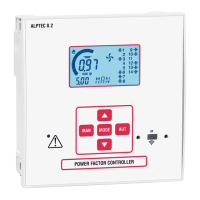
Power factor controller
ALPTEC 3.2 – ALPTEC 5.2 – ALPTEC 8.2
CONTENTS PAGE
1 - Introduction ..........................................................................................................................................................................................................................2
2 - Description ............................................................................................................................................................................................................................2
3 - Modularity .............................................................................................................................................................................................................................3
4 - IR programming port .........................................................................................................................................................................................................4
5 - Front panel.............................................................................................................................................................................................................................4
6 - Information on the display ..............................................................................................................................................................................................5
7 - Operating modes ................................................................................................................................................................................................................5
8 - Measurements ...................................................................................................................................................................................................................... 6
9 - Keyboard lock/unlock ........................................................................................................................................................................................................ 6
10 - “SET main menu ...............................................................................................................................................................................................................7
11 - First switch-on ....................................................................................................................................................................................................................8
12 - Main programming actions ..........................................................................................................................................................................................8
13 - Parameter tables ...............................................................................................................................................................................................................8
14 - Alarms ................................................................................................................................................................................................................................ 14
15 - Description of alarms ................................................................................................................................................................................................... 14
16 - “CMD” command menu ............................................................................................................................................................................................... 14
17 - “FUN” Ethernet menu ....................................................................................................................................................................................................15
18 - Position of terminals ..................................................................................................................................................................................................... 15
19 - Technical characteristics .............................................................................................................................................................................................. 16
MAN MODE AUT
CAUTION
Read this manual carefully before attempting to install or use the product.
- This equipment must only be installed by qualied sta in accordance with
the applicable regulations, to avoid causing damage to people and property.
- Before starting work on the device, de-energise the power supply and
measurement inputs and short-circuit the current transformers.
- The LEGRAND group will not accept liability for electrical safety if the product
is used incorrectly.
- The products described in this document are likely to be upgraded or
modied without prior warning.
- A breaking and protection device must be located in the immediate
vicinity, within the operator’s reach. It must be identied as a device which
disconnects the equipment.
- Clean the device with a soft dry cloth; do not use abrasive products, liquid
detergents or solvents.

Question and Answer IconNeed help?

Do you have a question about the LEGRAND ALPTEC 8.2 and is the answer not in the manual?

Summary

Important Safety Precautions

Product Introduction and Overview

Controller Description and Dimensions

Installation and Mounting Guide

Instructions for flush-mounting the controller and achieving IP54 protection.

Product Modularity and Extension Modules

IR Programming Port and Interface

Front Panel Controls and Indicators

Display Information and Operating Modes

Manual and Automatic Mode Operation

Detailed explanation of MAN and AUT operating modes.

Available Measurements and Keyboard Control

Accessing the Main Programming Menu

Programming Submenu Overview

Overview of BAS, ADV, ALA, CMD, EXIT, SAVE, and FUN submenus.

Initial Setup and Basic Parameter Tables

Advanced Parameter Tables

Alarm Parameter Tables

Alarms and Command Menu Operations

Detailed Alarm Descriptions

Codes, descriptions, and actions for various alarm conditions.

Ethernet Configuration and Terminal Layout

Technical Specifications and Certifications

Overview

The ALPTEC power factor controller is a compact, cutting-edge device designed for power factor correction applications. It features a modern design, an intuitive LCD screen, and ease of installation, with options for extension modules.

Function Description

The ALPTEC controller automatically manages power factor correction by connecting or disconnecting capacitor steps to maintain a setpoint cos phi. It performs accurate RMS measurements of various electrical parameters, including voltage, current, THD, and harmonics up to order 15. The device can operate in either automatic (AUT) or manual (MAN) mode. In AUT mode, it calculates the optimum step configuration based on power rating, number of operations, total operating time, and reconnection time. In MAN mode, users can manually select and connect/disconnect individual steps.

Important Technical Specifications

Versions:

  • ALPTEC 3.2: Controls 3 steps, extendable to 6.
  • ALPTEC 5.2: Controls 5 steps, extendable to 8.
  • ALPTEC 8.2: Controls 8 steps, extendable to 14.

Power Supply:

  • Nominal Voltage Us: 100-440 V~ / 110-250 V=
  • Operating Range: 90-484 V~ / 93.5-300 V=
  • Frequency: 45-66 Hz
  • Power Consumption/Dissipation: 3.5 W/9.5 VA

Voltage Inputs:

  • Nominal Voltage Ue max: 600 VAC L-L (346 VAC L-N)
  • Measurement Range: 50-720 V L-L (415 VAC L-N)
  • Frequency Range: 45-65 Hz - 360-440 Hz
  • Measurement Type: TRMS
  • Input Impedance: > 0.55 MΩ L-N, > 1.10 MΩ L-L
  • Wiring Mode: Single-phase, Two-phase, Three-phase (with or without neutral), and balanced system

Current Inputs:

  • Nominal Current Ie: 1 A~ or 5 A~
  • Measurement Range: 0.025-6 A~ (for 5 A setting), 0.025-1.2 A~ (for 1 A setting)
  • Input Type: Shunt powered by an external CT (LV) 5 A max.
  • Measurement Type: RMS
  • Overload Limit: +20% Ie
  • Overload Peak: 50 A per 1 second
  • Consumption: < 0.6 VA

Measurement Precision:

  • Line Voltage: ±0.5% f.s. ±1 digit

Relay Outputs:

  • ALPTEC 3.2: 2 x 1 NO + common contact
  • ALPTEC 5.2: 4 x 1 NO + common contact
  • ALPTEC 8.2: 7 x 1 NO + common contact
  • Max. Nominal Voltage: 440 V~
  • Nominal Current (AC1): 5 A 250V~
  • Nominal Current (AC15): 1.5 A 440 V~
  • Max. Current on Common Contact: 10 A

Insulation Level:

  • Nominal Insulation Voltage Ui: 600 V~
  • Nominal Impulse Withstand Voltage Uimp: 9.5 kV
  • Power Frequency Withstand Voltage: 5.2 kV

Ambient Operating Conditions:

  • Operating Temperature: -20 to +60°C
  • Storage Temperature: -30 to +80°C
  • Relative Humidity: < 80% (IEC/EN 60068-2-78)
  • Max. Pollution Level: Grade 2
  • Overvoltage Category: III
  • Measurement Category: III
  • Impact Resistance: 15 g (IEC/EN 60068-2-27)
  • Vibration Resistance: 0.7 g (IEC/EN 60068-2-6)

Casing:

  • Mounting: Flush-mountable
  • Material: Polycarbonate
  • Protection Class: IP 54 (front panel), IP 20 (terminal block)
  • Weight: 350 g

Extension Modules:

  • EXT2GR/EXT3GR: Additional relay outputs for 2 or 3 steps.
  • EXTRS485: RS 485 communication interface.
  • EXTETH: Ethernet communication (ALPTEC 8.2 only).

Usage Features

User Interface:

  • Backlit LCD display for clear, intuitive navigation.
  • 4 to 5 navigation and setting buttons.
  • Alarm messages available in 6 languages.

Operating Modes:

  • Automatic (AUT) Mode: The controller calculates the optimal step configuration to achieve the setpoint cos phi, considering various factors like power rating, number of operations, and reconnection time. It warns of imminent connection/disconnection by flashing the step number.
  • Manual (MAN) Mode: Allows users to manually select and connect/disconnect individual steps. The step configuration is maintained even after power disconnection.

Programming and Configuration:

  • IR Programming Port: Parameters can be configured via an optical port using a USB or Wi-Fi connection device. This port offers galvanic isolation, high-speed data transfer, IP54 front panel protection, and minimizes unauthorized access.
  • Password Protection: The device supports user and advanced password levels to prevent unauthorized parameter modifications.
  • Parameter Tables: Comprehensive tables list all programming parameters, including setting ranges and factory defaults, aiding in configuration.
  • Step Power Setting: Allows measurement of the actual power of each step and adjusts it after each switching operation.
  • Sensitivity: Configurable sensitivity for connection and disconnection, affecting the controller's reaction speed.
  • Step Insertion Mode: Options for Standard, Linear, or Disconnection modes to manage step switching.
  • Alarm Thresholds: Configurable thresholds for various alarms, including capacitor overload, over/undervoltage, THD V, THD I, and temperature.

Measurements: The ALPTEC provides a wide range of measurements displayed on the alphanumeric screen, including:

  • Delta-kVAr (reactive power needed to reach setpoint cos phi)
  • Total installation kVAr
  • Number of equivalent steps
  • Installation RMS voltage and current
  • Maximum voltage and current values
  • Weekly and instantaneous Power Factor (PF)
  • Capacitor current as a percentage of its nominal value
  • Temperature
  • Voltage and Current Total Harmonic Distortion (THD)
  • Individual voltage and current harmonics (up to order 15)
  • Cos phi setpoint setting
  • Step residual power as a percentage of nominal value
  • Number of step activations (OPC)
  • Number of step operating hours (H)

Modularity:

  • Extension BUS: Features one slot for EXT extension modules on ALPTEC 3.2/5.2 and two slots for ALPTEC 8.2, allowing for increased step control or communication interfaces (RS485, Ethernet).
  • Automatic Recognition: The controller automatically recognizes fitted EXT modules upon power-up.

Maintenance Features

Alarm Management:

  • Alarm Display: When an alarm is generated, an alarm icon, code, and description are displayed on the screen.
  • Automatic Reset: Alarms automatically reset once the conditions that triggered them disappear.
  • Configurable Alarm Actions: Alarms can be configured for activation (ON/OFF), global alarm relay activation (ALA), disconnection of steps (DISC), or a combination (A+D).
  • Delay Settings: Configurable time delays for alarm activation and unit of time (minutes/seconds).

Command Menu ("CMD"):

  • Maintenance Reset: Resets the maintenance interval.
  • Counter Resets: Resets step counter, original step power rating, and step operating hours.
  • Max Values Reset: Resets previously saved maximum measurement values.
  • Weekly Power Factor Reset: Resets the weekly Power Factor value.
  • Default Settings: Initializes all parameters to their default values.
  • Configuration Backup/Restore: Allows users to save a copy of their settings and restore them later.

Maintenance Interval:

  • Configurable Interval: Users can set a maintenance interval in hours (P.45) or based on the number of step activations (P.54). An alarm (A12) is generated when the interval is exceeded.

Cleaning:

  • Clean the device with a soft, dry cloth. Avoid abrasive products, liquid detergents, or solvents.

Safety:

  • Qualified Installation: Equipment must be installed by qualified staff according to applicable regulations.
  • De-energization: Before working on the device, de-energize the power supply and measurement inputs, and short-circuit current transformers.
  • Galvanic Isolation: The IR programming port is galvanically isolated from internal circuits for operator safety.
  • Breaking and Protection Device: A breaking and protection device must be located nearby, within operator's reach, and identified as a disconnect device.
  • Advanced Mode Parameters: Modifying advanced mode parameters carries risks of premature wear or destruction of equipment, and the user is solely responsible for any such action.

LEGRAND ALPTEC 8.2 Specifications

General IconGeneral
BrandLEGRAND
ModelALPTEC 8.2
CategoryController
LanguageEnglish

Related product manuals