EasyManua.ls Logo

LEGRAND FSIR-100 - User Manual

LEGRAND FSIR-100
11 pages
Print Icon
To Next Page IconTo Next Page
Loading...
FSIR-100
Wireless IR Configuration Tool
User Guide
USING THE FSIR100 CONFIGURATION TOOL
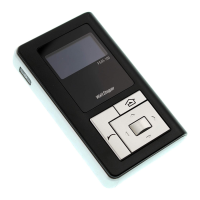
The FSIR-100 Wireless IR Configuration Tool is a handheld
tool for changing defaults and testing of WattStopper
devices.It provides wireless access to the devices for
parameter changes and testing.
The FSIR-100 display shows menus and prompts to lead
you through each process. The navigation pad provides a
simple way to navigate through the customization fields.
Within a certain mounting height of the sensor, the FSIR-
100 allows modification of the system without requiring
ladders or tools; simply with a touch of a few buttons.
The FSIR-100 IR transceiver allows bi-directional
communication between the device and the FSIR-100
configuration tool . Simple menu screens let you see
the current status of the sensor and make changes. It
can change device parameters such as high/low mode,
sensitivity, time delay, cut off and more. With the FSIR-100
you can also establish and store device parameter profiles.
BATTERIES
The FSIR-100 operates on three
standard 1.5V AAA Alkaline batteries
or three rechargeable AAA NiMH
batteries. The battery status displays
in the upper right corner of the
display. Three bars next to BAT=
indicates a full battery charge. A
warning appears on the display when the battery level falls
below a minimum acceptable level. To conserve battery
power, the FSIR-100 automatically shuts off 10 minutes
after the last key press.
If communication is not successful, (if possible) move
closer to the sensor.
If still not successful, there may be too much IR
interference from other sources. Programming the
unit at night when there is no daylight available may
be the only way to communicate with the sensor.
CONTENTS
Using The FSIR-100 Configuration Tool ........................... 1
Batteries .......................................................................... 1
Navigation ....................................................................... 2
FSP-211 .......................................................................... 2
IR Communication ........................................................... 2
FSP-211 Screens ............................................................. 3
Home Menu ...................................................................3
New Settings .................................................................3
Current Settings ............................................................5
Test Mode ......................................................................5
Recall Profiles ...............................................................6
HBP-111 .......................................................................... 7
HBP-111 Screens ............................................................. 8
Home Menu ...................................................................8
New Settings .................................................................8
Current Settings ............................................................9
Test Mode ....................................................................10
Load Toggle .................................................................10
Recall Profile ...............................................................10
Troubleshooting..............................................................10
Question and Answer IconNeed help?

Do you have a question about the LEGRAND FSIR-100 and is the answer not in the manual?

Summary

FSIR-100 Configuration Tool Overview

Tool Functionality and Navigation

Explains the FSIR-100's role in configuring WattStopper devices wirelessly and how to navigate its menus.

FSP-211 Sensor Introduction

FSP-211 Sensor Description

Introduces the FSP-211 as a low-profile PIR motion sensor for dimming lighting based on movement.

FSP-211 Parameter Configuration

Time Delay and Cut Off Settings

Configures time periods for lights fading to low mode and turning off after motion detection.

Sensitivity and Hold Off Setpoint

Adjusts PIR response and sets ambient light thresholds for light control.

Ramp Up, Fade Down, and Photocell Settings

Sets timing for light level changes and enables/disables photocell-based operation.

FSP-211 Configuration Actions and Modes

Sending and Saving FSP-211 Parameters

Covers sending configured parameters to the device and saving them as profiles.

Test Mode and Current Settings

Explains Test Mode for verification and how to view current sensor settings.

FSP-211 Profile and Lock Management

Recalling FSP-211 Parameter Profiles

Allows selection of saved parameter profiles for efficient programming of multiple sensors.

HBP-111 High Bay Sensor Overview

HBP-111 Parameter Configuration and Actions

HBP-111 Operational Modes and Troubleshooting

Troubleshooting HBP-111 Issues

Addresses common problems such as display issues or no response from the device.

Overview

The WattStopper FSIR-100 is a wireless IR configuration tool designed for changing defaults and testing WattStopper devices. It provides wireless access to devices for parameter changes and testing, eliminating the need for ladders or tools for modification within a certain mounting height of the sensor. The FSIR-100's display guides users through processes with menus and prompts, and a navigation pad simplifies customization field navigation.

Function Description:

The FSIR-100 acts as a handheld interface for bi-directional communication with WattStopper sensors like the FSP-211 and HBP-111. It allows users to view the current status of a sensor and modify various parameters. For the FSP-211, parameters include High/Low Mode, Time Delay, Cut Off, Sensitivity, Setpoint, and Ramp/Fade rates. For the HBP-111, adjustable parameters are Time Delay, Sensitivity, On Setpoint, Burn-In Mode, Walk-through Mode, and Visual Alert. The tool also enables users to establish and store device parameter profiles, which is particularly useful for programming multiple sensors with the same settings. Additionally, it offers a Test Mode to shorten timeouts for quick verification of settings and a Load Toggle feature to manually turn loads ON/OFF. A Lock Settings feature prevents unauthorized changes to FSP-211 parameters, requiring a power cycle to initiate configuration if locked.

Important Technical Specifications:

  • Power Source: Three standard 1.5V AAA Alkaline batteries or three rechargeable AAA NIMH batteries.
  • Battery Status Display: Indicated by three bars next to "BAT=" for a full charge; a warning appears when the battery level is low.
  • Auto Shut-off: The FSIR-100 automatically shuts off after 10 minutes of inactivity to conserve battery power.
  • IR Communication Range: Typically 15'-30', but can vary depending on the lighting environment.
  • FSP-211 Parameters:
    • High Mode: Range 0 V to 10 V, increments 0.2 V (default 10V).
    • Low Mode: Range OFF, 0 V to 9.8 V, increments 0.2 V (default 1V).
    • Time Delay: Range 30 sec, 1 min to 30 min, increments 1 min (default 5 min).
    • Cut Off: Range Disable, 1 min to 59 min, 1 hr to 5 hr, increments 1 min or 1 hr (default 1 hour).
    • Sensitivity: Range On-Fix, Off-Fix, Low, Med, Max (default Max).
    • Hold Off Setpoint: Range Auto, Disable, 1 fc to 250 fc, increments 1 fc (default Disable).
    • Ramp Up/Fade Down: Range Disable, 1 sec to 60 sec, increments 1 sec (default Disable).
    • Lock Delay: Range 10 min to 240 min, increments 1 min (default Disable).
  • HBP-111 Parameters:
    • Time Delay: Range 1 min to 30 min, increments 1 min (default 15 min).
    • Sensitivity: Range Low, Med, Max (default Max).
    • On Setpoint: Range Disabled, 1 fc to 300 fc, increments 1 fc (default 300 fc).
    • Burn-In Mode: Default Disabled.
    • Walk-through Mode: Default Off.
    • Visual Alert: Default Off.

Usage Features:

  • Navigation: Up/down arrow keys navigate between fields. The active field flashes between yellow text on black background and black text on yellow background.
  • Parameter Adjustment: Value fields are indicated by "" symbols. Left/right arrow keys decrement/increment values. Values wrap around at maximum/minimum.
  • Menu Access: The Select button moves to a menu or function within the active field.
  • Home Button: Returns to the main menu.
  • Back Button: Acts as an undo function, returning to the previous screen and discarding unsaved changes.
  • IR Communication: Requires positioning under the sensor without obstructions. The controlled load cycles every time communication is established.
  • Profile Management: Users can save and recall up to six parameter profiles for both FSP-211 and HBP-111 sensors, facilitating batch programming.
  • Test Mode: Shortens timeouts for High/Low and Cut Off settings (FSP-211) or time delay (HBP-111) for quick verification. Automatically disables after 5 minutes.
  • Load Toggle (HBP-111): Allows manual ON/OFF control of the load from the FSIR-100.
  • Current Settings View: Read-only display of a sensor's current parameters.
  • Light Level Reading: Displays the current light level at the sensor, useful for setpoint adjustments.
  • FSP-211 Auto Setpoint Calibration: The "Auto" option for Hold Off Setpoint initiates a calibration procedure where the load turns on to warm up, then cycles eight times before settling in an off state, automatically calculating a new setpoint. Communication to the FSP-211 is disabled during this process.
  • HBP-111 Burn-In Mode: When enabled, the light load turns ON for 100 hours regardless of occupancy. Can be exited via the FSIR-100 or the HBP-111's push button.
  • HBP-111 Walk-through Mode: Provides a 3-minute time delay for brief occupancy applications. If no activity is detected after 30 seconds, the load turns off 3 minutes after initial detection. If activity continues, the set time delay is used.
  • HBP-111 Visual Alert: Toggles the load for 1 second to alert occupants that the set time delay will be reached within 1 minute, providing a visual cue to move within the coverage area to keep lights on.

Maintenance Features:

  • Battery Replacement: Operates on AAA batteries; users should ensure batteries are installed correctly and are in good condition if the display does not come on.
  • Troubleshooting:
    • No Display: Check battery installation and condition.
    • No Response from Device:
      • Move closer to the sensor.
      • Ensure the device is not obstructed.
      • Verify the angle is not too high; move directly underneath the sensor if needed.
      • Consider programming at night to avoid IR interference from other sources.
      • Confirm using the correct tool (FSIR-100, not LMCT-100).
      • Ensure the device is within range and powered.
    • For other issues, contact Technical Support.

LEGRAND FSIR-100 Specifications

General IconGeneral
BrandLEGRAND
ModelFSIR-100
CategoryController
LanguageEnglish

Related product manuals