CS10/CS15 & GS Sensors, Operation
42
4.1.9 Inserting and Removing a SIM Card
Insert and remove a
SIM card
step-by-step
4.1.10 Setting up the Docking Station
Mounting
components of the
docking station
step-by-step
Description
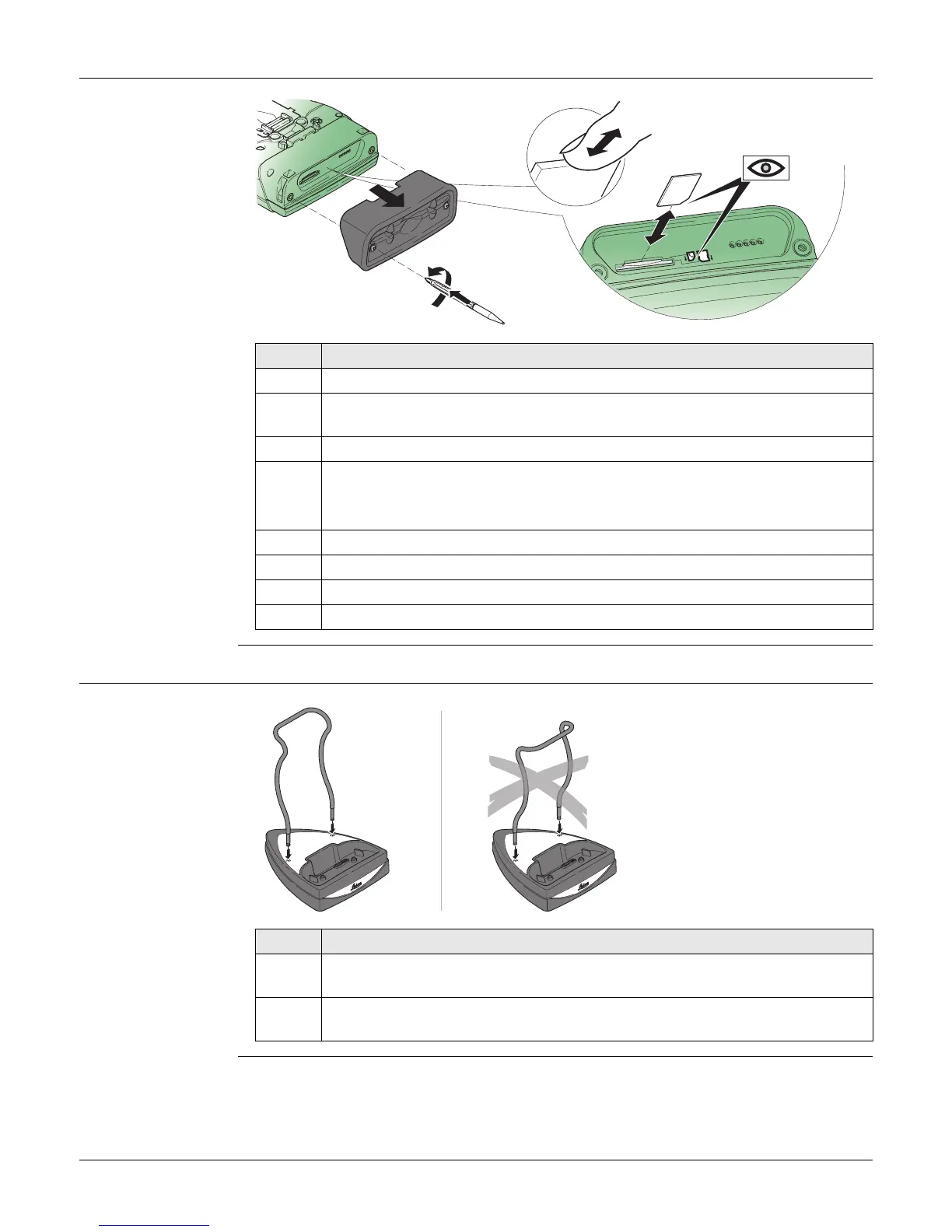
The SIM card is inserted into a slot inside the top of the CS10/CS15.
1. Loosen the screws inside the slot cover on top of the CS10/CS15 using the
screwdriver end of the stylus.
2. Detach the slot cover from the CS10/CS15.
3. Slide the card firmly into the slot until it clicks into position.
Do not force the card into the slot. The card should be held with the
contacts facing the slot.
4. Attach the slot cover and tighten the screws.
5. To remove the card, detach the slot cover of the CS10/CS15.
6. Gently press the top of the card to release it from the slot.
7. Remove the SIM card and attach the slot cover.
Step Description
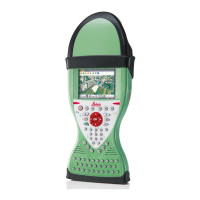
1. Hold the docking station bracket as shown in the illustration in relation to
the docking station rack.
2. Slightly press the holder into the docking station rack. A click can be felt
when the holder is secure.
CS_027
1
1
2
2



 To Next Page