EasyManua.ls Logo

Leica CTR16 - User Manual

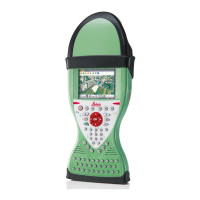
Leica CTR16
74 pages
Print Icon
To Next Page IconTo Next Page
Loading...
Leica CS10/CS15 &
GS Sensors
User Manual
Version 8.0
English

Table of Contents

Question and Answer IconNeed help?

Do you have a question about the Leica CTR16 and is the answer not in the manual?

Summary

Safety Directions

Definition and Limits of Use

Details intended use, misuse, and environmental limits for product operation.

Manufacturer and User Responsibilities

Outlines responsibilities of the manufacturer and the product user.

Hazards of Use and Precautions

Lists potential dangers and necessary precautions during product use.

Lightning Conductor Design Suggestions

Provides suggestions for lightning conductor design for GNSS systems.

Grounding and Battery Safety

Explains grounding procedures and battery safety precautions.

Environmental Risks and Disposal

Warns against wet conditions and provides product disposal guidelines.

Electromagnetic Compatibility (EMC)

EMC Overview and Precautions

Defines EMC and lists precautions for accessories and mobile devices.

FCC Statement and Labelling

RF Exposure and Canadian Compliance

Description of the System

Software Concept and Upload CS

Covers CS firmware, GS/ME firmware, and upload instructions for CS models.

Software Upload GS05;GS06 and GS08 plus;GS12

Provides firmware update instructions for GS05/GS06 and GS08plus/GS12.

Power and Data Storage Concepts

Details power options and memory device usage for data storage.

User Interface

Operating Principles

Explains how to operate the interface using keyboard and touch screen.

Operation

Equipment Setup Overview

Describes equipment setup for static operations over markers.

Equipment Setup Step-by-Step

Provides a step-by-step guide for setting up the instrument.

Setting up as Real-Time Base

Details the procedure for setting up real-time base stations.

Real-Time Base Setup Step-by-Step

Step-by-step guide for setting up as a real-time base station.

Real-Time Base Setup Step-by-Step (Cont.)

Continues the step-by-step guide for real-time base station setup.

Setting up as Real-Time Rover

Describes setup for real-time rover use with extended field operation.

Real-Time Rover Setup Step-by-Step

Step-by-step guide for setting up as a real-time rover.

Setting up Viva Uno

Explains setup for static operations or rover use with Viva Uno.

Viva Uno Setup Step-by-Step

Step-by-step guide for setting up Viva Uno.

Connecting to PC - USB Drivers

Instructions for installing USB drivers for PC connection.

Connecting to PC via USB Cable

Step-by-step guide for connecting the device to a PC via USB.

Care and Transport

Technical Data

CS10;CS15 Specifications

Details design, dimensions, weight, power, and battery specs for CS10/CS15.

GS05;GS06 Accuracy

Provides accuracy specifications for differential code and phase measurements.

CTR16;CTR17 Specifications

Details description, dimensions, power, and environmental specs for CTR16/CTR17.

GS08 plus;GS12 Accuracy

Provides accuracy specifications for differential code and phase measurements.

Appendix A: Pin Assignments and Sockets

Summary

Safety Directions

Definition and Limits of Use

Details intended use, misuse, and environmental limits for product operation.

Manufacturer and User Responsibilities

Outlines responsibilities of the manufacturer and the product user.

Hazards of Use and Precautions

Lists potential dangers and necessary precautions during product use.

Lightning Conductor Design Suggestions

Provides suggestions for lightning conductor design for GNSS systems.

Grounding and Battery Safety

Explains grounding procedures and battery safety precautions.

Environmental Risks and Disposal

Warns against wet conditions and provides product disposal guidelines.

Electromagnetic Compatibility (EMC)

EMC Overview and Precautions

Defines EMC and lists precautions for accessories and mobile devices.

FCC Statement and Labelling

RF Exposure and Canadian Compliance

Description of the System

Software Concept and Upload CS

Covers CS firmware, GS/ME firmware, and upload instructions for CS models.

Software Upload GS05;GS06 and GS08 plus;GS12

Provides firmware update instructions for GS05/GS06 and GS08plus/GS12.

Power and Data Storage Concepts

Details power options and memory device usage for data storage.

User Interface

Operating Principles

Explains how to operate the interface using keyboard and touch screen.

Operation

Equipment Setup Overview

Describes equipment setup for static operations over markers.

Equipment Setup Step-by-Step

Provides a step-by-step guide for setting up the instrument.

Setting up as Real-Time Base

Details the procedure for setting up real-time base stations.

Real-Time Base Setup Step-by-Step

Step-by-step guide for setting up as a real-time base station.

Real-Time Base Setup Step-by-Step (Cont.)

Continues the step-by-step guide for real-time base station setup.

Setting up as Real-Time Rover

Describes setup for real-time rover use with extended field operation.

Real-Time Rover Setup Step-by-Step

Step-by-step guide for setting up as a real-time rover.

Setting up Viva Uno

Explains setup for static operations or rover use with Viva Uno.

Viva Uno Setup Step-by-Step

Step-by-step guide for setting up Viva Uno.

Connecting to PC - USB Drivers

Instructions for installing USB drivers for PC connection.

Connecting to PC via USB Cable

Step-by-step guide for connecting the device to a PC via USB.

Care and Transport

Technical Data

CS10;CS15 Specifications

Details design, dimensions, weight, power, and battery specs for CS10/CS15.

GS05;GS06 Accuracy

Provides accuracy specifications for differential code and phase measurements.

CTR16;CTR17 Specifications

Details description, dimensions, power, and environmental specs for CTR16/CTR17.

GS08 plus;GS12 Accuracy

Provides accuracy specifications for differential code and phase measurements.

Appendix A: Pin Assignments and Sockets

Leica CTR16 Specifications

General IconGeneral
TypeController
Operating Temperature-20°C to +50°C
CompatibilityLeica total stations
CommunicationBluetooth, USB
OutputBluetooth

Related product manuals