CS10/CS15 & GS Sensors, Operation
49
4.4 Working with the Memory Device
• Keep the card dry.
• Use it only within the specified temperature range.
•Do not bend the card.
• Protect the card from direct impacts.
Failure to follow these instructions could result in data loss and/or permanent damage
to the card.
Insert and remove
an SD card
step-by-step
Step Description
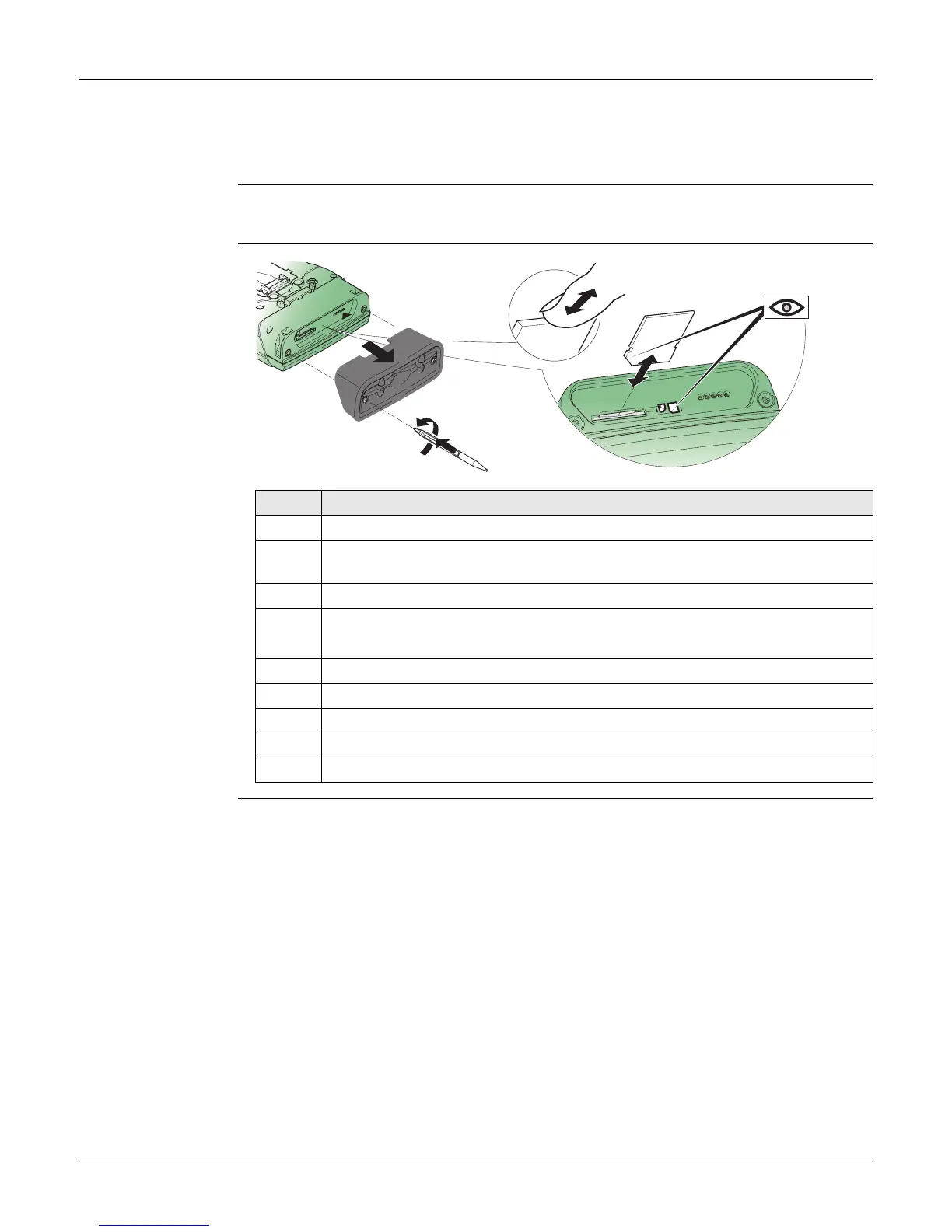
The SD card is inserted into a slot inside the top of the CS10/CS15.
1. Loosen the screws inside the slot cover on top of the CS10/CS15 using the
screwdriver end of the stylus.
2. Detach the slot cover from the CS10/CS15.
3. Slide the card firmly into the slot until it clicks into position.
Do not force the card into the slot.
4. The card must be held with the contacts facing the slot.
5. Attach the slot cover and tighten the screws.
6. To remove the card, detach the slot cover of the CS10/CS15.
7. Gently press the top of the card to release it from the slot.
8. Remove the SD card and attach the slot cover.
0012607_001
1
2
4
SD
3



 To Next Page