CS10/CS15 & GS Sensors, User Interface
27
3User Interface
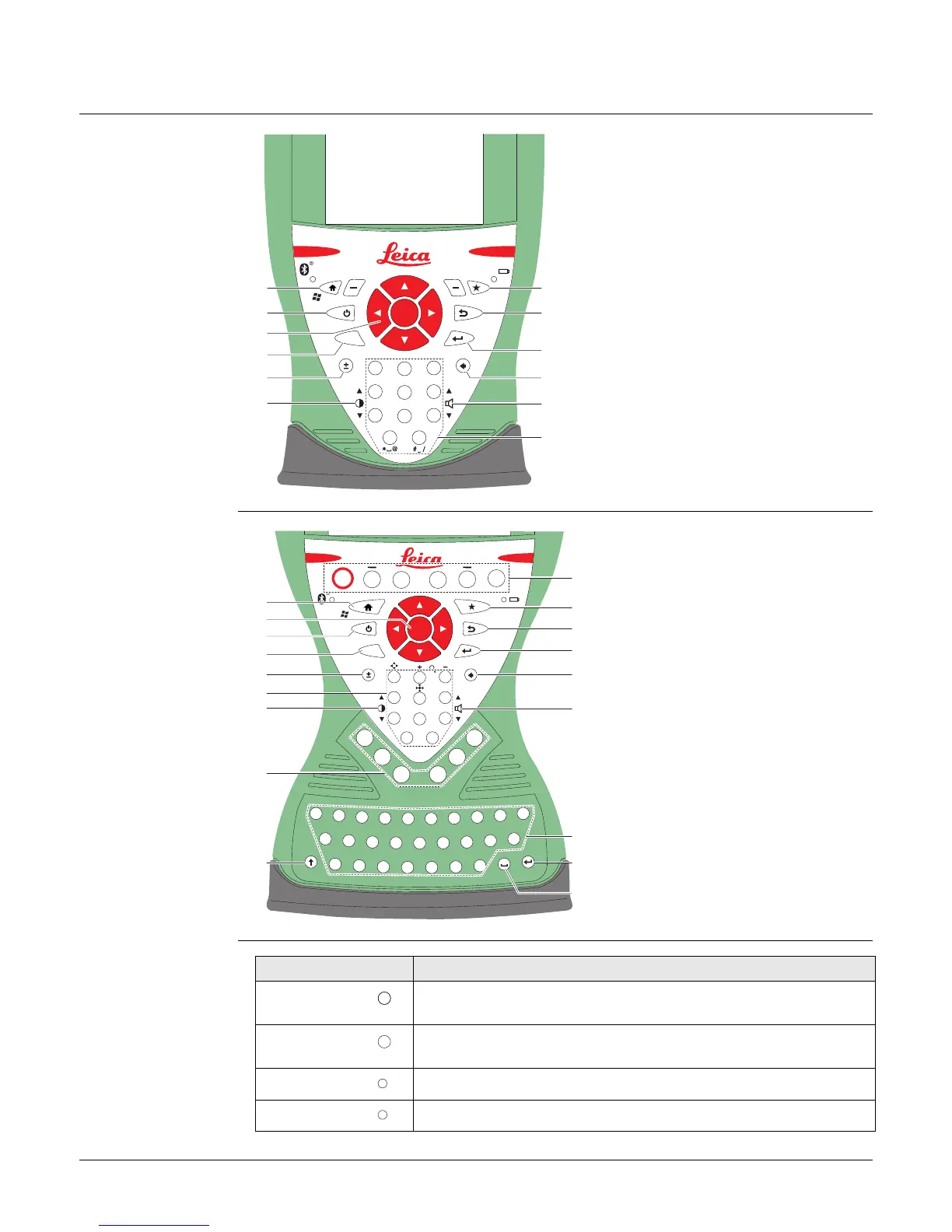
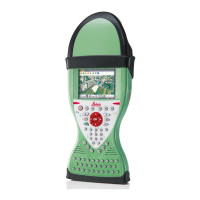
3.1 Keyboard
Keyboard display
CS10
Keyboard display
CS15
Keys
a) Home
b) ON/OFF
c) Arrow keys, OK
d) Fn
e) ± key
f) Brightness
g) Favourites
h) ESC
i) Enter
j) Backspace
k) Volume
l) Numeric keys
2
31
.
5
6
4
8
9
7
0
Fn
ABC
DEF
GHI
JKL
MNO
PQRS
TUV
WXYZ
OK
000176_004
e
f
g
d
a
b
c
h
i
j
k
l
a) Home
b) Arrow keys, OK
c) ON/OFF
d) Fn
e) ± key
f) Numeric keys
g) Brightness
h) Function keys F7 - F12
i) CAPS Lock
j) Function keys F1 - F6
k) Favourites
l) ESC
m) ENTER
n) Backspace
o) Volume
p) Alpha keys
q) ENTER
r) SPACE
F1
F2
F7
F8
F9
F10
F11
F12
F3
F4
F5
F6
.
2
3
1
5
4
Fn
6
8
9
7
0
Q
W
E
R
T
Y
U
I
O
P
L
K
J
H
G
F
D
S
A
Z
X
C
V
B
N
M
OK
000177_005
e
g
h
c
a
b
d
f
i
j
k
l
m
n
o
p
q
r
Key Function
Function keys
F1-F6
Correspond to six softkeys that appear on the bottom of the
screen when the screen is activated.
Function keys
F7-F12
User definable keys to execute chosen commands or access
chosen screens.
Alpha keys To type letters.
Numeric keys To type numbers.
F1
F7
X
1



 To Next Page