EasyManua.ls Logo

Leica DSX - Grid Definition and Project Summary Confirmation

Leica DSX
82 pages
Print Icon
To Next Page IconTo Next Page
To Previous Page IconTo Previous Page
Loading...
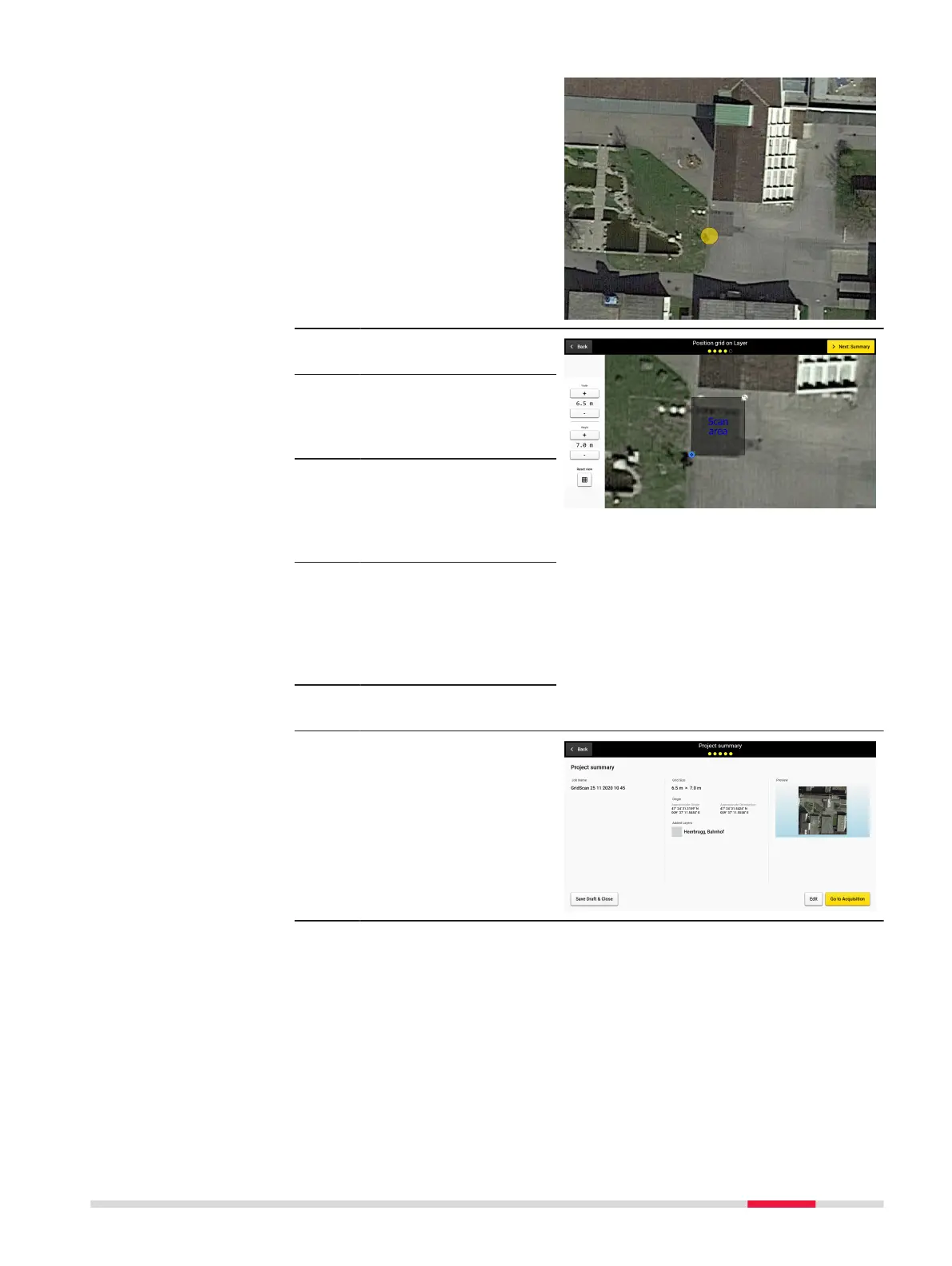
6. Tap the map to set an
initial reference point
directly on the map.
This will be indicated by
a yellow circle over the
point.
7. Select Use Location to
continue.
8. Adjust scan area as
desired by increasing or
decreasing the with and
height.
9. Move the position of
the grid area using the
blue circle in the bot-
tom left corner of the
grid area.
10. Change the orientation
of the grid area by
moving the white circle
in the upper right
corner of the marked
grid area.
11. Select Next: Summary
to continue.
12. Conrm the information
of the project summary.
Save and close the
draft for further scan or
proceed to scanning by
typing Go to Acquisi-
tion.
Procedures for Working with the DSX 51

Other manuals for Leica DSX