EasyManua.ls Logo

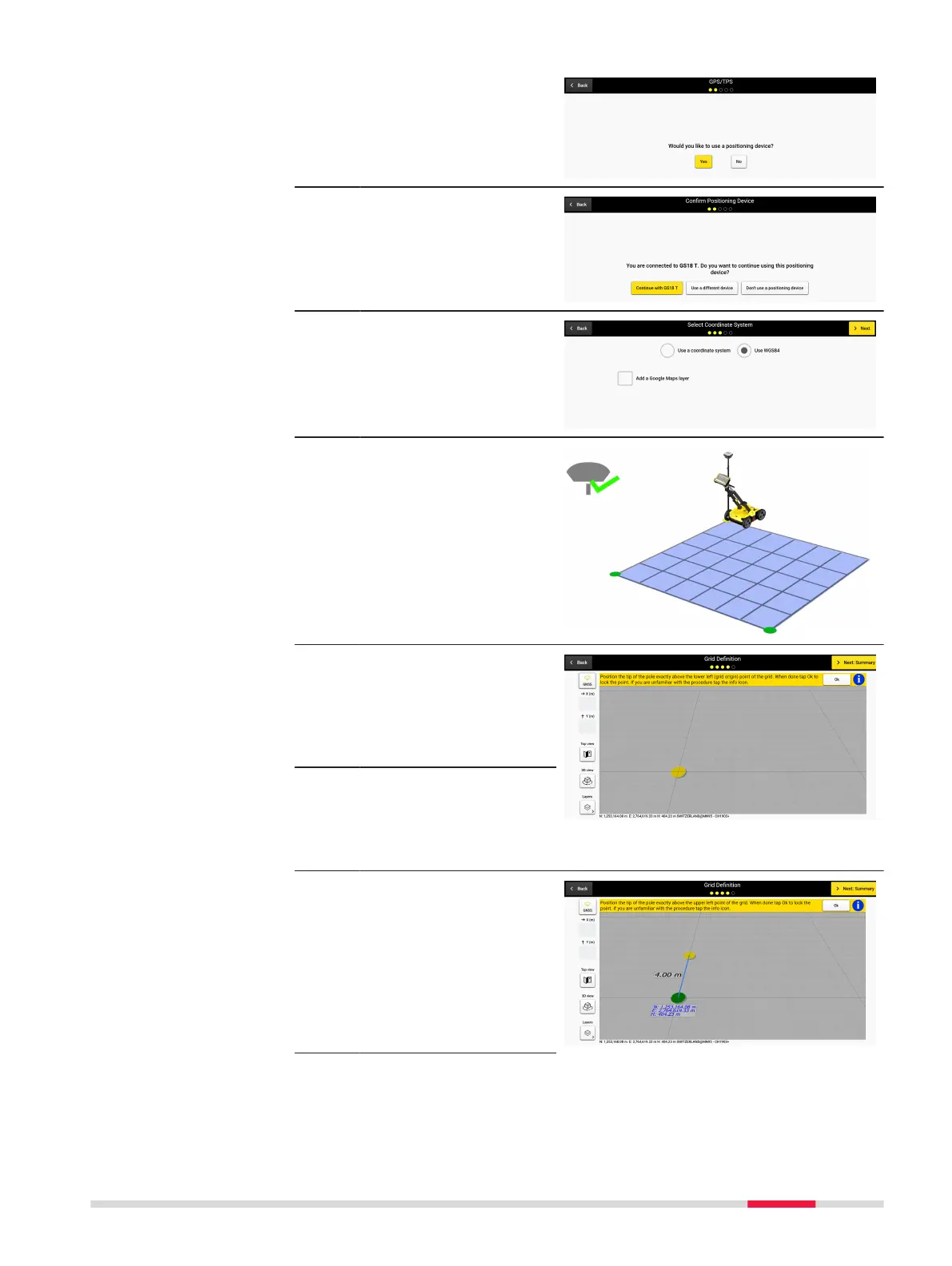
Leica DSX - Grid Definition Workflow with Positioning Device

Leica DSX
82 pages
Print Icon
To Next Page IconTo Next Page
To Previous Page IconTo Previous Page
Loading...
1. Select the positioning
device.
2. Proceed with the con-
nected positioning
device or select an
alternative workow.
3. Select the coordinate
system and later
optionally a CAD layer
or proceed with WGS84
and Google Maps layer.
4. When a positioning
device is connected,
the new grid denition
screen provides grid
positioning and size
denition guidance.
5. Walk to the desired loc-
ation, place the pole tip
above the grid origin
and lock the point by
pressing the OK but-
ton.
Make sure that RTK has
been fully established
beforehand. Otherwise
this step cannot be
completed successfully.
6. To dene the grid ori-
entation, walk to the
second point (upper left
corner of the grid) and
lock it as previously.
In real time, a label is
displayed to reect the
size of the grid side.
Project setup and grid
denition workow
Step-by-step
Procedures for Working with the DSX 67

Other manuals for Leica DSX