54
Version 2.0, Revision I
Operation
5
Fig. 44
3
2
4
1
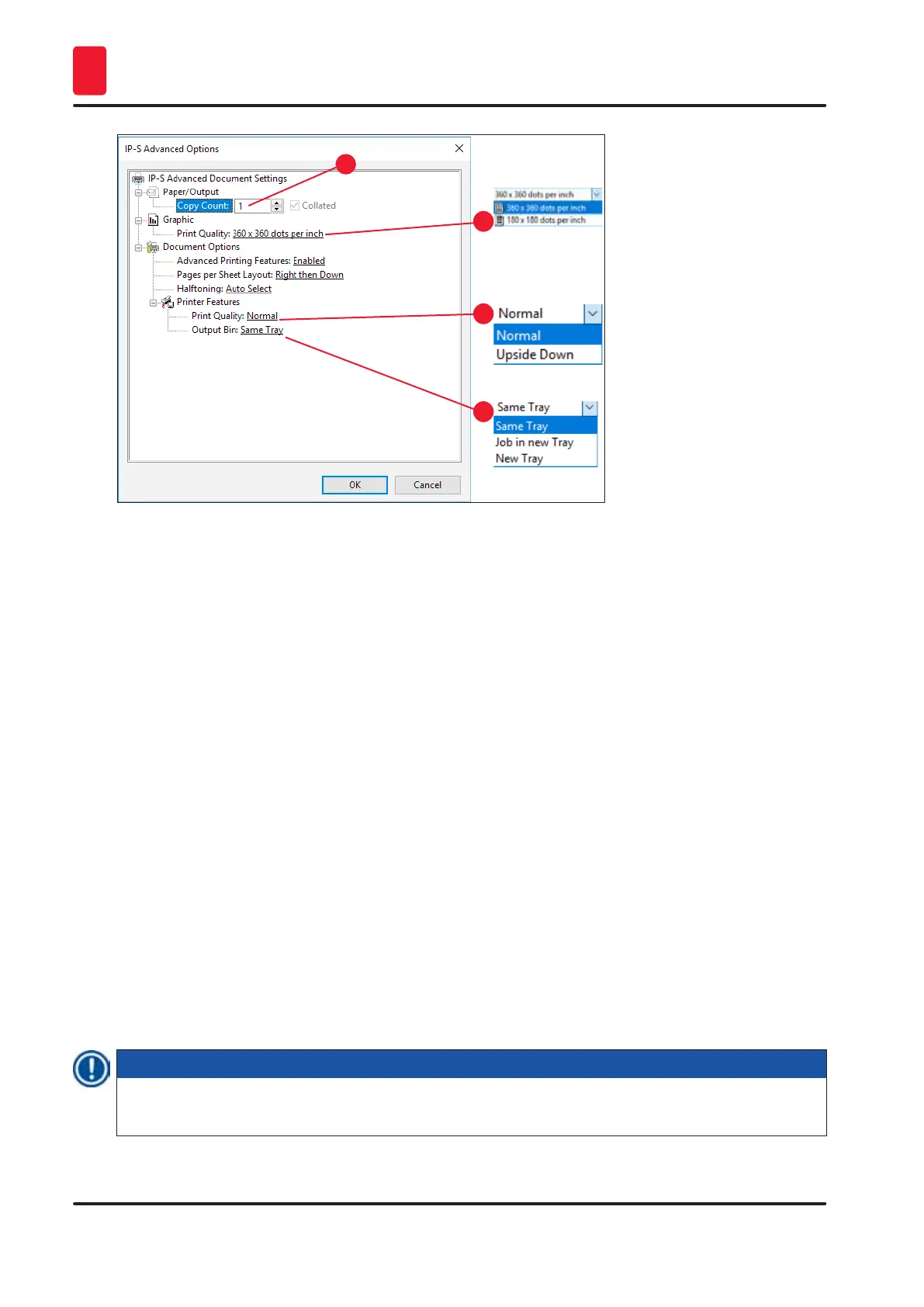
Paper/Output > Copy Count menu (→ "Fig. 44-1"):
• The amount of copies to be printed can be entered here.
Graphic > Print Quality menu (→ "Fig. 44-2")
• The print head resolution can be switched between 360 and 180 dpi. With slide surfaces not
appropriate for 360 dpi resolution, printing results will be poor when selecting that. For such slides,
180 dpi should be selected.
Printer Features > Print Quality menu (→ "Fig. 44-3")
• You can select whether an imprint is to be applied onto a slide normally (Normal) or are rotated 180 °
(Upside Down).
Printer Features > Output Bin menu (→ "Fig. 44-4"): The menu item is important above all for the multi-
slide unload station.
• Same Tray: slides keep being deposited onto a tray until the tray is full.
• Job in new tray: each print job starts with a new tray.
• New Tray: Only for special applications – do not select this option under standard Windows
programs.
Note
When using the manual unloading system, the values configured in the Paper/Output menu item are
not considered by the device.



 To Next Page