42
Instructions for Use V 2.3 RevH – 05/2018
6. Optional Accessories
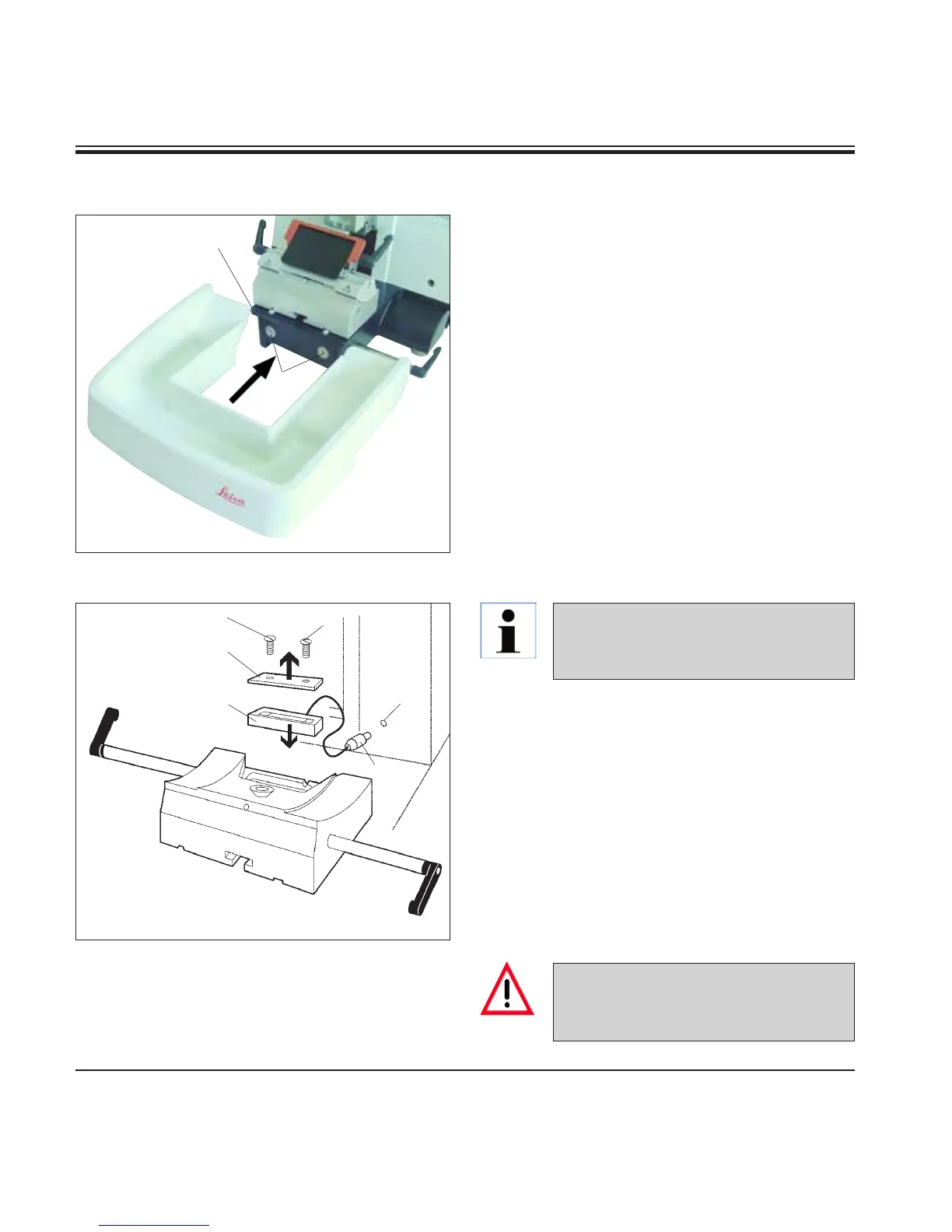
• Pushthesectionwastetray(18) from the front
to the microtome base plate (53) until it is held
in place by the two magnets (39) (on the front
of the microtome base plate).
To remove the section waste tray, lift it slightly
and pull it off towards the back.
Fig. 40
6.4 Section waste tray
53
18
39
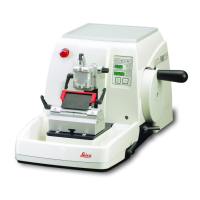
• Remove the two screws(1) using a slotted
screwdriver and then remove the cover plate
(2).
• Insertthebacklighting(3) in the recess at the
rear of the knife holder base.
• Inserttheplug(4) for the backlighting into the
socket (5) of the microtome and connect the
plug of the power adapter to an AC power
socket.
The backlighting illuminates once the microtome
is turned on with the power switch.
Fig. 41
2
1
3
4
1
5
6.5 Backlighting
NEVER use the backlighting illumi-
nation with the super mega-cassette
clamp!
The backlighting is inserted into the
front of the one-piece knife holder
base.


 To Next Page