Unity Motorhome
51
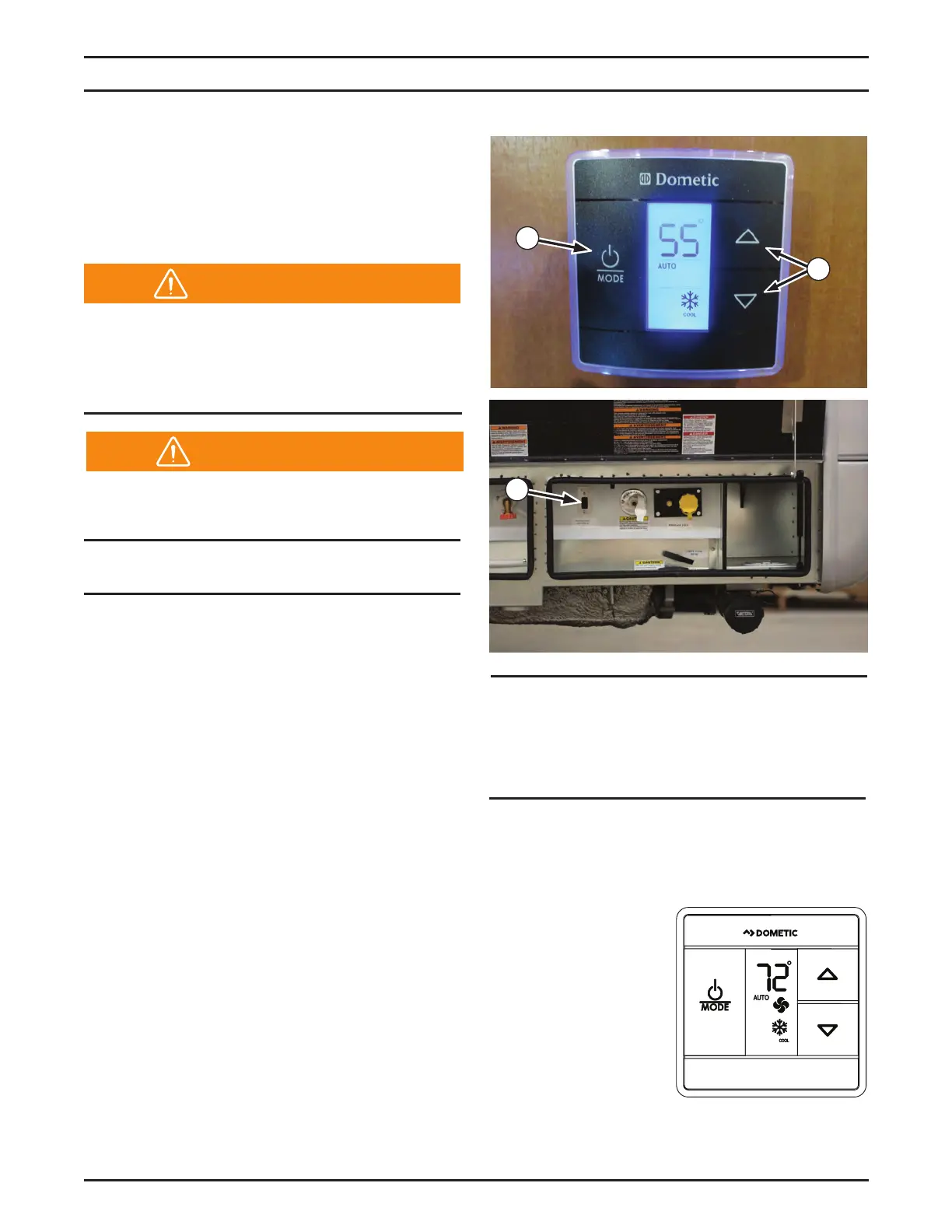
Dometic Capacitive Touch Thermostat
Operating Thermostat
1. To turn ON, depress “mode” button.
2. To turn OFF,
depress mode
button and toggle
through until OFF
is displayed.
3. To change from
°F to °C, depress
both the UP and
DOWN buttons.
Refer to Dometic Capacitive Touch
Thermostat manual for detailed instructions.
Appliance and Equipment Operation
LP Gas Furnace
Operating the LP Gas Furnace
The LP gas furnace is controlled by the single-
zone thermostat (1) located in the coach living
area.
1
LP Gas Furnace Operating Tips
Do NOT operate the furnace while the
vehicle is moving.
1. Make sure the LP gas valve switch (3),
located in the rear utility center, is turned
“ON.” Refer to the “Liquid Propane Gas
System” chapter for details.
2. Do not attempt to manually light the furnace–
the furnace does not have a pilot light. It is
ignited by a direct spark ignition system.
NOTE: Simultaneously hold the
thermostat plus (+) and minus (-)
buttons (2) to switch between °C and °F.
3. If the burner fails to light, check the propane
level at the system monitor panel to ensure
there is propane in your tank. Refer to the
“Liquid Propane Gas System” chapter for
details.
4. If there is propane in the tank and the burner
fails to ignite, verify that the LP gas valve
switch (3) is in the “ON” position.
5. If there is propane in the tank and the LP
gas valve switch (3) is on but the furnace
still fails to light, turn off the thermostat (1),
turn off the LP gas valve switch, and contact
your dealer or a local RV service center.
2
3
Before operating the thermostat, carefully
read and follow the operating instructions
in the LP gas furnace manual located in the
Motorhome Information Kit.
Warning
NOTICE
Ensure the thermostat fan is set to “AUTO”
mode before turning on heat.
Warning


 To Next Page