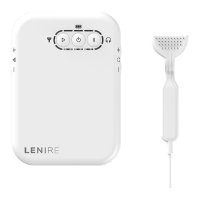
IFU-0026 Lenire User Manual Version 2.0
Page 13
Chapter 11 - Device Setup
To commence a treatment session, the Lenire device should be set up as follows:
11.1 - Controller and Headphones Setup
The Headphones should be worn so they cover both ears and should be adjusted to maximise
comfort before commencing the treatment session.
It is essential that the left and right earphones cover the left and right ears,
respectively. This is because the device calibration is unique to each ear – it
is based on your audiogram. Failure to put on the Headphones correctly
could result in excessive loudness in one ear, which could cause discomfort,
or incorrect loudness that may reduce the eectiveness of the treatment.
The Headphones supplied to you at the time of purchase will include
markings to distinguish the left and right earcups. For details on your specific
Headphones, please see the Lenire Headphones Handbook which can be
found at www.lenire.com/product-support.
The above instruction assumes that the Headphones are already ‘paired’ with
the Controller. This should be the case in most situations, as the clinician will
have paired the Headphones during the device fitting. If they are not paired,
or if you are having diculty connecting to the Headphones, then you should
follow the instructions in Chapter 20.
During treatment, the Controller can be kept adjacent to you, e.g. in a pocket
or a bag, or in another dry location that is close by, e.g. on a bedside table.
11.2 - Connecting the Headphones with the Controller
The Controller connects to the Headphones wirelessly via Bluetooth by following these steps:
• Turn on the Controller, by pressing the Power Button for two seconds. The Controller will
attempt to connect to the Headphones during which time the Headphones Indicator will
pulse blue.
• Turn the Headphones on (see Lenire Headphone Handbook at www.lenire.com/product-
support for headphone specic details).
• Once the connection to the Headphones has been established, the Headphones Indicator
on the Controller will illuminate green.



 To Next Page