Page 24
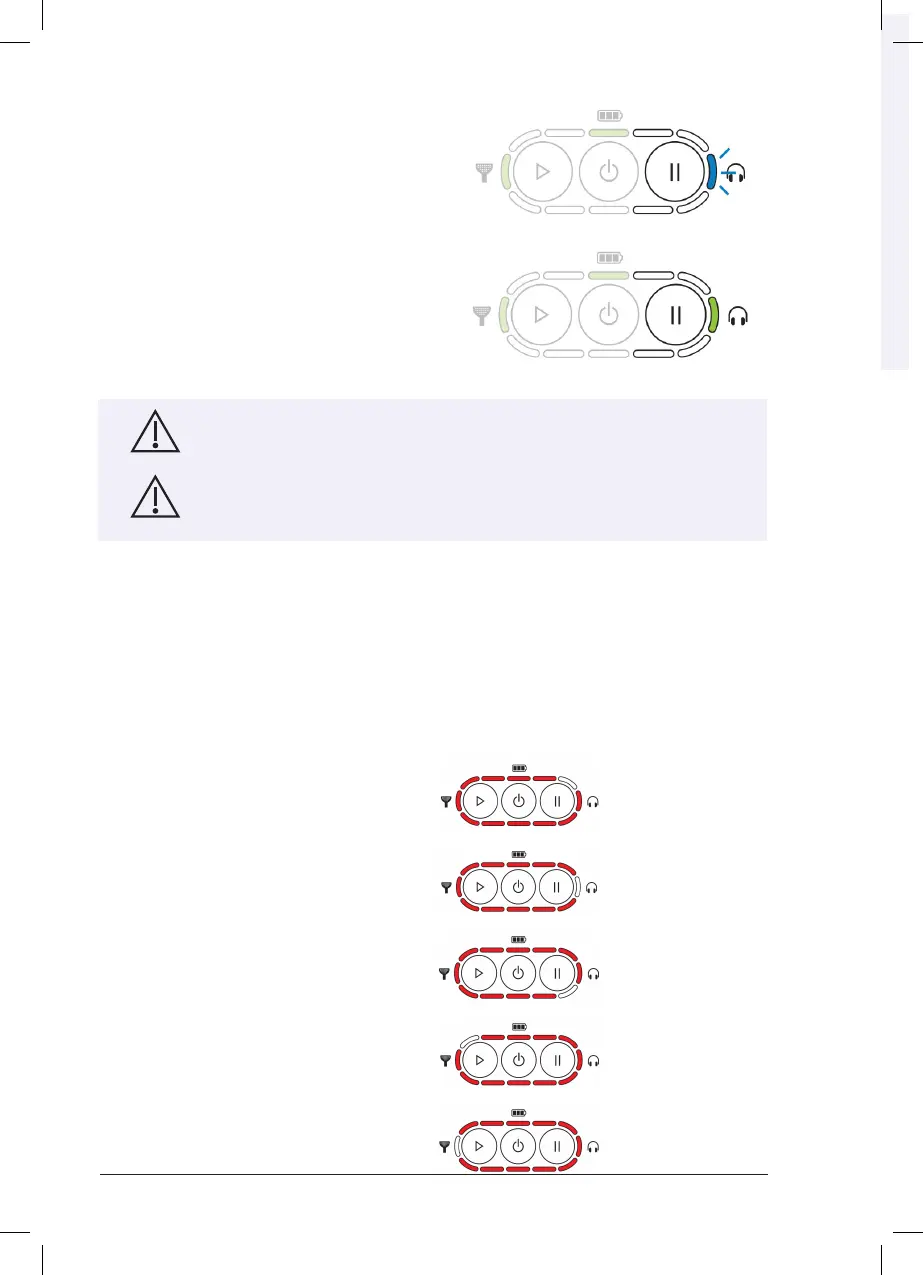
• The Controller will search for and attempt to
pair with the Headphones. The Headphones
Indicator on the Controller will pulse rapidly
during this procedure.
• If no discoverable Headphones are found
within 20 minutes, the Controller will shut down.
Otherwise, the Controller will connect to the
Headphones and the Headphones Indicator
on the Controller will illuminate green.
Chapter 21 - Servicing
The device is not intended to be user-serviced. If it should fail for any reason,
please return to Customer Support for repair (see section F for contact
details).
This device is not intended to be modified in any way.
Chapter 22 - Device Errors
If any of the following error indicators occur that prevents the use of the Lenire device, please
contact Customer Support (see Section F for contact details). The errors will be indicated via the
lights on the Controller. All but one of the lights will turn solid red. The position of the light that is
not lit will indicate the error that has occurred.
After displaying the error indicator for 5 seconds, the Controller will shut down.
Error Indicators
Controller hardware failure.
Controller software error.
Internal storage error.
Tonguetip hardware failure
Tonguetip software error.



 To Next Page