Page 8
7.2 - Batteries
The Controller is powered by a 3.7V Lithium Ion battery. The battery is charged using the
supplied Charger. The Controller battery is pre-tted and is not intended to be replaced.
See Chapter 10 for instructions on charging the Controller and Headphones.
If there are any diculties charging the Controller or the Headphones, see the section on
Troubleshooting (see Section D) or contact Customer Support (see Section F).
Chapter 8 - Controls and Indicators
8.1 - Treatment Controls
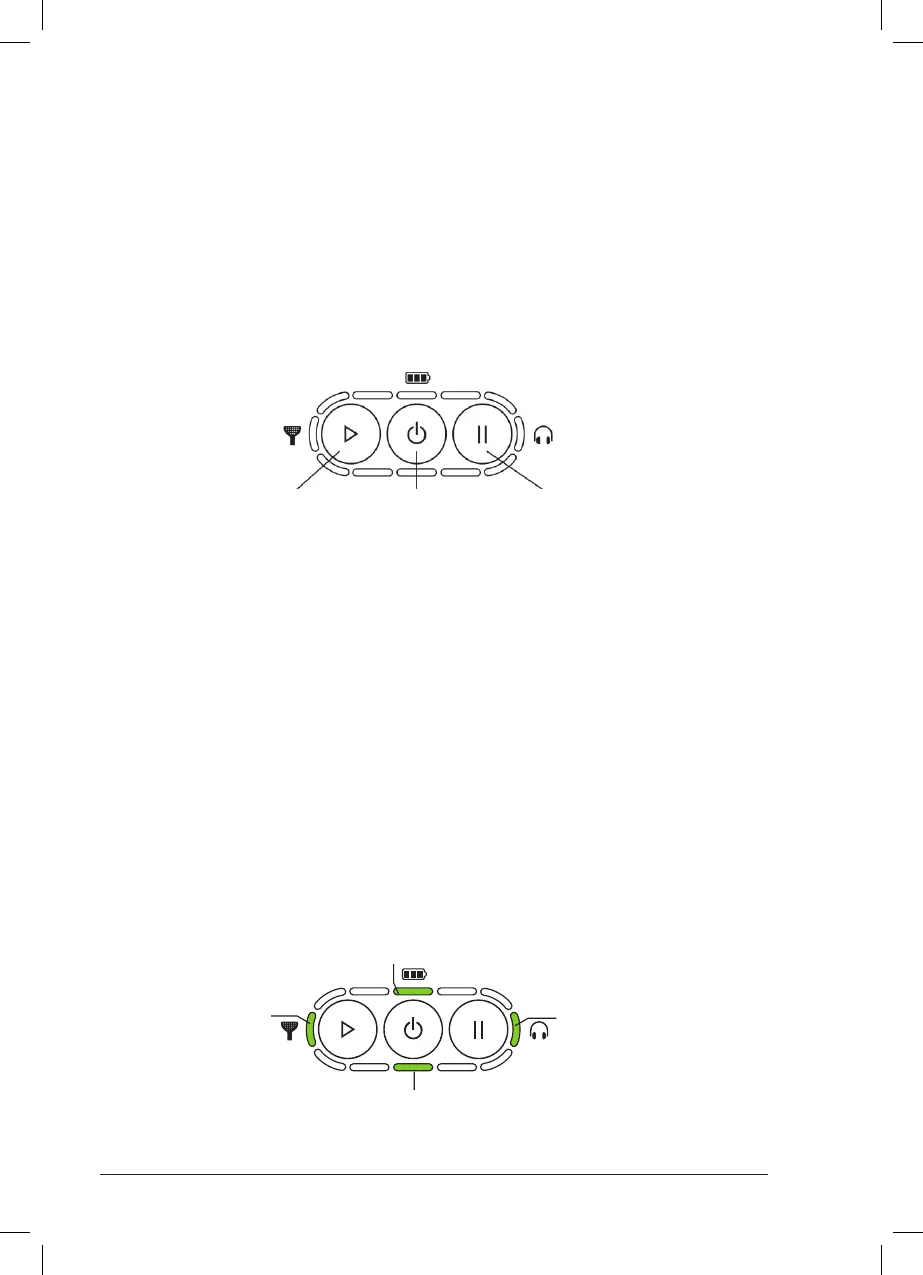
There are three control buttons on the front of the Controller:
1. Power Button
Hold this button for 2 seconds to switch the device on.
Hold this button for 2 seconds to switch the device o.
2. Play Button
Press this button to start or resume the treatment session.
3. Pause Button
Press this button to pause the treatment session.
Play Button Power Button Pause Button
8.2 - Indicators
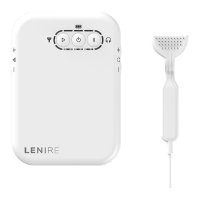
The status of the device is indicated by several lights surrounding the buttons on the top
of the Controller.
Battery Indicator
Headphone Indicator
Tonguetip Indicator
Treatment Indicator



 To Next Page