Replacing CRUs 39
Replacing the M.2 storage drive
Attention
Do not open your computer or attempt any repairs before reading the Important
Product Information Guide.
If your computer supports one M.2 storage drive, install the drive into the M.2 storage drive slot 1. If your
computer supports two M.2 storage drives, install one drive into the M.2 storage drive slot 1 rst and then
install the other into the slot 2. See
System board for the locations of the slots.
1
Remove any media from the drives and turn off all connected devices and the computer.
2
Disconnect all power cords from electrical outlets and disconnect all cables that are connected to
the computer.
3
Remove the computer cover. For details, see Removing the computer cover.
4
Remove the bottom cover. For details, see Replacing the bottom cover.
5
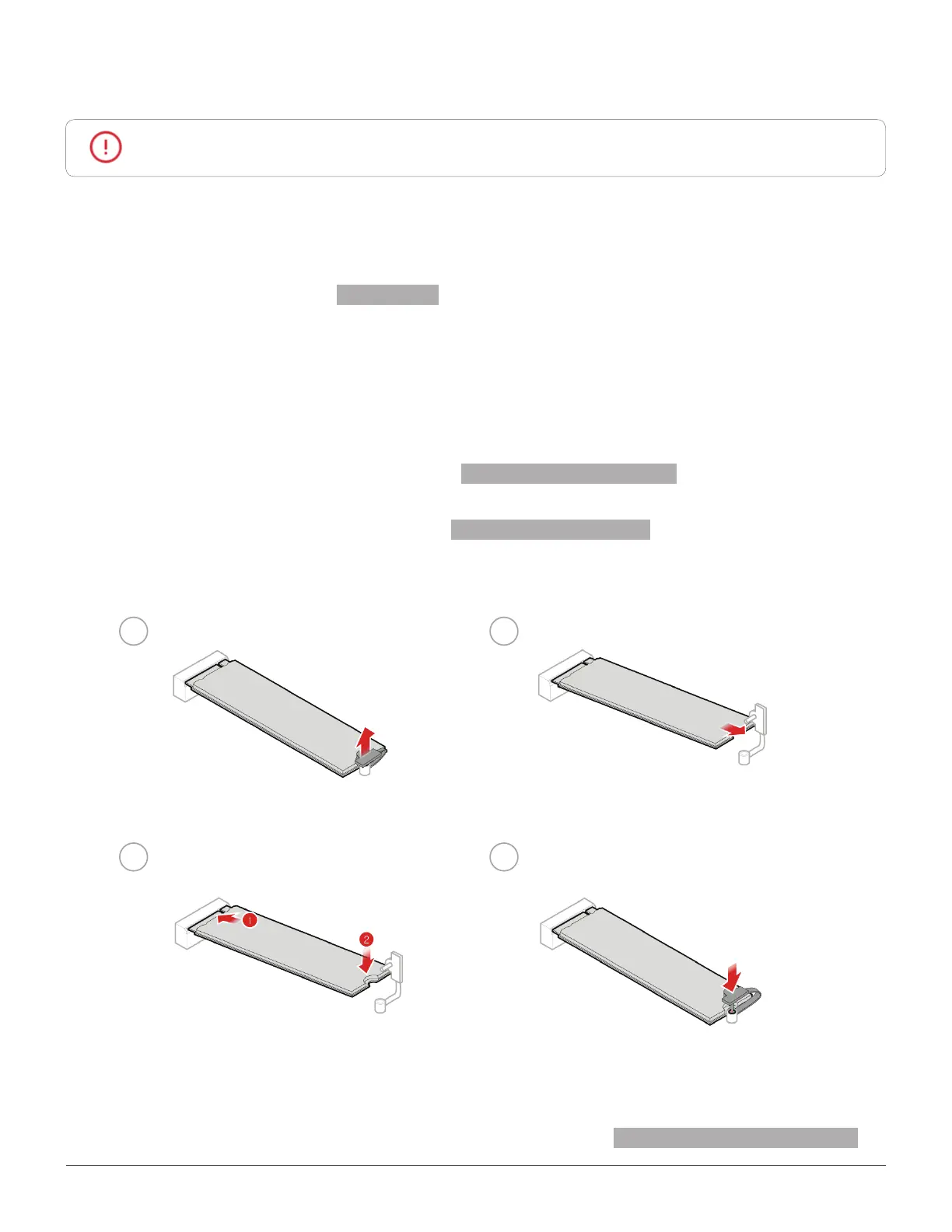
Replace the M.2 storage drive.
1 2
3
4
6
Reinstall the removed parts and computer cover. For details, see Completing the parts replacement.


 To Next Page