Replacing FRUs 54
Replacing the antenna bracket
Attention
Do not open your computer or attempt any repairs before reading the Important
Product Information Guide.
1
Remove the computer cover. For details, see Removing the computer cover.
2
Remove the storage drive. For details, see Replacing the storage drive.
3
Remove the internal speaker. For details, see Replacing the internal speaker.
4
Remove the system fan. For details, see Replacing the system fan.
5
Remove the PCI Express card. For details, see Replacing the PCI Express card and PCI Express card
adapter.
6
Remove the advanced speaker. For details, see Replacing the advanced speaker.
7
Remove the Front Wi-Fi antenna. For details, see Replacing the Wi-Fi antennas.
8
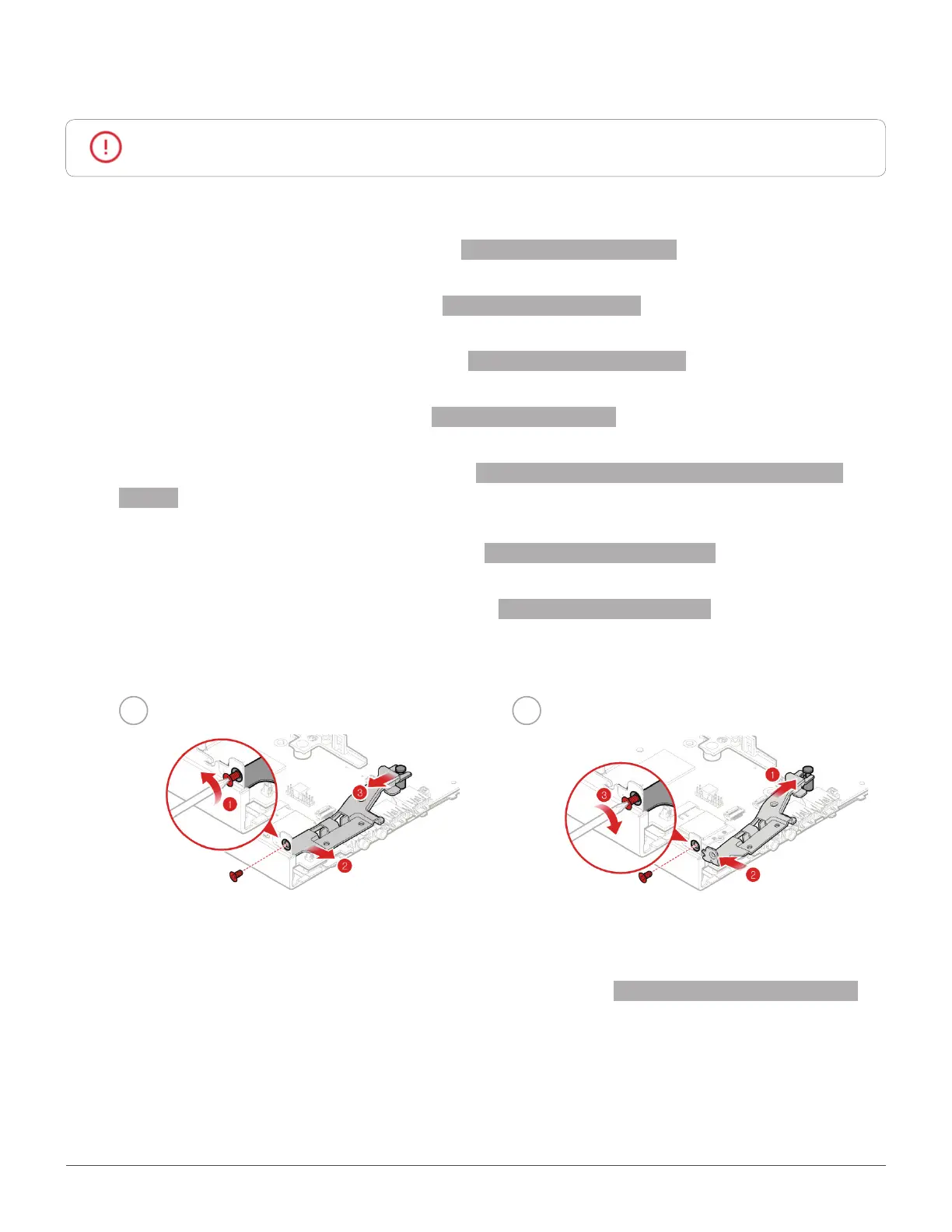
Replace the antenna bracket.
1 2
9
Reinstall the removed parts and computer cover. For details, see Completing the parts replacement.


 To Next Page