Replacing FRUs 44
Replacing the advanced speaker
Note
The advanced speaker is available only on some models.
Attention
Do not open your computer or attempt any repairs before reading the Important
Product Information Guide.
1
Remove the computer cover. For details, see Removing the computer cover.
2
Remove the storage drive. For details, see Replacing the storage drive.
3
Remove the system fan. For details, see Replacing the system fan.
4
Remove the PCI Express card. For details, see Replacing the PCI Express card and PCI Express card
adapter.
5
Disconnect the advanced speaker cable from the advanced speaker connector on the system board.
See
System board.
6
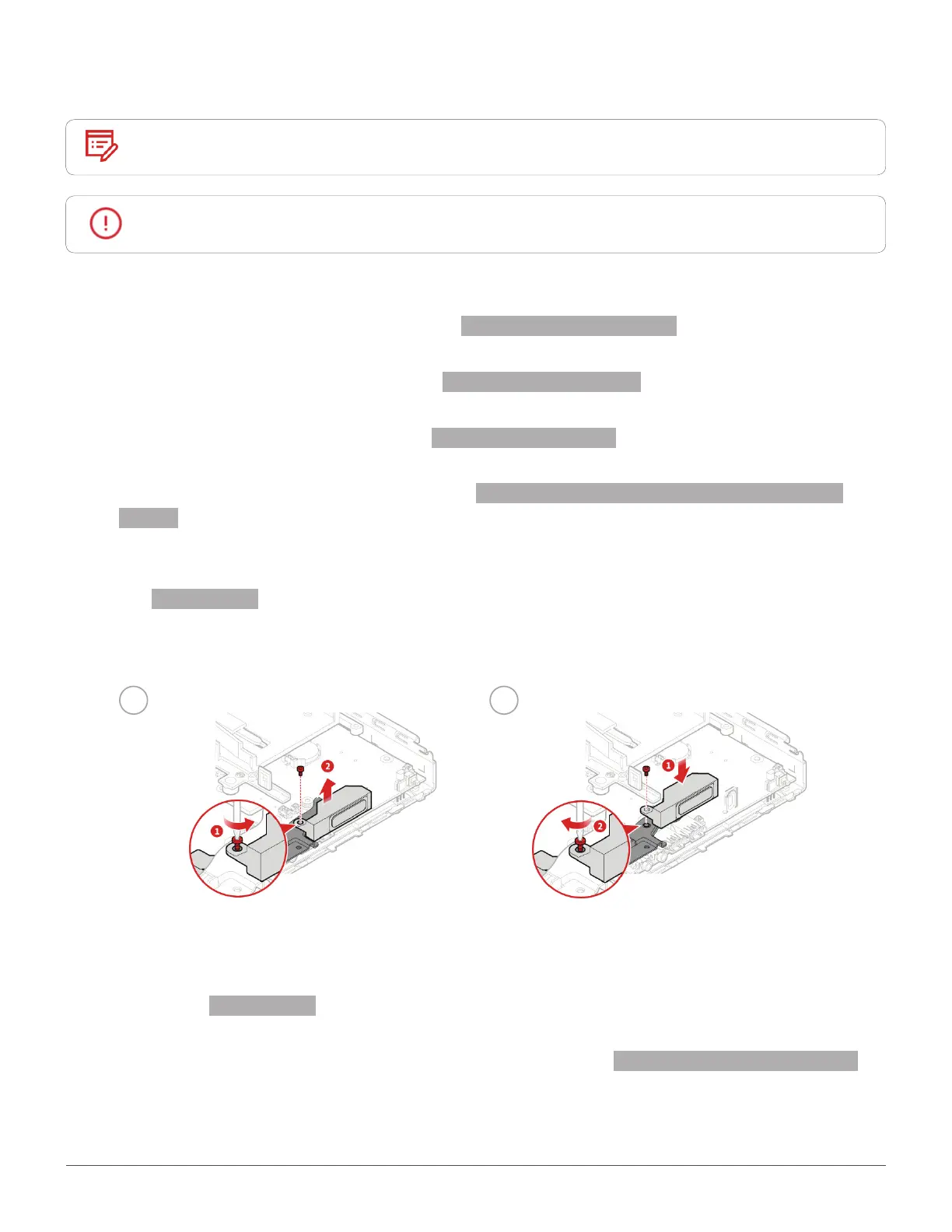
Replace the advanced speaker.
1 2
7
Connect the advanced speaker cable to the advanced speaker connector on the system board. For
details, see
System board.
8
Reinstall the removed parts and computer cover. For details, see Completing the parts replacement.


 To Next Page