Replacing FRUs 50
Replacing the microprocessor
Attention
Do not open your computer or attempt any repairs before reading the Important
Product Information Guide.
Caution
The heat sink and microprocessor might be very hot. Before you open the computer
cover, turn off the computer and wait several minutes until the computer is cool.
1
Remove the computer cover. For details, see Removing the computer cover.
2
Remove the storage drive. For details, see Replacing the storage drive.
3
Remove the internal speaker. For details, see Replacing the internal speaker.
4
Remove the system fan. For details, see Replacing the system fan.
5
Remove the PCI Express card. For details, see Replacing the PCI Express card and PCI Express card
adapter.
6
Remove the heat sink. For details, see Replacing the heat sink.
7
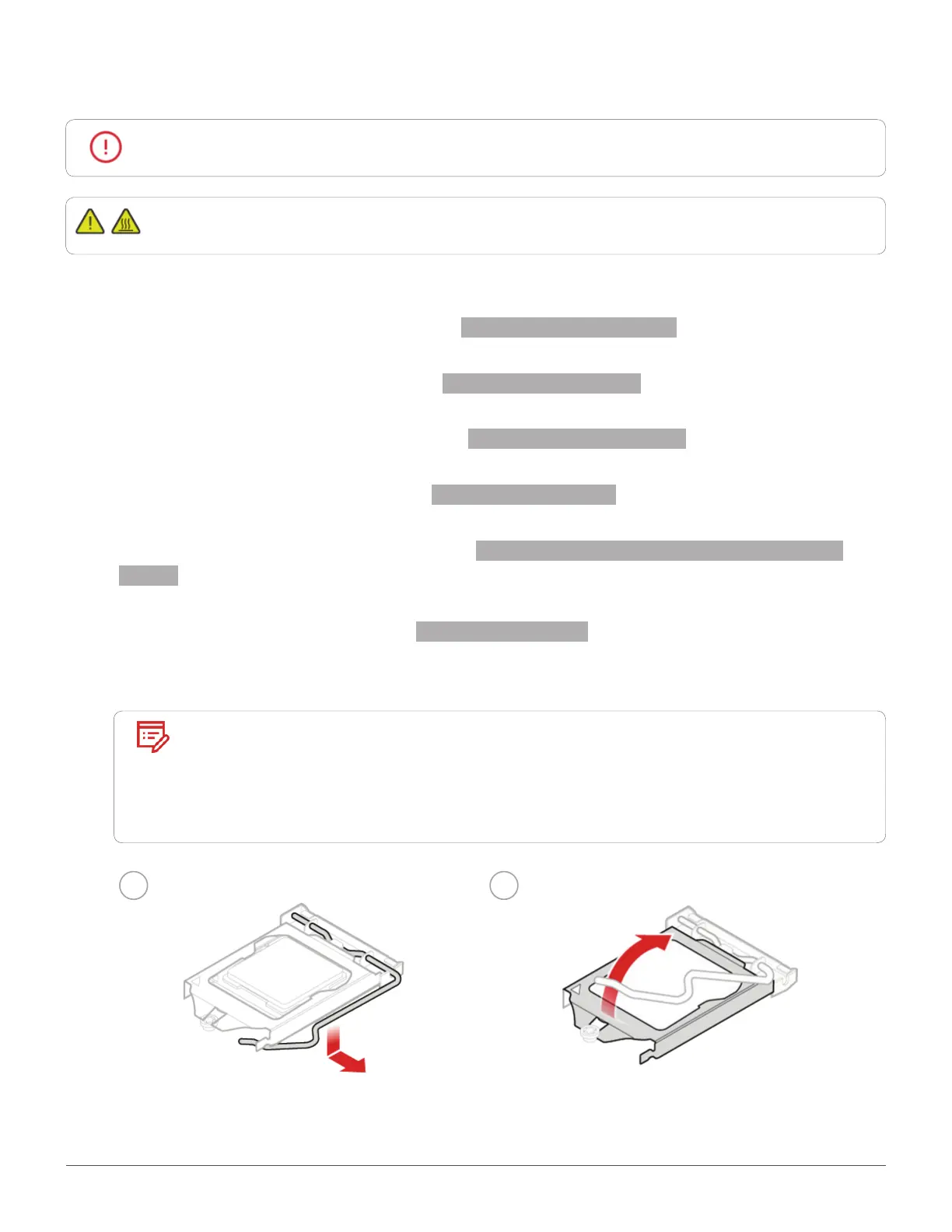
Replace the microprocessor.
Note
• Your microprocessor and socket might look different from the one illustrated.
• Touch only the edges of the microprocessor. Do not touch the gold contacts
on the bottom.
• Do not drop anything onto the microprocessor socket while it is exposed.
The socket pins must be kept as clean as possible.
1 2


 To Next Page