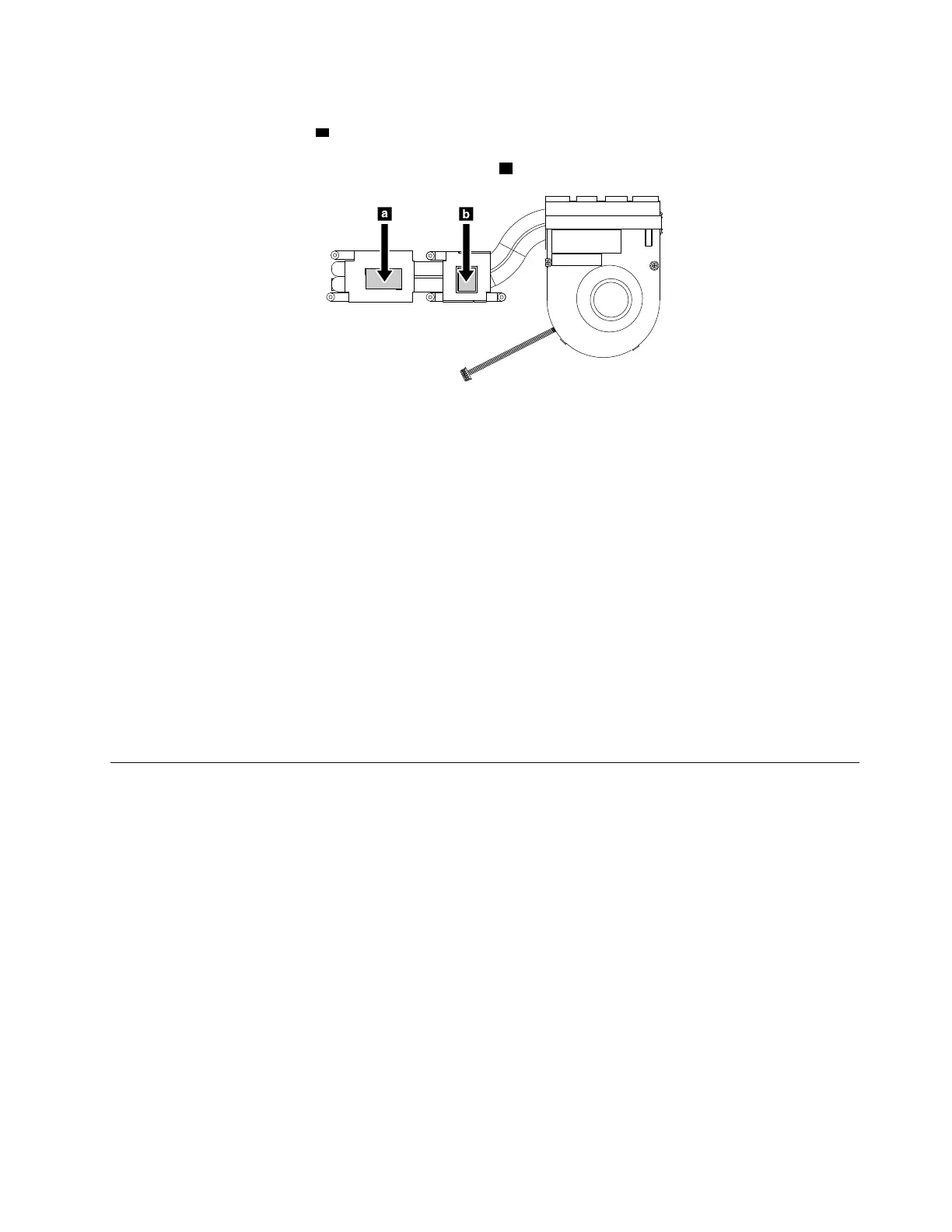
• Before you attach the thermal fan assembly to the computer, apply thermal grease, at an amount of 0.2
grams, on the part marked
a as shown in the following illustrations. Either too much or too less
application of grease can cause a thermal problem due to imperfect contact with a component. You might
need to peel the thin film off from the rubbers marked
b .
• Do not touch the thermal grease.
• Do not press, touch, or rotate the fan impeller.
• Do not touch the fan inlet hole.
• Do not twist or pull the cable of the thermal fan assembly.
• Do not apply pressure on the top and bottom covers of the thermal fan assembly.
• Do not press the heat pipe. Hold both sides of the heat pipe if you must take the thermal fan assembly.
• Do not shake or drop the thermal fan assembly.
• Ensure that the fan connector is attached firmly.
• Replace the thermal fan assembly if you observe the following:
– The cover of the thermal fan assembly is deformed or damaged.
– There is abnormal noise during rotation.
When you install the system board:
Ensure that all the connectors are attached firmly to the system board.
1150 Trackpad cable and trackpad
For access, remove this FRU:
• “1030 Base cover assembly” on page 65
Chapter 9. Removing or replacing a FRU 77











 To Next Page