• “1040 Hard disk drive” on page 67
• “1060 Memory module” on page 69
• “1070 M.2 solid-state drive” on page 70
• “1080 I/O card” on page 71
• “1090 Speaker assembly” on page 72
• “1110 Wireless LAN card” on page 73
• “1120 Battery pack” on page 74
• “1130 Coin-cell battery” on page 75
• “1140 Thermal fan assembly” on page 76
• “1150 Trackpad cable and trackpad” on page 77
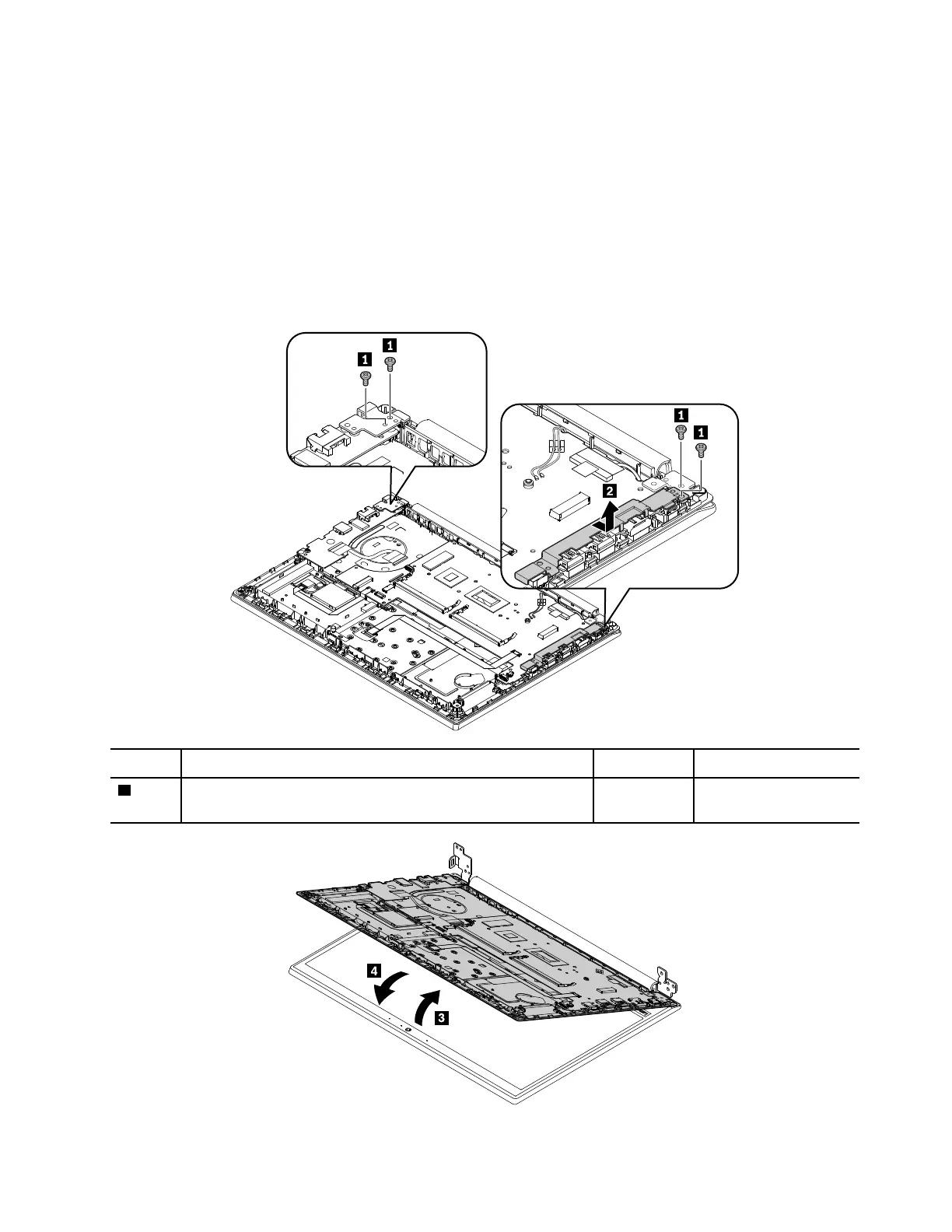
Removal steps of the keyboard bezel assembly and LCD unit
Step Screw (quantity) Color
Torque
1
M2.5 × 5 mm, flat-head, nylon-coated (4)
Black 0.294 Nm
(3.0 kgf-cm)
Chapter 9. Removing or replacing a FRU 79











 To Next Page