Chapter1.Productoverview
Thischaptercontainsthefollowingtopics:
•“Locatingcomputercontrols,connectors,andindicators”onpage1
•“Locatingimportantproductinformation”onpage10
•“Features”onpage11
•“Specifications”onpage13
•“Operatingenvironment”onpage13
•“Lenovoprograms”onpage14
Locatingcomputercontrols,connectors,andindicators
Thissectionintroducesthecomputerhardwarefeaturestogiveyouthebasicinformationyouneedto
startusingthecomputer.
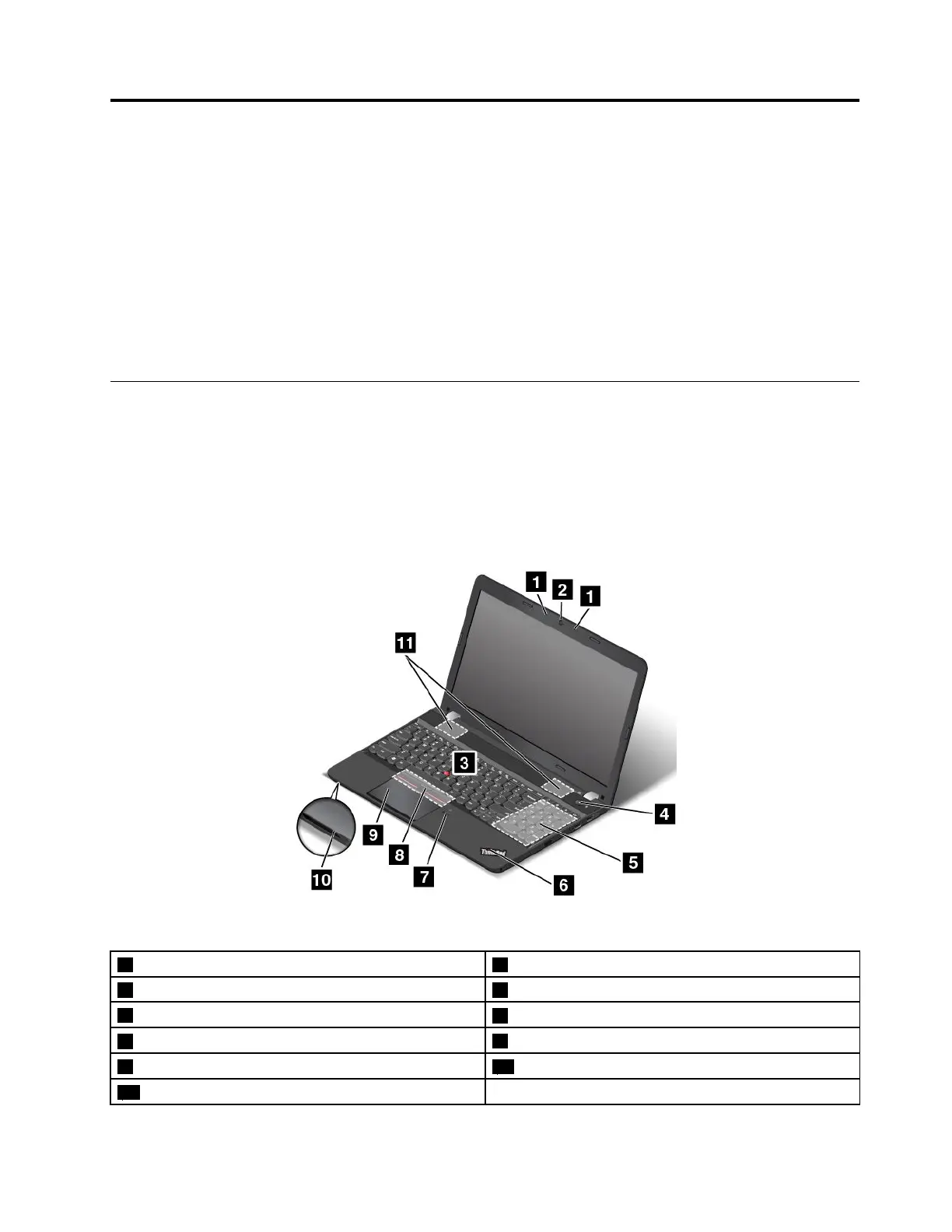
Frontviewformodelswitha2Dcamera
Note:Dependingonthemodel,yourcomputermightlookdifferentfromthefollowingillustration.
Figure1.Frontviewformodelswitha2Dcamera
1Microphones22Dcamera
3TrackPoint
®
pointingstick4Powerbutton
5Numerickeypad
6System-statusindicator
7Fingerprintreader(availableonsomemodels)
8TrackPointbuttons
9Trackpad10Media-cardslot
11Speakers
©CopyrightLenovo2015
1















 To Next Page