•ForWindows10:OpentheStartmenu,andthenclickGetstartedfromtherightpanel.Additionally,you
cansearchfromthetaskbartofindhelp,apps,files,settings,andsoon.
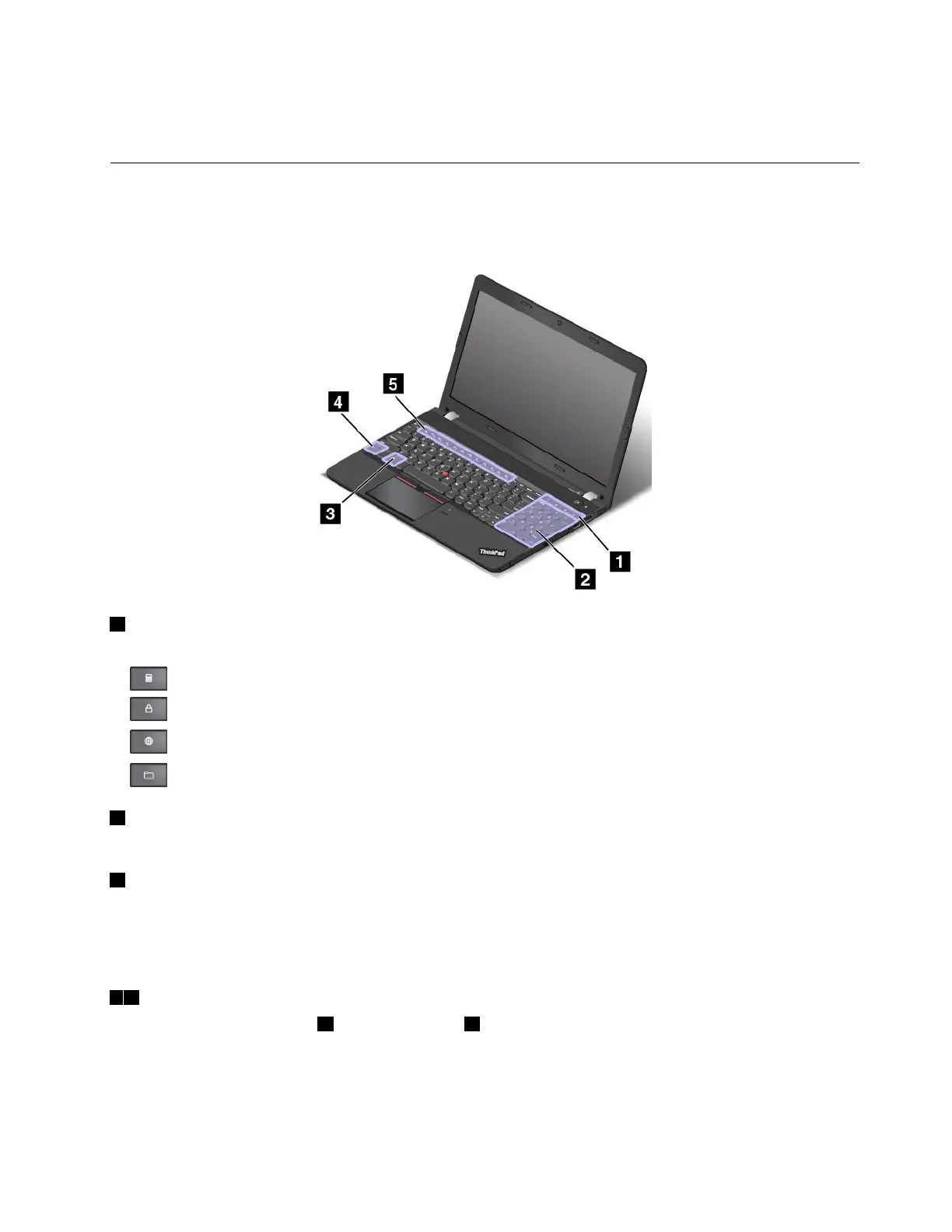
Specialkeys
Yourcomputerhasseveralspecialkeystohelpyouworkmoreeasilyandeffectively.
Note:Dependingonthemodel,yourcomputermightlookdifferentfromthefollowingillustration.
1Additionalshortcutkeys
Yourcomputermighthavefouradditionalshortcutkeys:
•:Launchescalculator
•:Locksoperatingsystem
•:Opensthedefaultbrowser
•:OpensComputer
2Numerickeypad
Youcanusethisnumerickeypadtoinputnumbersquickly.
3Windowskey
PresstheWindowskeytoopentheStartmenu.
ForinformationaboutusingtheWindowskeywithotherkeys,refertothehelpinformationsystemofthe
Windowsoperatingsystem.
45Fnkeyandfunctionkeys
YoucanconfiguretheFnkey4andfunctionkeys5intheKeyboardPropertieswindowbydoingthe
following:
1.GotoControlPanel,andthenchangetheviewofControlPanelfromCategorytoLargeiconsorSmall
icons.
2.ClickKeyboard.IntheKeyboardPropertieswindow,clicktheFnandfunctionkeystab.
Chapter2.Usingyourcomputer19















 To Next Page