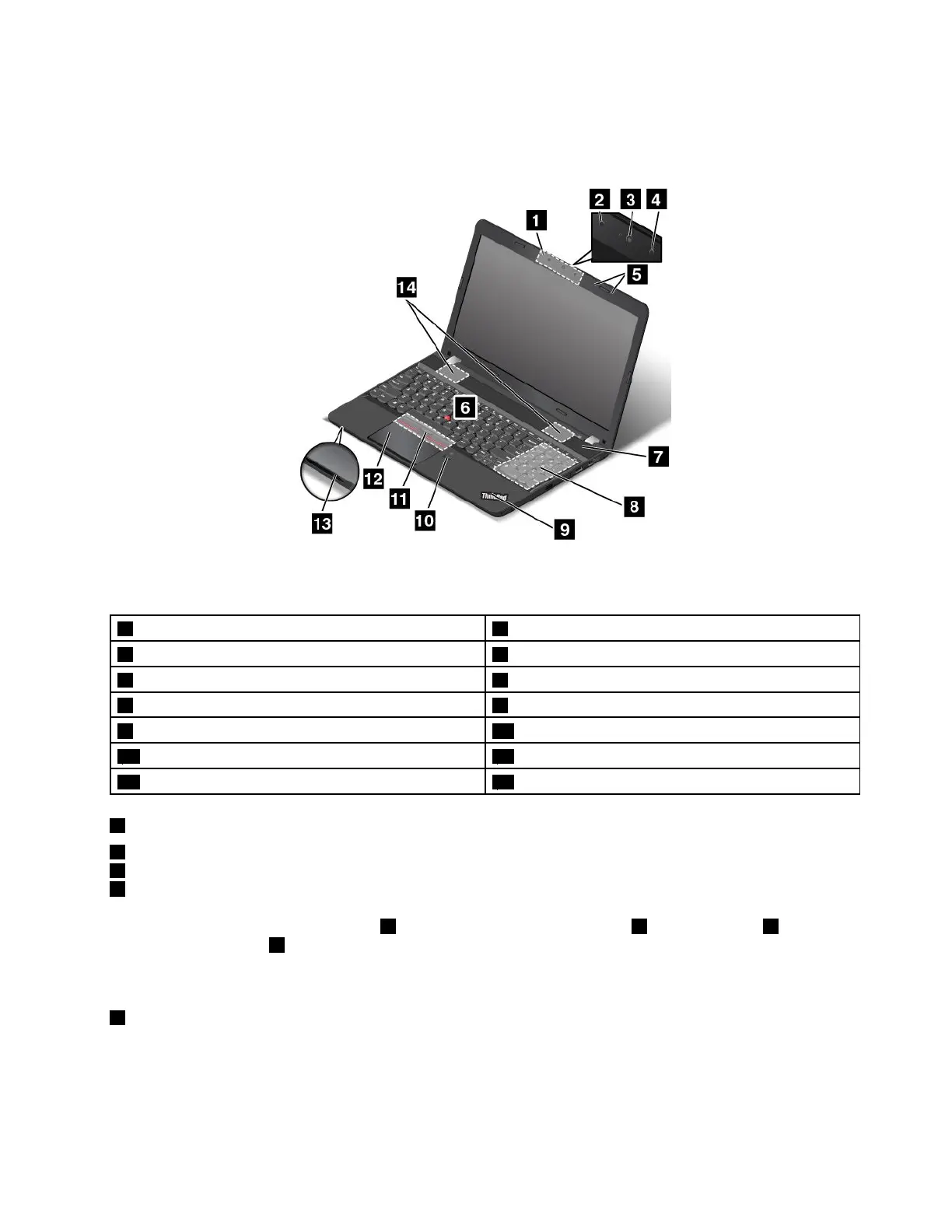
Frontviewformodelswitha3Dcamera
Note:Dependingonthemodel,yourcomputermightlookdifferentfromthefollowingillustration.
Figure2.Frontviewformodelswitha3Dcamera
13Dcamera
2Infraredcamera
3Colorcamera
4Infraredlaserprojector
5Microphones6TrackPointpointingstick
7Powerbutton8Numerickeypad
9System-statusindicator10Fingerprintreader(availableonsomemodels)
11TrackPointbuttons12Trackpad
13Media-cardslot
14Speakers
13Dcamera
2Infraredcamera
3Colorcamera
4Infraredlaserprojector
Somemodelscomewitha3Dcamera1.Consistedofaninfraredcamera2,acolorcamera3,andan
infraredlaserprojector
4,the3Dcameraenablesyoutointeractwithyourcomputereasilyandconveniently.
The3Dcamerasupportsallfunctionsofa2Dcamera.Usethe3Dcameratotakepicturesorholdavideo
conference.Formoreinformation,see“Usingthecamera”onpage33.
5Microphones
Themicrophonescapturesoundandvoicewhenusedwithaprogramcapableofhandlingaudio.
Chapter1.Productoverview3















 To Next Page