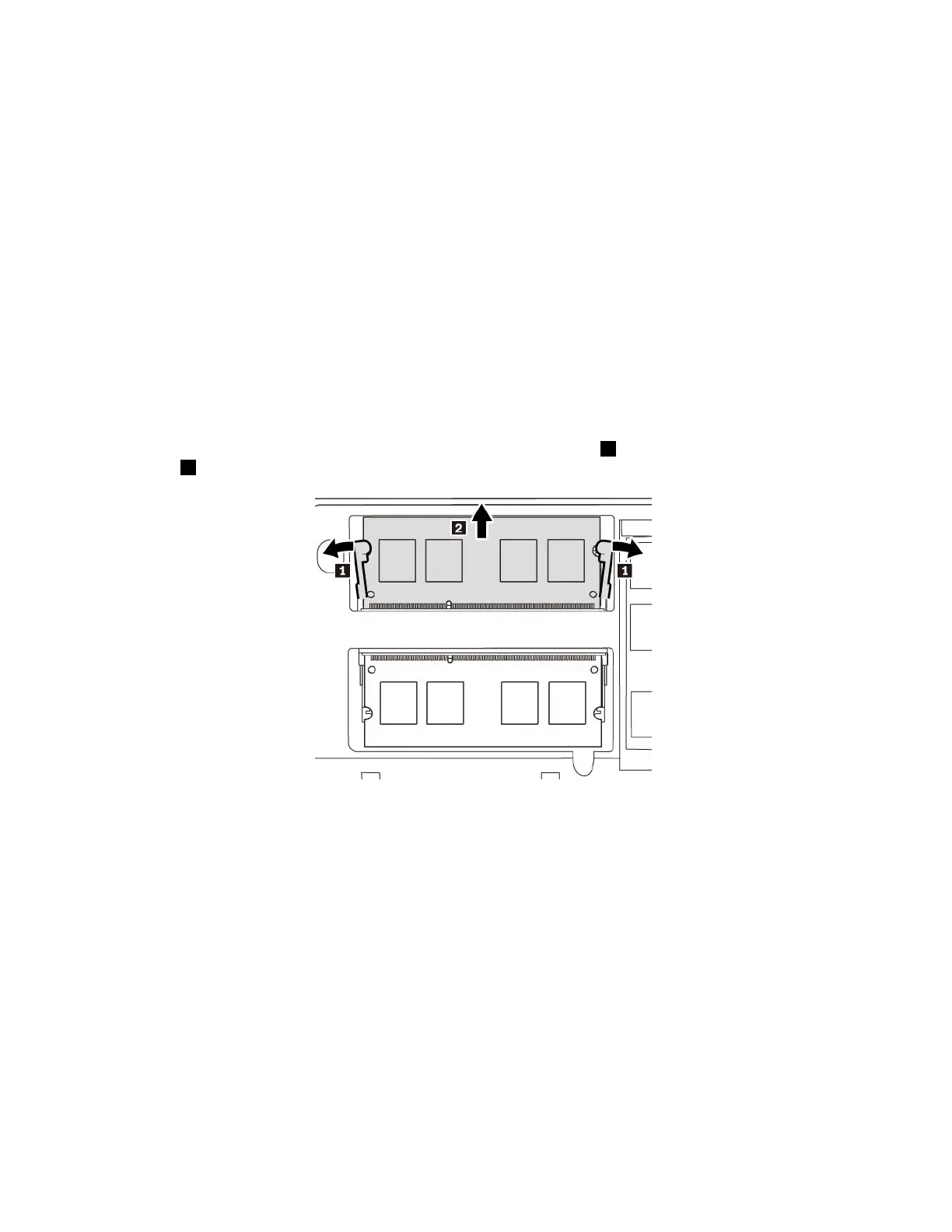
Increasingmemorycapacityisaneffectivewaytomakeprogramsrunfaster.Youcanincreasememory
capacitybyreplacingoraddingamemorymodule.
Note:Theoperatingspeedofthememorymodulehasdependencyonthesystemconfiguration.Insome
conditions,thememorymoduleinyourcomputermightnotbeabletooperateatthemaximumspeed.
Attention:
•Beforeyoustartthereplacement,touchagroundedmetalobject.Thisactionreducesanystaticelectricity
fromyourbody.Staticelectricitymightdamagethememorymodule.
•Donottouchthecontactedgeofthememorymodule.Otherwisethememorymodulemightgetdamaged.
Toreplaceamemorymodule,dothefollowing:
1.Ensurethatthecomputeristurnedoffanddisconnectedfromacpowerandallcables.
2.Closethecomputerdisplayandturnthecomputerover.
3.Removetheremovablebattery.See“Replacingtheremovablebattery”onpage77.
4.Removethebottomcover.See“Replacingthebottomcover”onpage83.
5.Openthelatchesonbothsidesofthememoryslotatthesametime1,andthenremovethememory
module2.
86ThinkPadE570,E570c,andE575UserGuide














 To Next Page