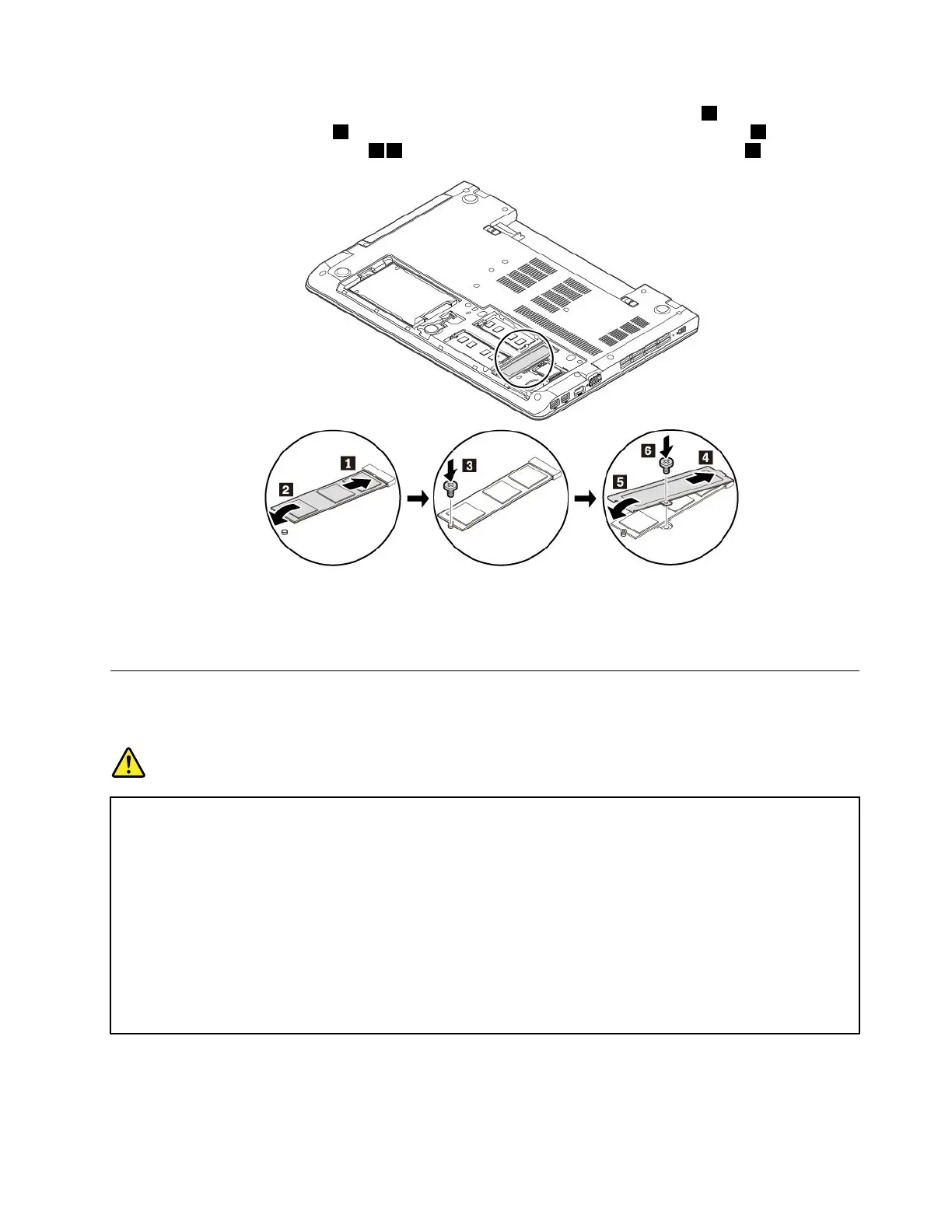
6.InsertthenewM.2solid-statedriveintotheslotatanangleofabout20degrees1andpivottheM.2
solid-statedrivedownward
2.TheninstallthescrewtosecuretheM.2solid-statedrive3.Reinstallthe
metalsheetintoplaceasshown45andreinstallthescrewtosecurethemetalsheet6.
7.Reinstallthebottomcover.See“Replacingthebottomcover”onpage83.
8.Reinstalltheremovablebattery.See“Replacingtheremovablebattery”onpage77.
9.Turnthecomputerover.Connecttheacpoweradapterandallcablestothecomputer.
Replacingthecoin-cellbattery
Beforeyoustart,read“Importantsafetyinformation”onpagevandprintthefollowinginstructions.
DANGER
Ifthecoin-cellbatteryisincorrectlyreplaced,thereisdangerofanexplosion.Thecoin-cellbattery
containsasmallamountofharmfulsubstance.Toavoidpossibleinjury:
•ReplaceonlywithabatteryofthetyperecommendedbyLenovo.
•Keepthebatteryawayfromfire.
•Donotexposeittoexcessiveheat.
•Donotexposeittowaterorrain.
•Donotshort-circuitit.
•Donotdrop,crush,puncturethebattery,ormakeitsubjecttostrongforces.Batteryabuseor
mishandlingcancausethebatterytooverheat,whichcancausegassesorflameto"vent"
fromthebatteryorcoin-cellbattery.
Toreplacethecoin-cellbattery,dothefollowing:
1.Ensurethatthecomputeristurnedoffanddisconnectedfromacpowerandallcables.
2.Closethecomputerdisplayandturnthecomputerover.
Chapter9.Replacingdevices91














 To Next Page