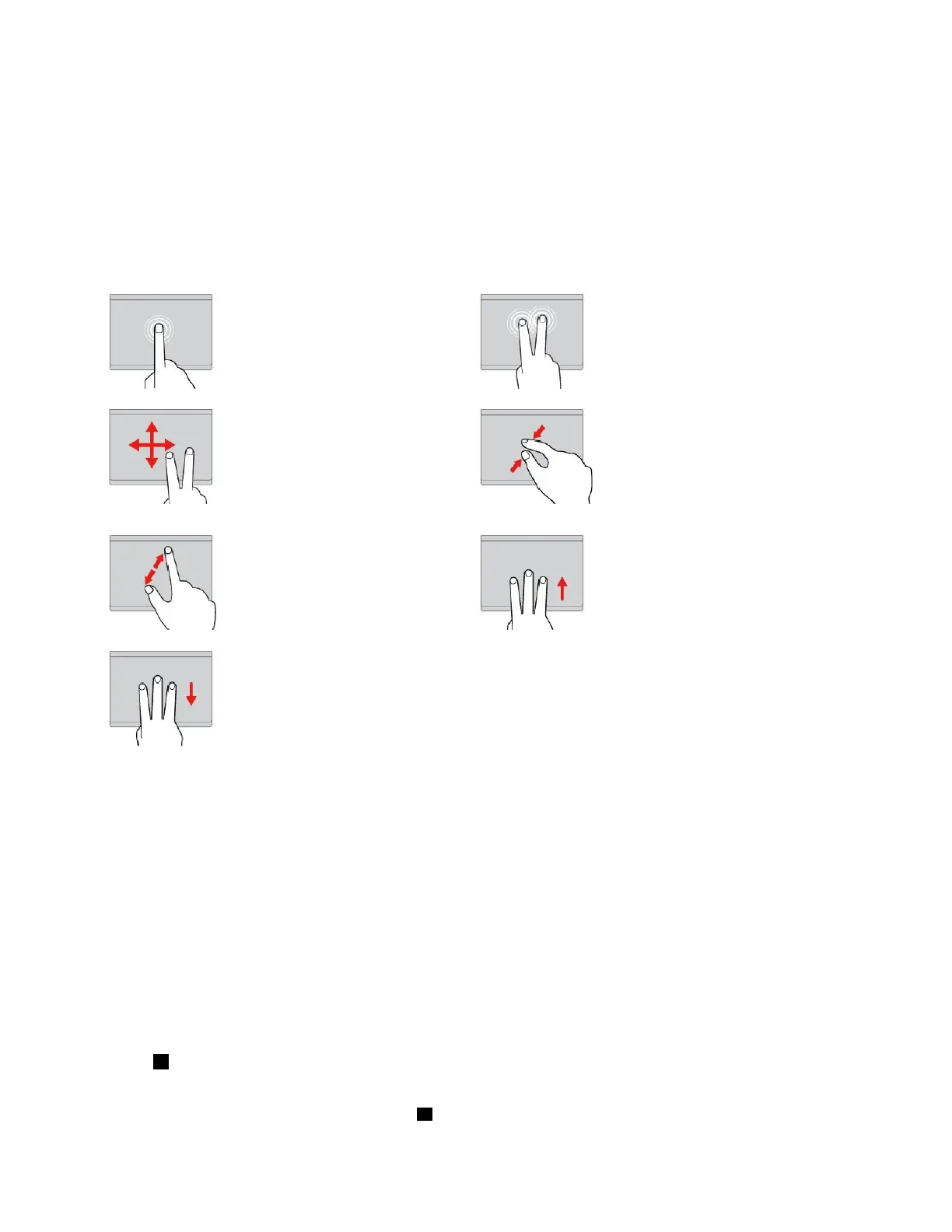
Thefollowingsectionintroducessomefrequentlyusedtouchgesturessuchastapping,dragging,and
scrolling.Formoregestures,seethehelpinformationsystemoftheThinkPadpointingdevice.
Notes:
•Whenusingtwoormorefingers,ensurethatyoupositionyourfingersslightlyapart.
•SomegesturesarenotavailableifthelastactionwasdonefromtheTrackPointpointingdevice.
•Somegesturesareonlyavailablewhenyouareusingcertainapps.
•Dependingonthemodel,thetrackpadonyourcomputermightlookdifferentfromtheillustrationsin
thistopic.
Tap
Tapanywhereonthetrackpad
withonefingertoselectoropen
anitem.
Two-fingertap
Tapanywhereonthetrackpadwith
twofingerstodisplayashortcut
menu.
Two-fingerscroll
Puttwofingersonthetrackpad
andmovethemintheverticalor
horizontaldirection.Thisaction
enablesyoutoscrollthroughthe
document,Website,orapps.
Two-fingerzoomout
Puttwofingersonthetrackpadand
movethemclosertogethertozoom
out.
Two-fingerzoomin
Puttwofingersonthetrackpad
andmovethemfartherapartto
zoomin.
Swipethreefingersup
Putthreefingersonthetrackpad
andmovethemuptoopenthetask
viewtoseeallyouropenwindows.
Swipethreefingersdown
Putthreefingersonthetrackpad
andmovethemdowntoshow
thedesktop.
CustomizingtheThinkPadpointingdevice
YoucancustomizetheThinkPadpointingdevicesoyoucanuseitmorecomfortablyandefficiently.For
example,youcanchoosetoenabletheTrackPointpointingdevice,thetrackpad,orboth.Youalsocan
disableorenablethetouchgestures.
TocustomizetheThinkPadpointingdevice,dothefollowing:
1.GotoControlPanel.
2.ViewControlPanelbyLargeiconsorSmallicons.ClickMouse.TheMousePropertieswindowis
displayed.
3.IntheMousePropertieswindow,followtheinstructionsonthescreentocompletethecustomization.
Replacingthecaponthepointingstick
Thecap1ontheendofthepointingstickisremovable.Afteryouusethecapforaperiodoftime,you
mightconsiderreplacingthecapwithanewone.
Note:Ensurethatyouuseacapwithgroovesaasshowninthefollowingillustration.
20ThinkPadE570,E570c,andE575UserGuide














 To Next Page