3CapsLockindicator
Whenthisindicatorison,youcantypeuppercaselettersbydirectlypressingtheletterkeys.
5acpowerstatusindicator
Thisindicatorshowstheacpowerandchargingstatusofthecomputer.
•Green:connectedtoacpower(charging90%–100%)
•Yellow:connectedtoacpower(charging0%–90%)
•Off:notconnectedtoacpower(nocharging)
Importantproductinformationlabels
Thissectionprovidesinformationtohelpyoulocatethefollowinglabels:
•Machinetypeandmodellabel
•FCCIDandICCertificationlabel
•LabelsfortheWindowsoperatingsystems
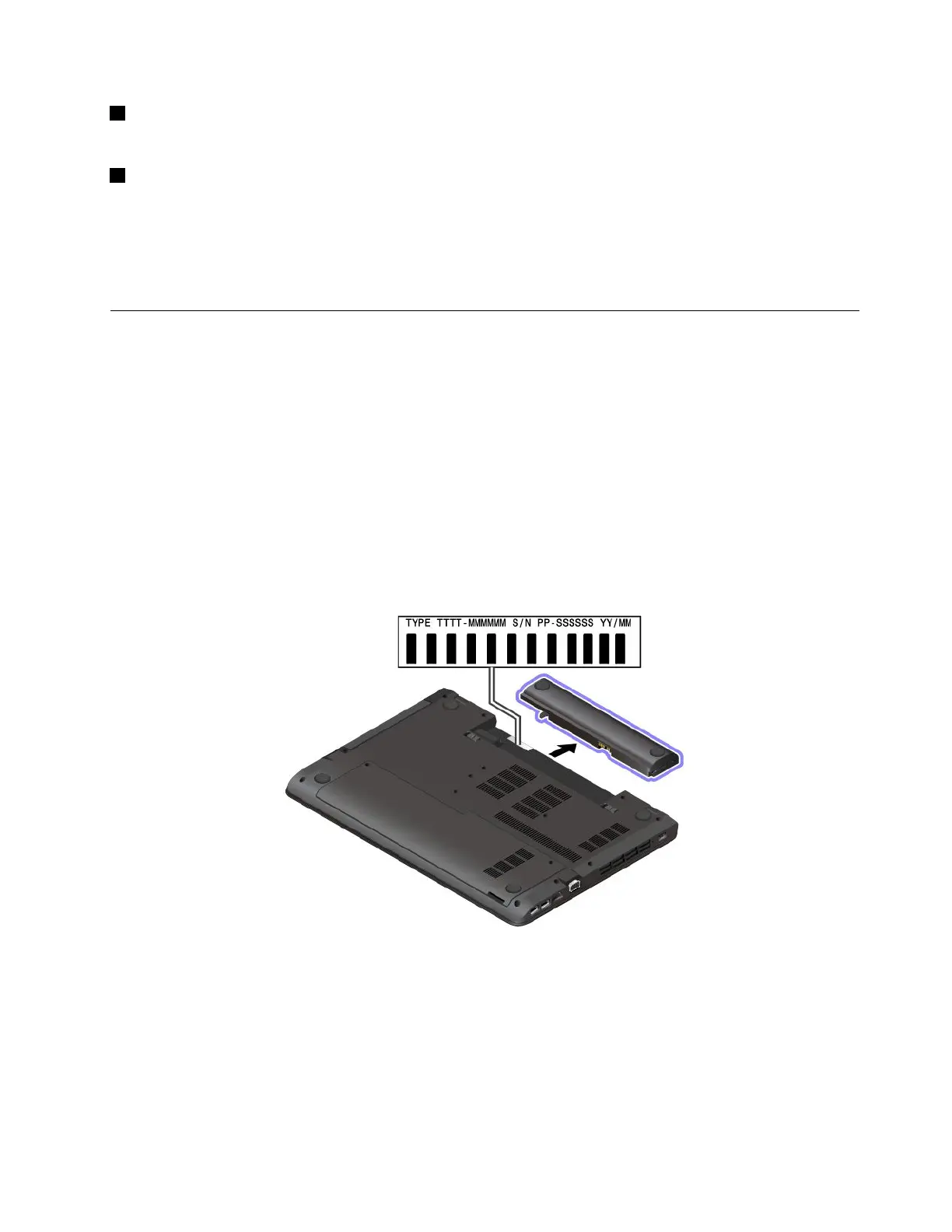
Machinetypeandmodellabel
WhenyoucontactLenovoforhelp,themachinetypeandmodelinformationhelpsthetechniciansto
identifyyourcomputerandprovidefasterservice.
Thefollowingillustrationshowswheretofindthelabelthatcontainsthemachinetypeandmodelinformation
ofyourcomputer.
FCCIDandICCertificationnumber
TheFCCandICCertificationinformationisidentifiedbyalabelonthecomputerasshowninthefollowing
illustration.
Note:Dependingonthemodel,yourcomputermightlookdifferentfromthefollowingillustration.
Chapter1.Productoverview7














 To Next Page