DANGER
Iftherechargeablebatteryisincorrectlyreplaced,thereisdangerofanexplosion.Thebattery
containsasmallamountofharmfulsubstances.Toavoidpossibleinjury:
•ReplaceonlywithabatteryofthetyperecommendedbyLenovo.
•Keepthebatteryawayfromfire.
•Donotexposeittoexcessiveheat.
•Donotexposeittowaterorrain.
•Donotshort-circuitit.
•Donotdrop,crush,puncture,orsubjecttostrongforces.Batteryabuseormishandlingcan
causethebatterytooverheat,whichcancausegassesorflameto"vent"fromthebattery.
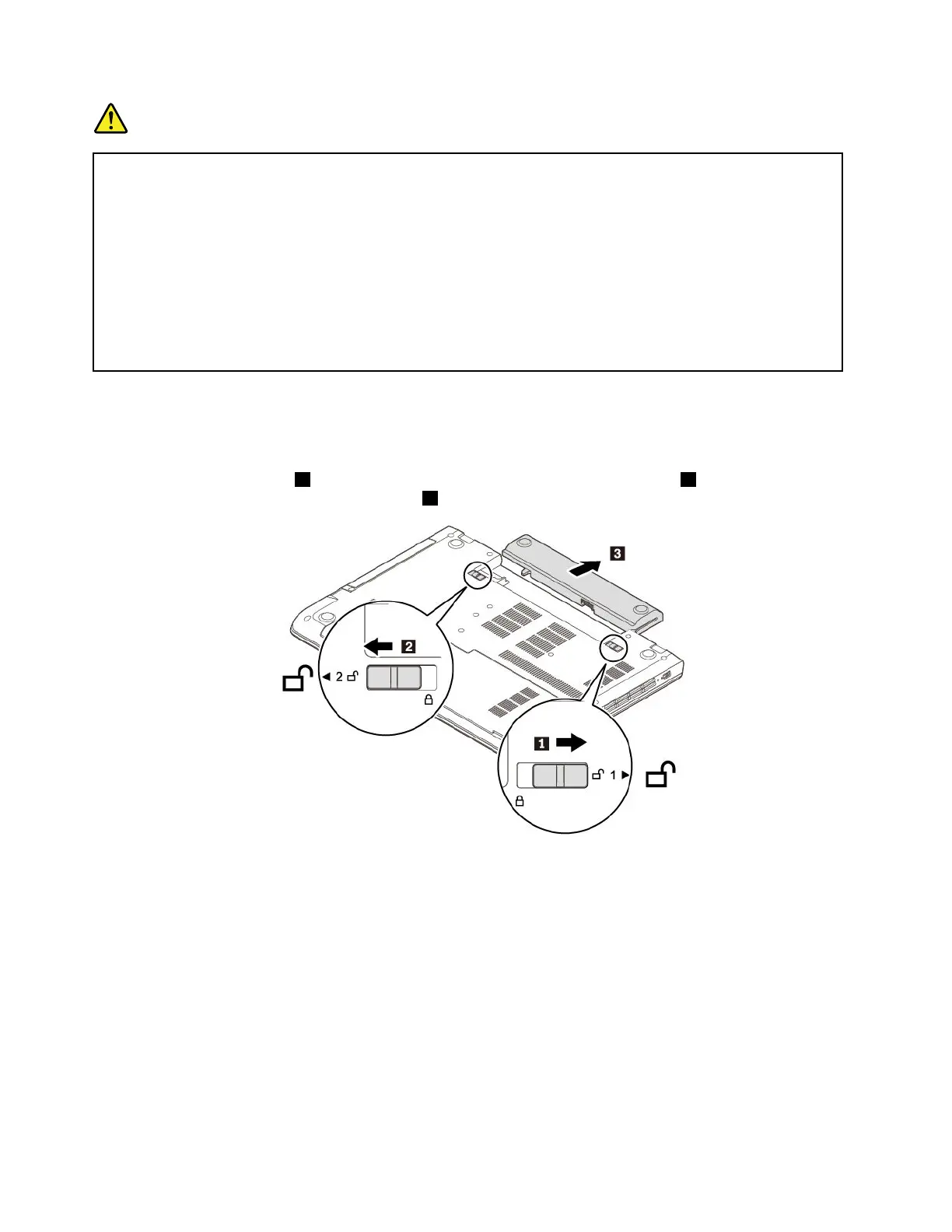
Toreplacetheremovablebattery,dothefollowing:
1.Ensurethatthecomputeristurnedoffanddisconnectedfromacpowerandallcables.
2.Closethecomputerdisplayandturnthecomputerover.
3.Unlockthebatterylatch1.Holdthebattery-lockleverintheunlockedposition2andremovethe
batteryinthedirectionasshownbyarrow
3.
78ThinkPadE570,E570c,andE575UserGuide














 To Next Page