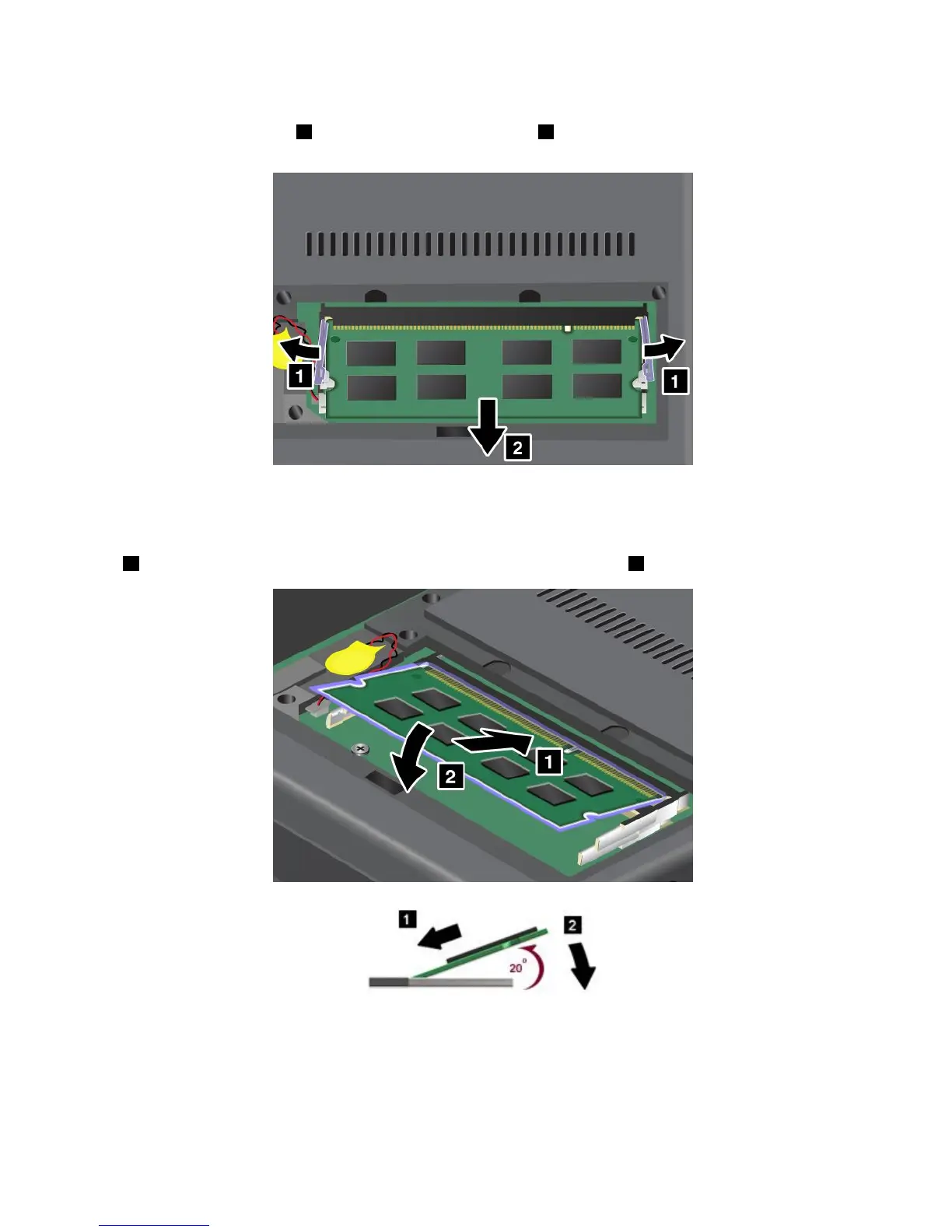
5.IfthetwoSO-DIMMsarealreadyinthememoryslots,pressoutonthelatchesonbothedgesofthe
socketatthesametime1,andthenremoveanSO-DIMM2tomakeroomforthenewone.Be
suretosaveitforfutureuse.
6.FindthenotchonthecontactedgesideoftheSO-DIMMyouareinstalling.
Attention:ToavoiddamagingtheSO-DIMM,donottouchitscontactedge.
7.WiththenotchedendoftheSO-DIMMtowardthecontactedgesideofthesocket,inserttheSO-DIMM
1intothesocketatanangleofabout20degrees;thenpressitinrmly2.
Note:Ifyouinstallamemorymoduleinonlyoneofthetwomemoryslots,installitinthebottomslot.
8.PivottheSO-DIMMdownwarduntilitsnapsintoplace.
9.MakesurethattheSO-DIMMisrmlyxedintheslotandcannotbemovedeasily.
94UserGuide















 To Next Page