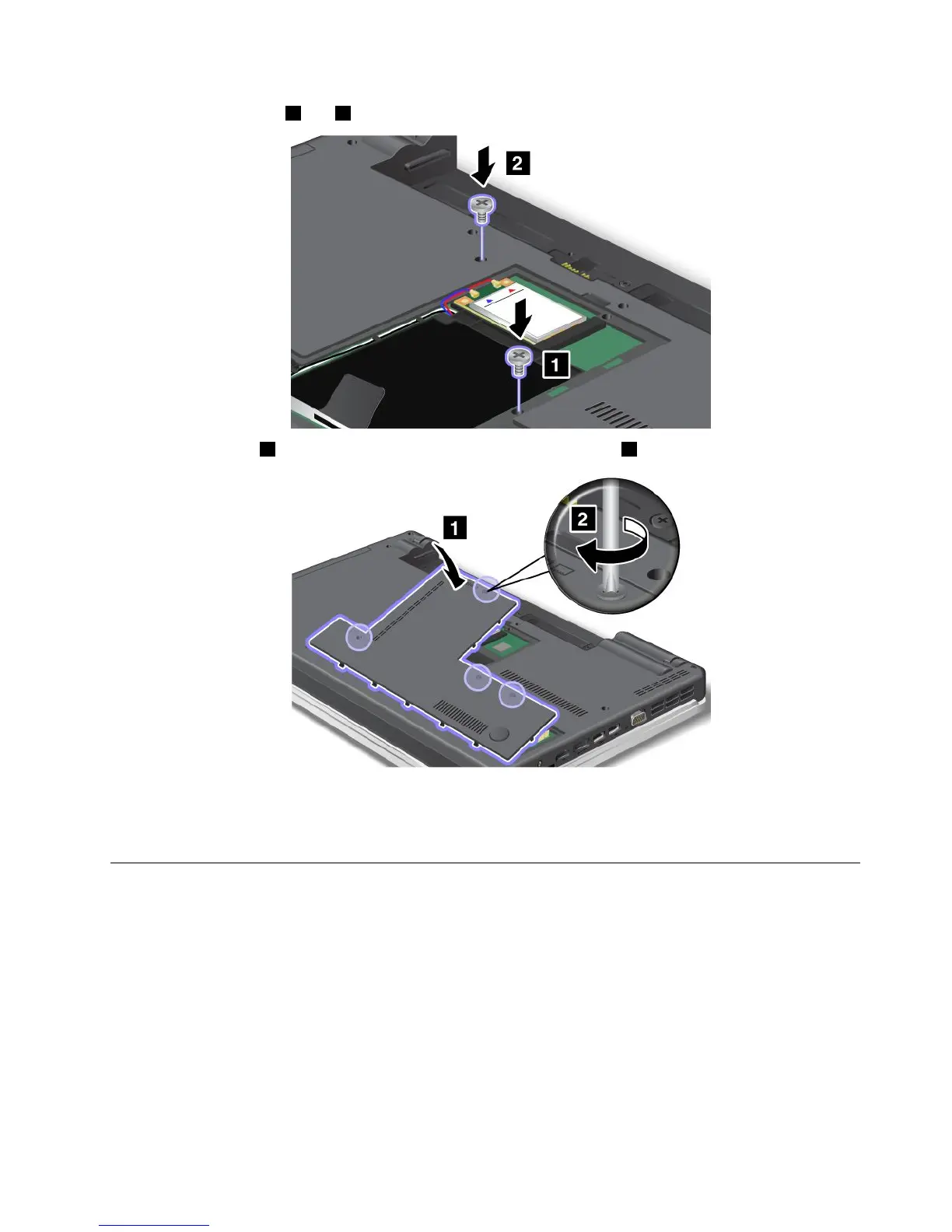
4.Reinstallthescrews1and2.
5.Attachthecover1,pivotitdownwards,andthentightenthescrews2.
6.Reinstallthebattery.Formoreinformationabouthowtoreinstallthebattery,referto“Replacingthe
battery”onpage77.
7.Turnthecomputeroveragain.Connecttheacpoweradapterandcablestothecomputer;thenturniton.
ReplacingtheSIMcard
Beforeyoustart,printtheseinstructions.
YourcomputermayrequireaSIM(SubscriberIdenticationModule)cardtoestablishawirelessWAN(Wide
AreaNetwork)connections.Dependingonthecountryofdelivery,theSIMcardmaybealreadyinstalledin
yourcomputerorwillbepartoftheshippingcontentsthatcamewithyourcomputer.
IfyoundtheSIMcardsincludedintheshippingcontents,adummycardisinstalledintheSIMcard
slot.Thenproceedtothefollowinginstructions.
Ifyoundthedummycardintheshippingcontents,theSIMcardisalreadyinstalledintheSIMcard
slot,andnofurtherinstallationisneeded.
Chapter6.Replacingdevices103















 To Next Page