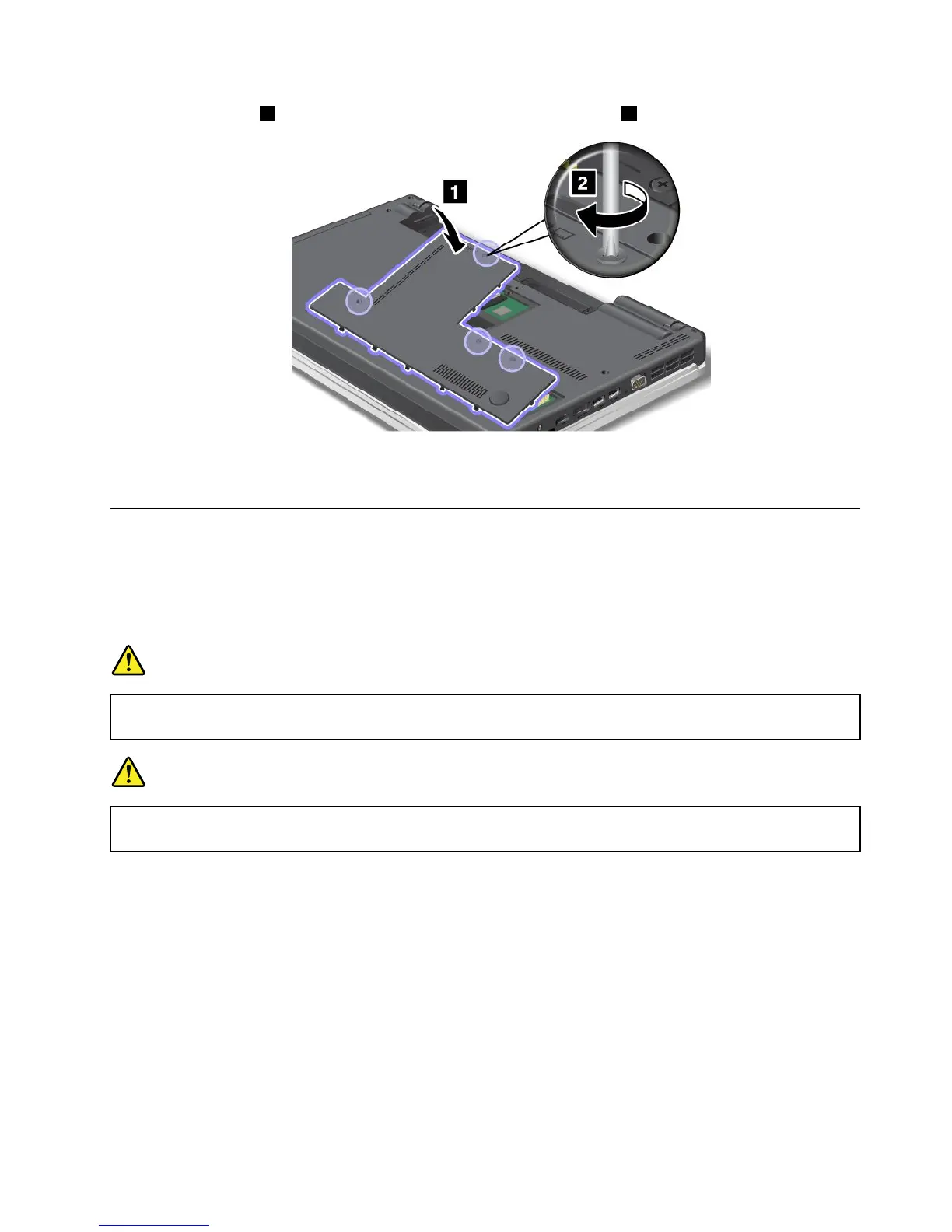
10.Attachthecover1,pivotitdownwards,andthentightenthescrews2.
11.Reinstallthebattery.Formoreinformationabouthowtoreinstallthebattery,refertoReinstallthebattery.
12.Turnthecomputeroveragainandreconnectthecables.
Replacingthekeyboard
Beforeyoustart,printtheseinstructions.
Youcanusethefollowingprocedurestoreplacethekeyboardwithanewone,availableasanoption.
Prerequisitesfortheprocedure
DANGER
Duringelectricalstorms,donotconnectthecabletoordisconnectitfromthetelephoneoutlet
onthewall.
DANGER
Electriccurrentfrompower,telephone,andcommunicationcablesishazardous.Toavoidshock
hazard,disconnectthecablesbeforeopeningthecoverofthisslot.
ThinkPadEdgeE420
Removingthekeyboard
Toremovethekeyboard,dothefollowing:
1.Turnoffthecomputer;thendisconnecttheacpoweradapterandallcablesfromthecomputer.Waitfor
afewminutes,tilltheinsideofthecomputercools,beforeyoustartthefollowingprocedures.
2.Closethecomputerdisplay,andturnthecomputerover.
3.Removethebattery.Formoreinformation,referto“Replacingthebattery”onpage77.
Chapter6.Replacingdevices95















 To Next Page