5Slimopticaldrive
SomeservermodelscomewithaslimSATAopticaldrive(DVD-RWorDVD-ROM).
72.5-inch-drivebays(0–7)
TheEMIintegrityandcoolingoftheserverareprotectedbyhavingalldrivebayscoveredoroccupied.
Thenumberoftheinstalleddrivesinyourservervariesbymodel.Thevacantdrivebaysareoccupied
bydummytrays.
Whenyouinstalldrives,followtheorderofthedrivebaynumbers.
Frontpanel
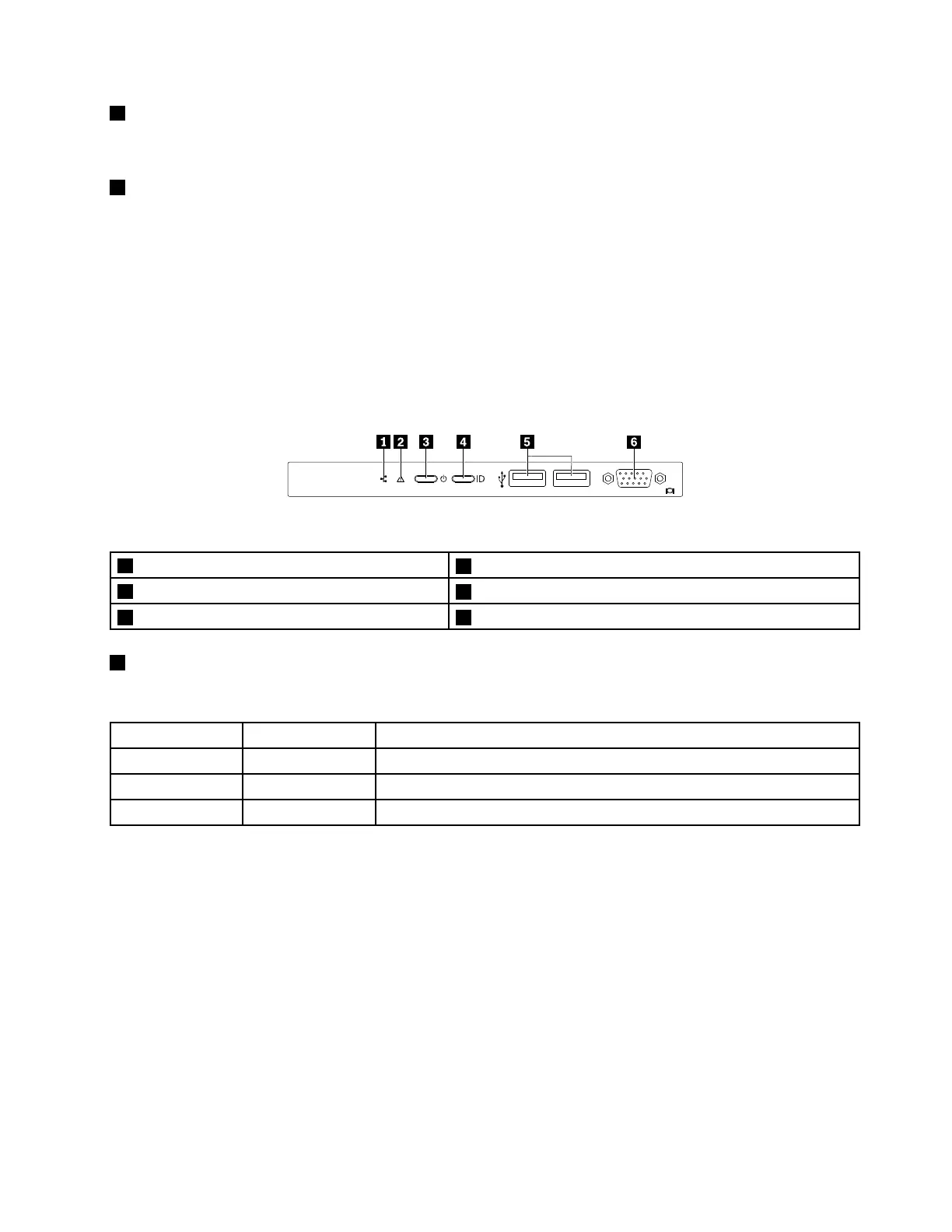
Thefollowingillustrationshowsthecontrols,connectors,andLEDsonthefrontpaneloftheserver.Tolocate
thefrontpanel,see“Frontviewoftheserver”onpage17.
Figure7.Frontpanel
1NetworkstatusLED
2SystemhealthLED
3PowerbuttonwithpowerstatusLED
4SystemIDbuttonwithIDLED
5USB2.0connectors(2)6VGAconnector
1NetworkstatusLED
ThenetworkstatusLEDonthefrontpanelhelpsyouidentifythenetworkconnectivityandactivity.
StatusColor
Description
OnGreen
Theserverisconnectedtoanetwork.
Blinking
Green
Thenetworkisconnectedandactive.
Off
None
Theserverisdisconnectedfromthenetwork.
Chapter3.Productoverview21










 To Next Page