See“OnlineBooksfolder”onpage65formoreinformationaboutaccessingandviewingthepublications.
Antivirussoftware
Yourcomputercomeswithantivirussoftwarethatyoucanusetodetectandeliminateviruses.Lenovo
providesafullversionofantivirussoftwareonyourcomputerwithafree30-daysubscription.After30days,
youmustrenewthelicensetocontinuereceivingtheantivirussoftwareupdates.
Formoreinformationabouthowtouseyourantivirussoftware,refertothehelpsystemofyourantivirus
software.
Locatingcomputercontrols,connectors,andparts
Thissectionprovidesinformationtohelpyoulocateyourcomputercontrols,connectors,andparts.
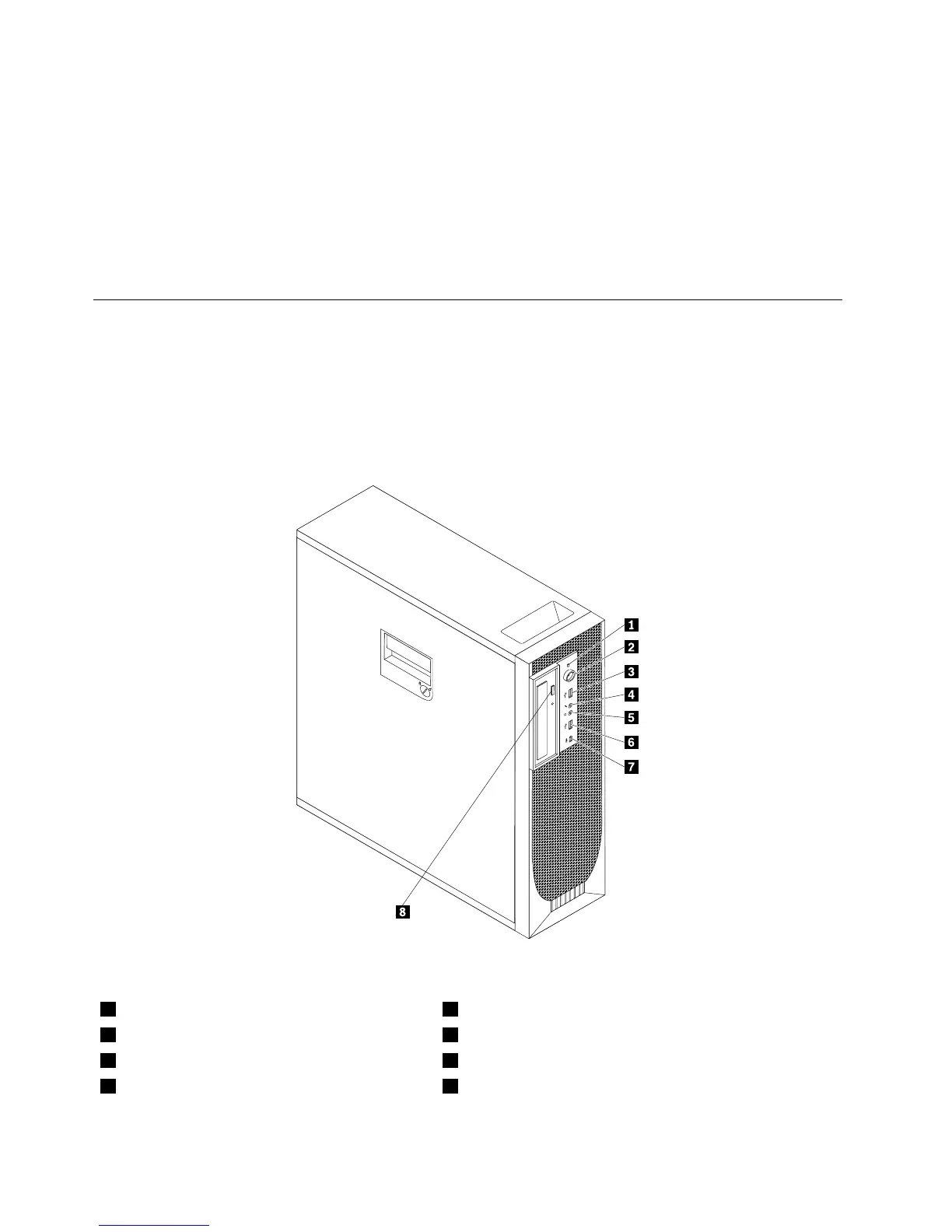
Locatingcontrolsandconnectorsonthefrontofyourcomputer
Figure1“Frontcontrolandconnectorlocations”onpage6showsthelocationsofthecontrolsand
connectorsonthefrontofyourcomputer.
Figure1.Frontcontrolandconnectorlocations
1Harddiskdriveactivityindicator5Headphoneconnector
2Powerswitchandpowerindicator
6USBconnector
3USBconnector7IEEE1394connector(availableonsomemodels)
4Microphoneconnector
8Opticaldriveejectbutton
6ThinkStationUserGuide



 To Next Page
 Loading...












