1.Removeallmediafromthedrivesandturnoffallattacheddevicesandthecomputer.Then,disconnect
allpowercordsfromelectricaloutletsanddisconnectallcablesthatareconnectedtothecomputer.
2.Removethecomputercover.See“Removingthecomputercover”onpage13.
3.Removethefrontbezel.See“Removingandreinstallingthefrontbezel”onpage14.
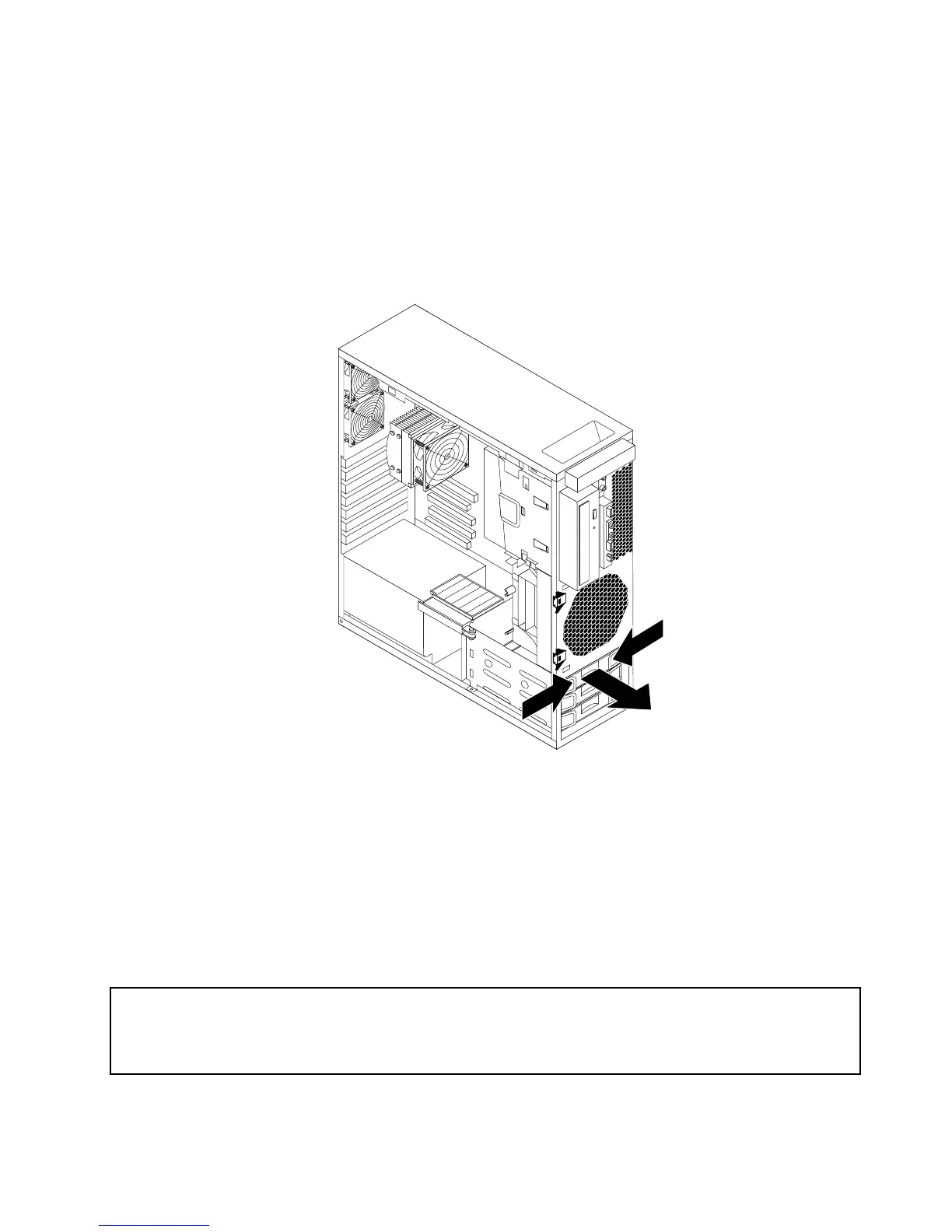
4.Locatetheharddiskdrivethatyouwanttoreplace.
5.Disconnectthesignalcableandthepowercablefromtherearoftheharddiskdrive.Pressthetwo
tabsoftheharddiskdrivebrackettowardeachother,andthenpullthebracketoutwardtoremovethe
harddiskdrivewiththebracketfromthechassis.
Figure23.Removingtheharddiskdrive
6.Removethefailingharddiskdrivefromthebracketbyexingthebracket.
7.Toinstallanewharddiskdrive,goto“Installinganewharddiskdrive”onpage23.
Whattodonext:
•Toworkwithanotherpieceofhardware,gototheappropriatesection.
•Tocompletetheinstallationorreplacement,goto“Completingthepartsreplacement”onpage37.
Replacingtheopticaldrive
Attention:
Donotopenyourcomputerorattemptanyrepairbeforereadingandunderstandingthe“Importantsafetyinformation”
intheThinkStationSafetyandWarrantyGuidethatcamewithyourcomputer.ToobtainacopyoftheThinkStation
SafetyandWarrantyGuide,goto:
http://support.lenovo.com
Thissectionprovidesinstructionsonhowtoreplacetheopticaldrive.
Chapter2.Installingorreplacinghardware27



 To Next Page
 Loading...












