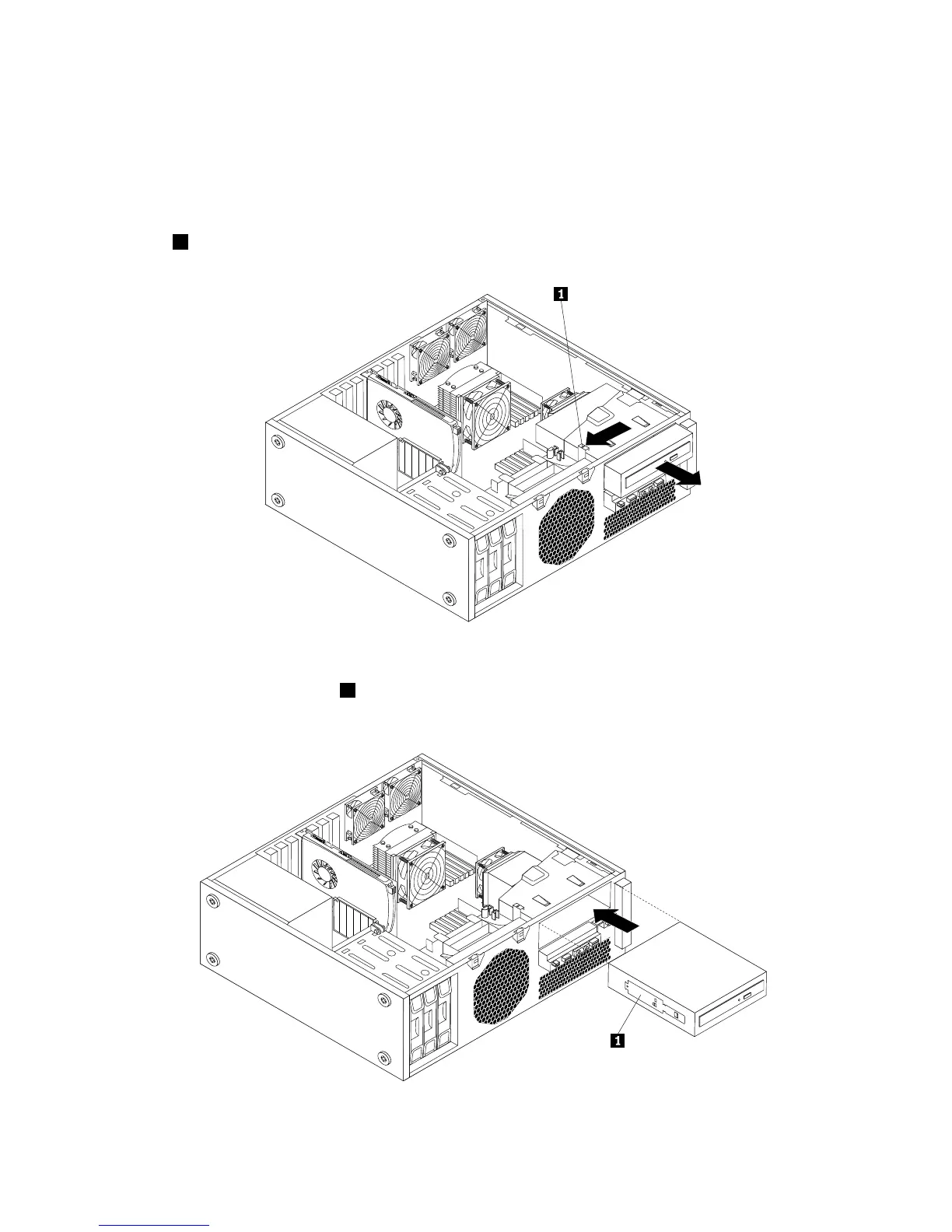
Toreplacetheopticaldrive,dothefollowing:
1.Removeallmediafromthedrivesandturnoffallattacheddevicesandthecomputer.Then,disconnect
allpowercordsfromelectricaloutletsanddisconnectallcablesthatareconnectedtothecomputer.
2.Removethecomputercover.See“Removingthecomputercover”onpage13.
3.Removethefrontbezel.See“Removingandreinstallingthefrontbezel”onpage14.
4.Disconnectthesignalcableandthepowercablefromtherearoftheopticaldrive,pressthebluerelease
button1asshown,andthenslidetheopticaldriveoutofthecomputer.
Figure24.Removingtheopticaldrive
5.Installtheopticaldriveretainer1onthesideofthenewopticaldrive.Then,slidethenewopticaldrive
intotheopticaldrivebracketfromthefrontofthecomputeruntiltheopticaldrivesnapsintoposition.
Figure25.Installingthenewopticaldrive
28ThinkStationUserGuide



 To Next Page
 Loading...












