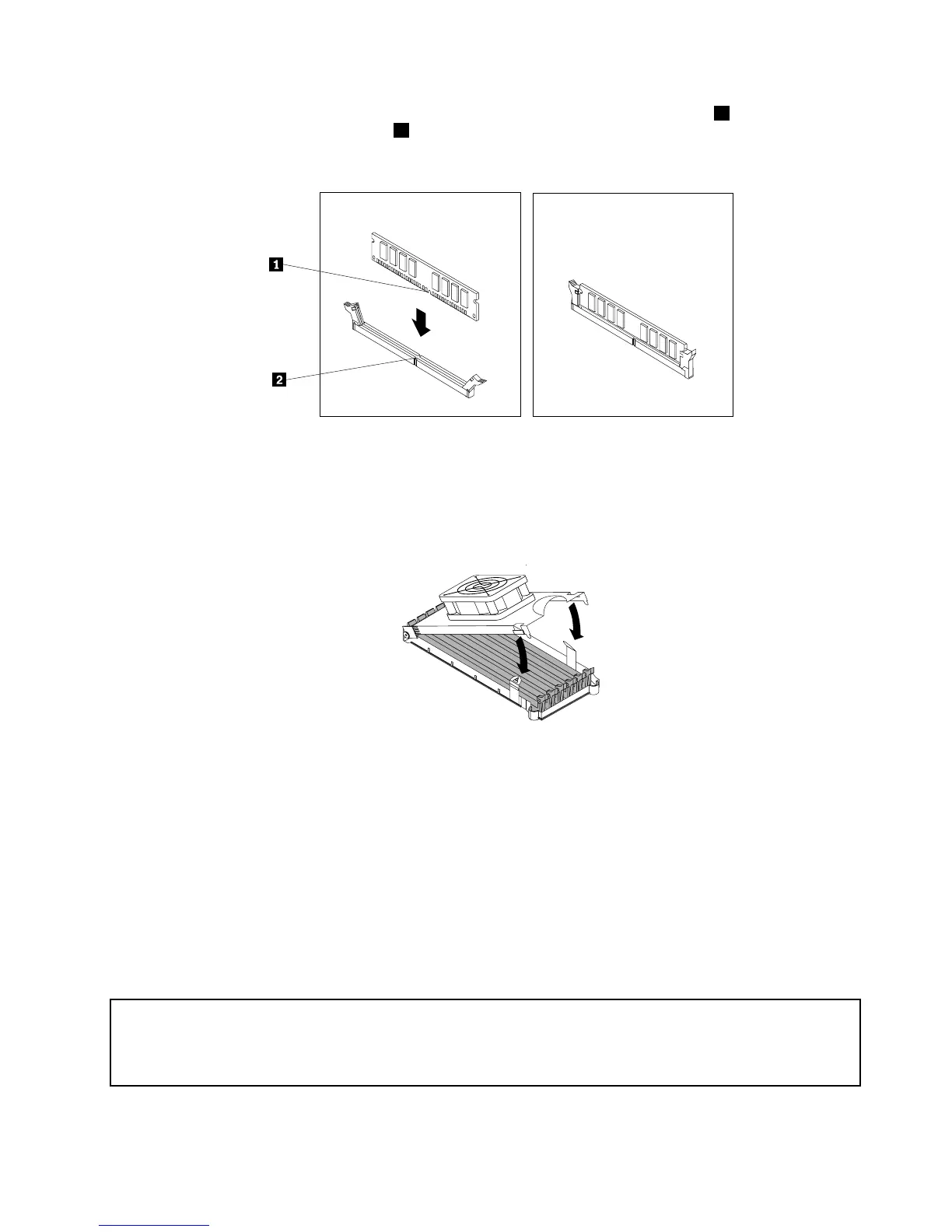
8.Positionthenewmemorymoduleoverthememoryslot.Makesurethatthenotch1onthememory
modulealignscorrectlywiththekey2inthememoryslot.Pushthememorymodulestraightdowninto
theslotuntiltheretainingclipsclose.
Figure14.Installingamemorymodule
9.Toinstallthememoryfanduct,engagetherearoftheductwiththeretaineronthesystemboardand
thenpivotthefanductdownwarduntilthefanductsnapsintoposition.Reconnectthememoryfan
cabletothesystemboard.See“Locatingpartsandconnectorsonthesystemboard”onpage9.
Figure15.Installingthememoryfanduct
10.Reinstalltheblueshippingclipifyourcomputerneedstoberepackagedandshippedinthefuture.
11.Reinstalltheopticaldrivebracketintothechassisifyouhaveremovedit.Then,reinstalltheoptical
driveintothechassis.See“Replacingtheopticaldrive”onpage27.
12.ReinstallthePCIcardholder.See“RemovingandreinstallingthePCIcardholder”onpage15.
Whattodonext:
•Toworkwithanotherpieceofhardware,gototheappropriatesection.
•Tocompletetheinstallationorreplacement,goto“Completingthepartsreplacement”onpage37.
InstallingorreplacingaPCIcard
Attention:
Donotopenyourcomputerorattemptanyrepairbeforereadingandunderstandingthe“Importantsafetyinformation”
intheThinkStationSafetyandWarrantyGuidethatcamewithyourcomputer.ToobtainacopyoftheThinkStation
SafetyandWarrantyGuide,goto:
http://support.lenovo.com
Chapter2.Installingorreplacinghardware21



 To Next Page
 Loading...












