Cable lock
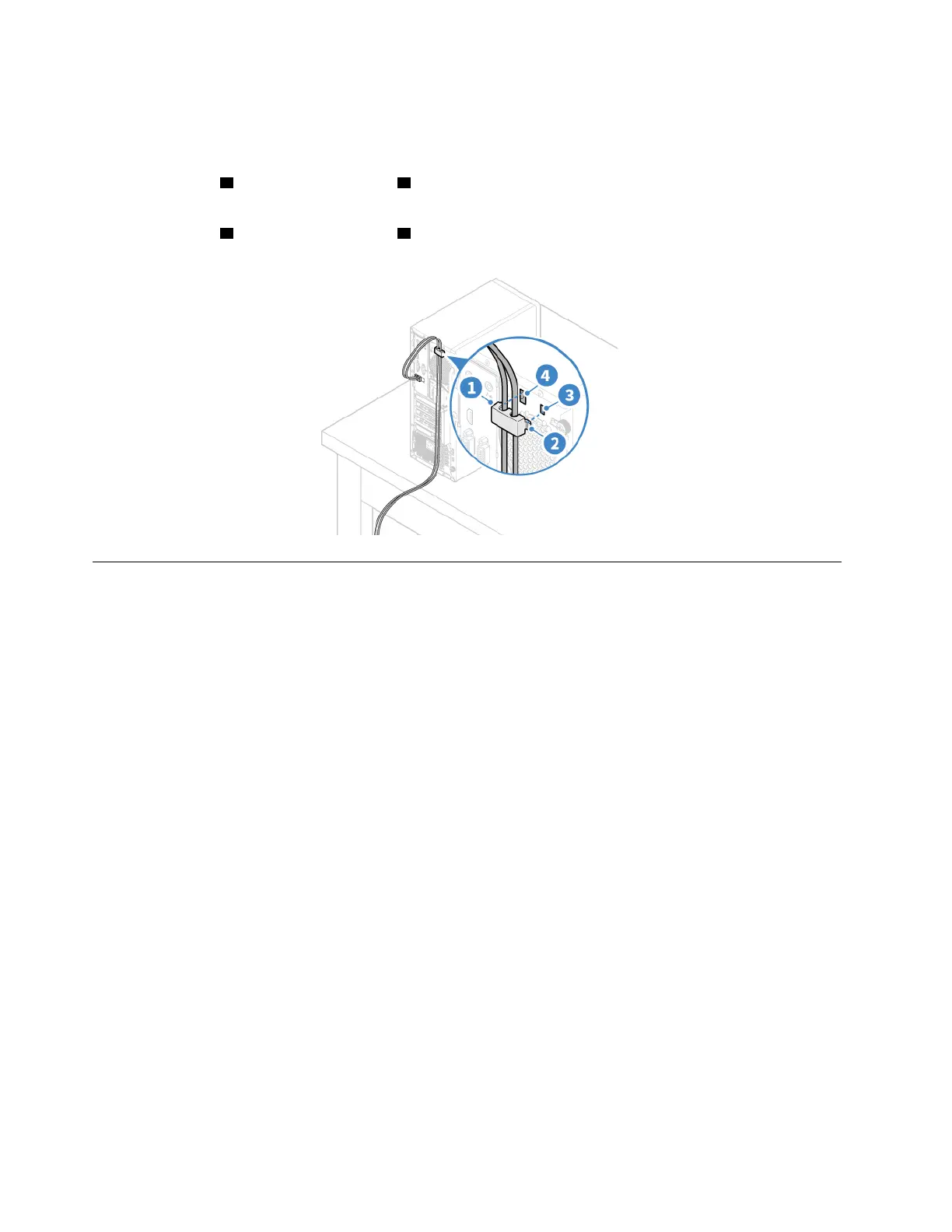
Secure devices, such as the keyboard and the mouse, by locking the device cables to the computer. The
cable lock connects to the cable-lock slots on the rear of the computer. To install a cable lock:
1. Insert the clip
1 into the cable-lock slot 4 .
2. Guide the cables you want to lock into the grooves of the cable lock.
3. Press the clip
2 into the cable-lock slot 3 until it snaps into position.
Log in to your computer securely
This section provides secure ways to log in to your computer with a password, a fingerprint, or your face.
Use passwords
Password types
You can set the following passwords in UEFI (Unified Extensible Firmware Interface) BIOS (Basic Input/
Output System) to prevent unauthorized access to your computer. However, you are not prompted to enter
any UEFI BIOS password when your computer resumes from sleep mode.
• Power-on password
When a power-on password is set, you are prompted to enter a valid password each time the computer is
turned on. The computer cannot be used until the valid password is entered.
• Supervisor password
Setting a supervisor password deters unauthorized users from changing configuration settings. If you are
responsible for maintaining the configuration settings of several computers, you might want to set a
supervisor password.
When a supervisor password is set, you are prompted to enter a valid password each time you try to enter
the BIOS menu.
If both the power-on password and supervisor password are set, you can enter either password.
However, you must use your supervisor password to change any configuration settings.
• Hard disk password
Setting a hard disk password prevents unauthorized access to the data on the storage drive. When a hard
disk password is set, you are prompted to enter a valid password each time you try to access the storage
drive.
18
Lenovo V55t-15API User Guide


 To Next Page