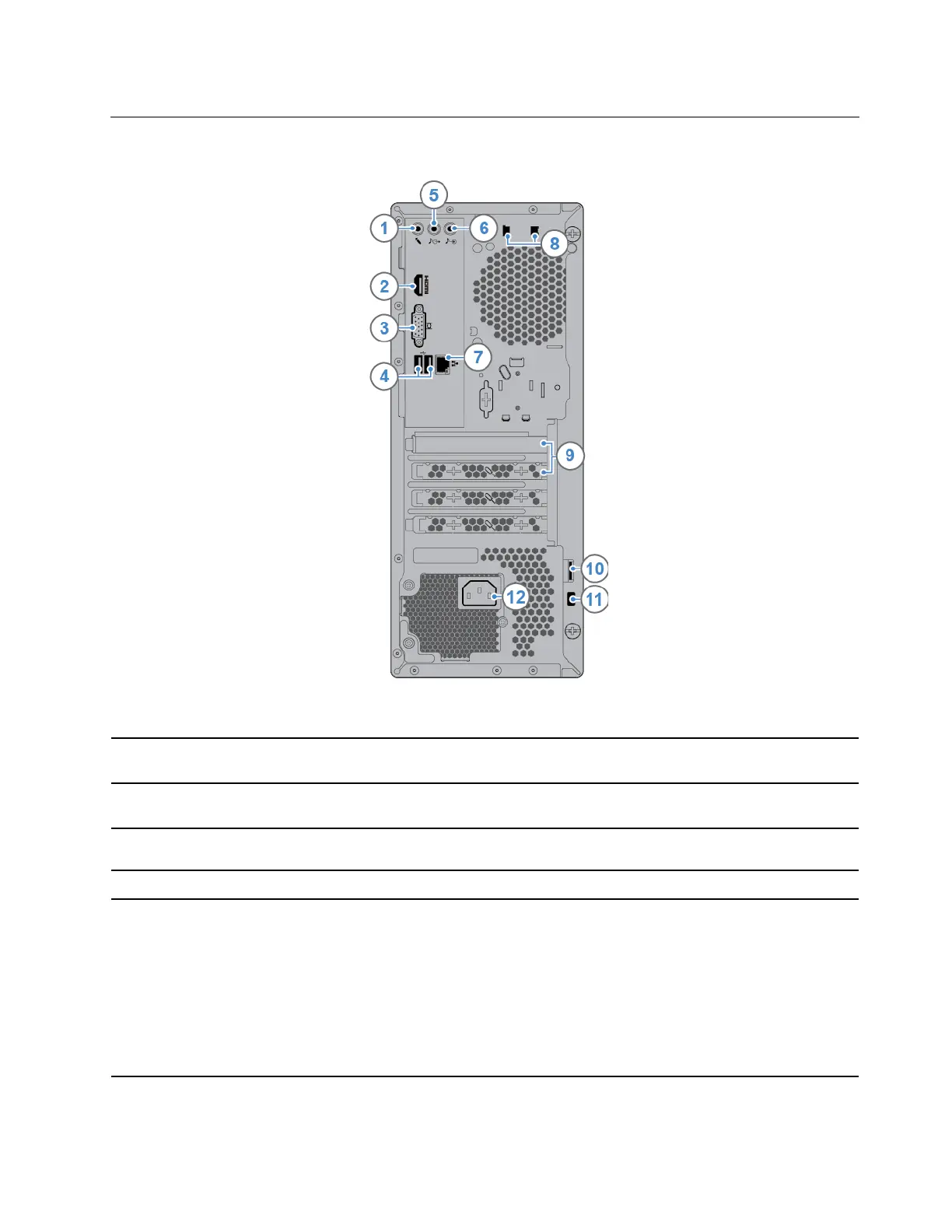
Rear
1. Microphone connector
Used to connect a microphone to your computer when you want to record sound
or use speech recognition software.
2. HDMI
™
1.4 out connector
Used to send audio and video signals from the computer to another audio or
video device, such as a high-performance monitor.
3. VGA out connector
Used to send video signals from the computer to another video device, such as a
monitor.
4. USB 2.0 connectors (2) Used to connect a device that requires a USB 2.0 connection.
5. Audio line-out connector
Used to send audio signals from the computer to external devices, such as
powered stereo speakers, headphones, or multimedia keyboards. To connect a
stereo system or other external recording device, connect a cable between the
audio line-in connector of the device and the audio line-out connector of the
computer.
Note: If your computer has both an audio line-out connector and a headset or
headphone connector, always use the headset connector or headphone
connector for earphones, headphones, or a headset. The headphone connector
does not support headset microphones.
Chapter 1. Meet your computer 3


 To Next Page