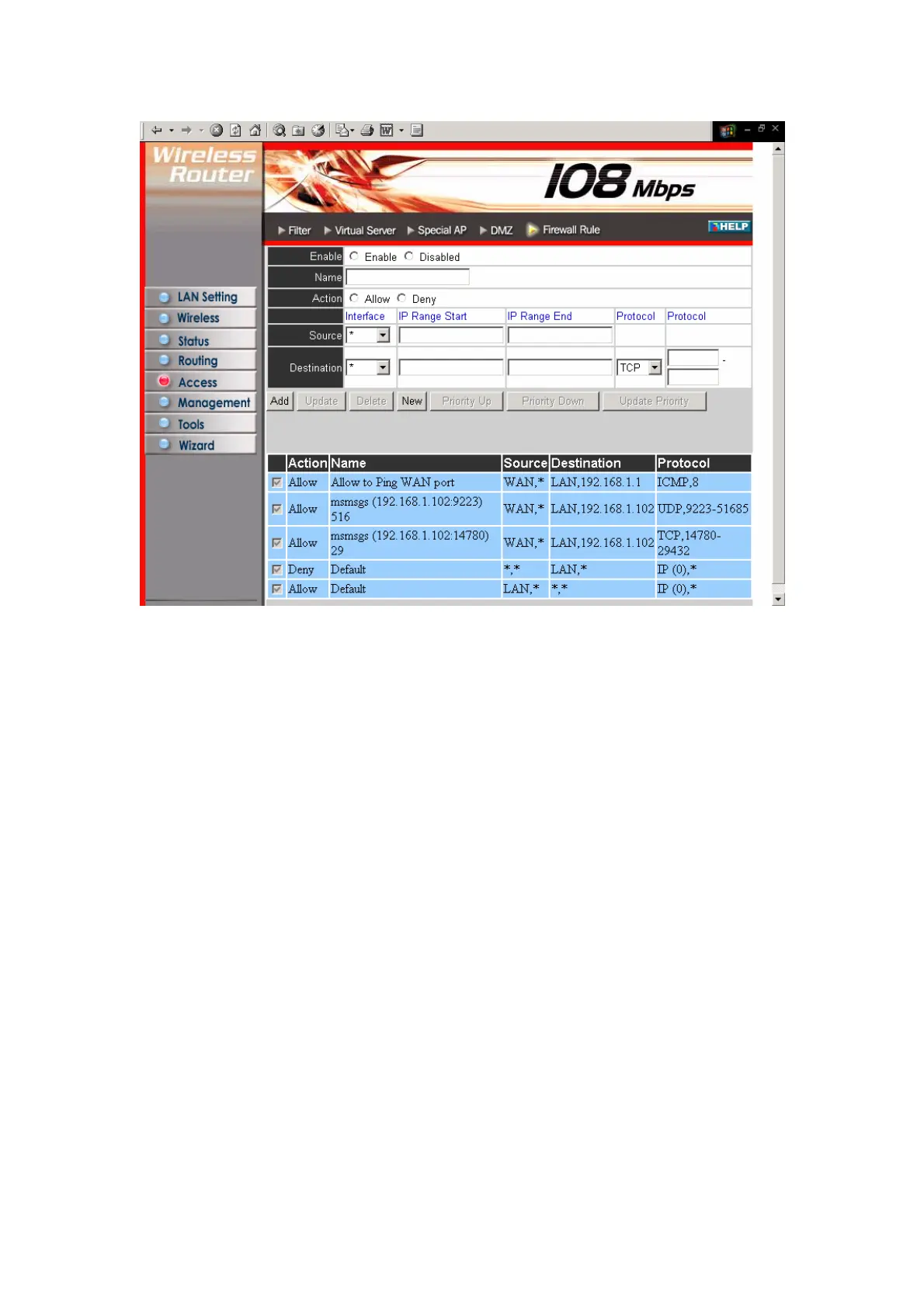
Enable: Click to enable or disable the firewall rule profile.
Name: Type a descriptive name for the firewall rule profile.
Action: Select whether to allow or deny packets that conform to the rule.
Inactive Timeout: Type the number of seconds of network inactivity that elapses
before the router refuses the incoming packet.
Source: Defines the source of the incoming packet that the rule is applied to.
● Interface: Select which interface (WAN or LAN) the rule is applied to.
● IP Range Start: Type the start IP address that the rule is applied to.
● IP Range End: Type the end IP address that the rule is applied to.
Destination: Defines the destination of the incoming packet that the rule is applied to.
● Interface: Select which interface (WAN or LAN) the rule is applied to.
● IP Range Start: Type the start IP address that the rule is applied to.
● IP Range End: Type the end IP address that the rule is applied to.
● Protocol: Select the protocol (TCP, UDP, or ICMP) of the destination.
● Port Range: Select the port range.
Add: Click to add the rule profile to the table at the bottom of the screen.
Update: Click to update information for the rule if you have selected a list item and
have made changes.
44



 To Next Page