54
For more settings click on More.
DHCP Server: To either Disable or Enable DHCP Server.
IP Pool Starting/Ending Address: The pool of IP’s that can be allocated to clients
Lease Time: DHCP lease time to the DHCP client
Domain Name: To assign a Domain Name (optional)
Primary DNS/Secondary DNS: To assign DNS Servers (optional)
Primary WINS/Secondary WINS: To assign WINS Servers (optional)
Gateway: The IP address of an alternate gateway (optional)
Clients List: Check the DHCP client list.
Fixed Mapping: Take you to the Security > MAC Control page.
After you finish your selections click either Save to store your settings, or Undo to exit.
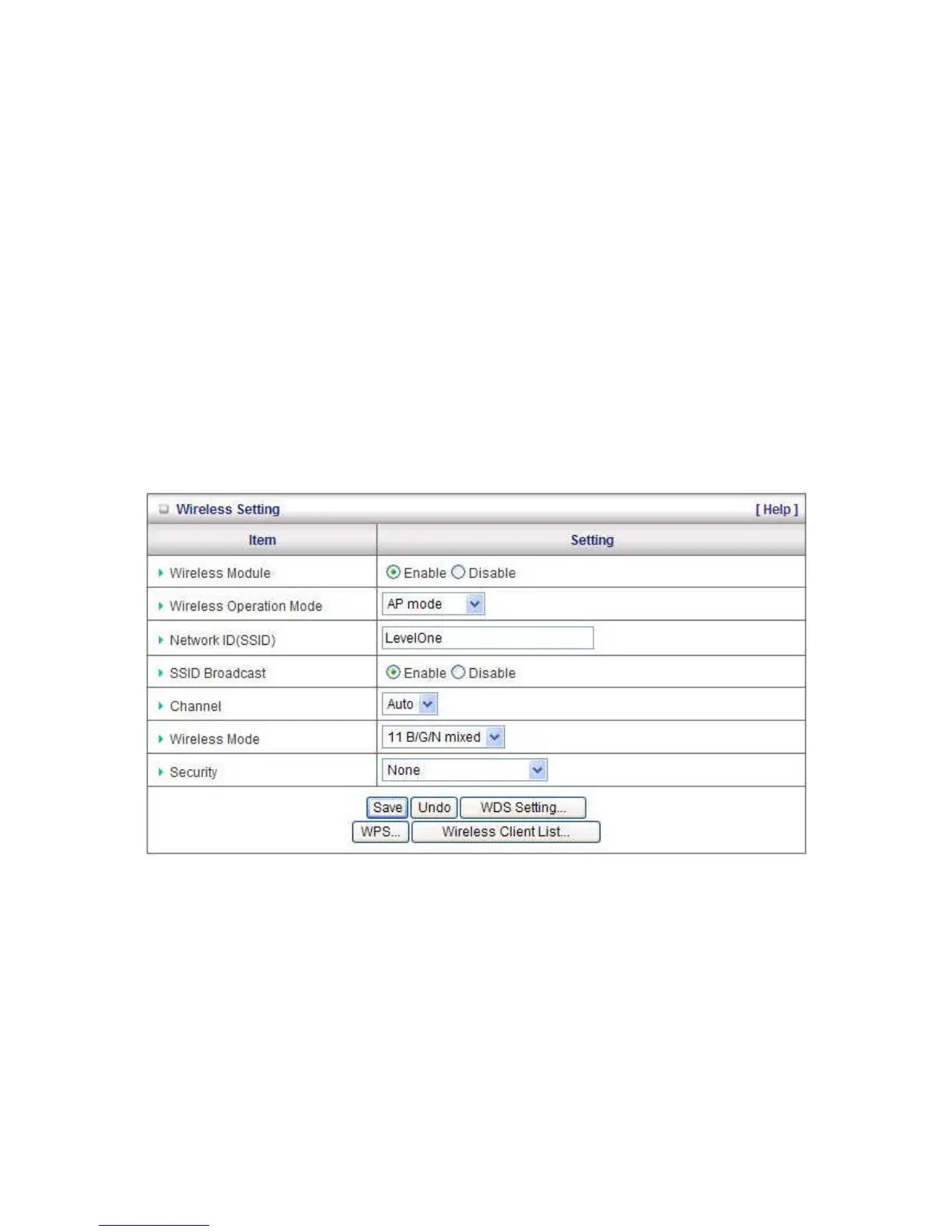
Wireless Settings
Wireless - Enabled by default. Disabling this will turn off the wireless feature of this unit.
Wireless Operation Mode: Select between Access Point or Wireless Client mode.
Note: Wireless Client modes supports the following Wireless Encryption modes:
WEP, WPA-PSK (TKIP), WPA2-PSK (AES)
Network ID (SSID): Service Set Identifier (SSID) is the name designated for a specific wireless local
area network (WLAN). The SSID's factory default setting is LevelOne. The SSID can be easily
changed to establish a new wireless network.
Note: SSID names may contain up to 32 ASCII characters.















 To Next Page