Lexmark C925/X925 Color Product Study Guide Rev 2.3
For Training Purposes Only 6/21/2011
34
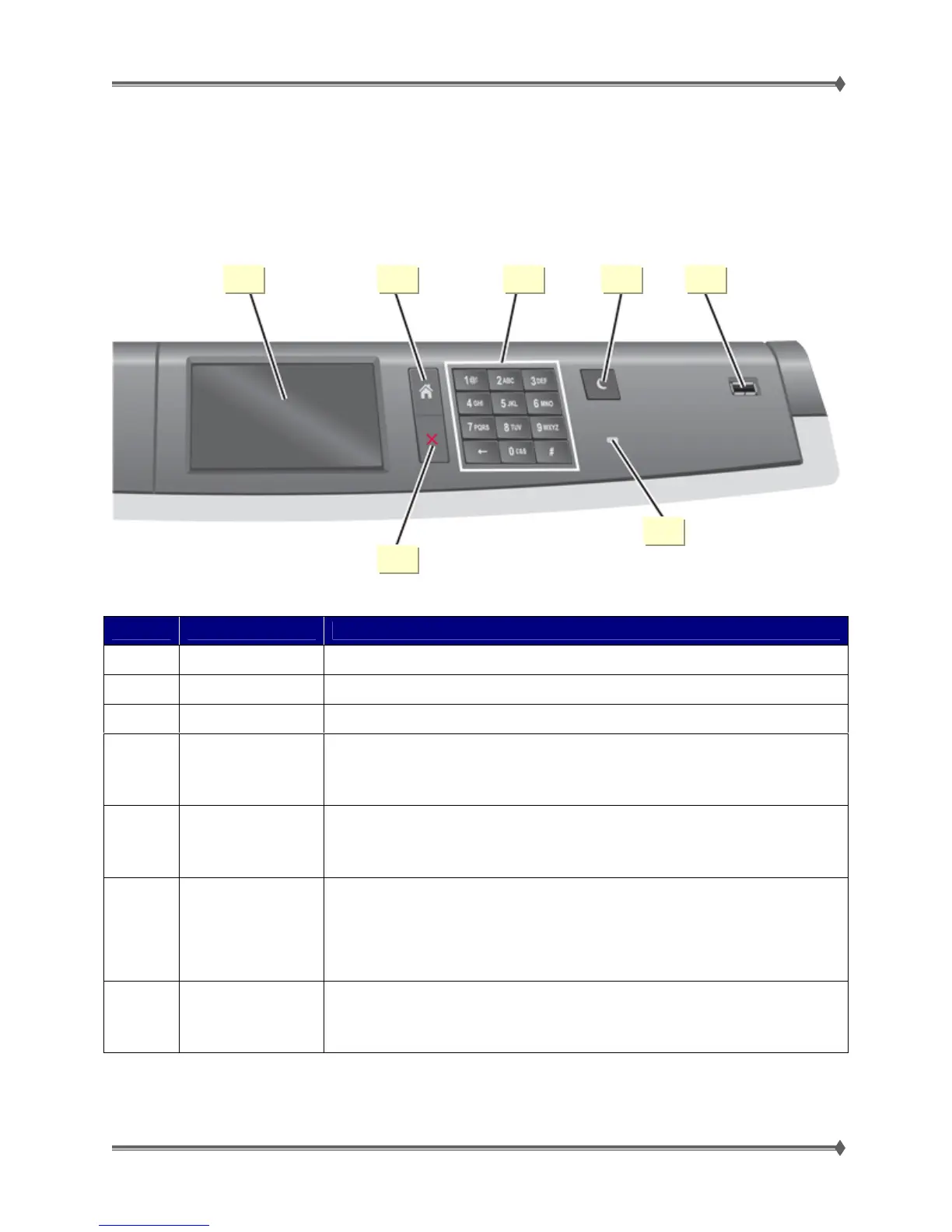
Operator Panel and Menus
C925 Operator Panel
Number Item Description
1 Display Shows the status of the printer
2 Home Lets you navigate back to the home screen
3 Keypad Allows you to enter numbers, letters, or symbols
4 Sleep
Enables Sleep Mode
Note: Touching the screen or any hard button presses can cause the printer to wake from
Sleep Mode.
5
PictBridge and USB
port
Allows the user to connect a PictBridge-enabled digital camera, a USB Bluetooth adapter,
or a flash drive to the printer
Note: Only the front USB port supports flash drives.
6 Indicator light
• Off – The printer is off.
• Blinking green – The printer is warming up, processing data, or printing.
• Solid green – The printer is on, but idle.
• Solid red – Operator intervention is needed.
• Amber – The printer is in Sleep mode or Hibernate mode
7 Stop/Cancel
Stops all printer activity
Note: A list of options is displayed once Stopped appears on the display.
2 1 3 4 5
7
6



 To Next Page