100
3-2. Destination search
Before starting the route guidance, the
demonstration of the route guidance
can be viewed.
1 Select and hold “OK” on the route
overview screen until a beep
sounds.
Press the “MAP” button on the
Remote Touch to end demo mode.
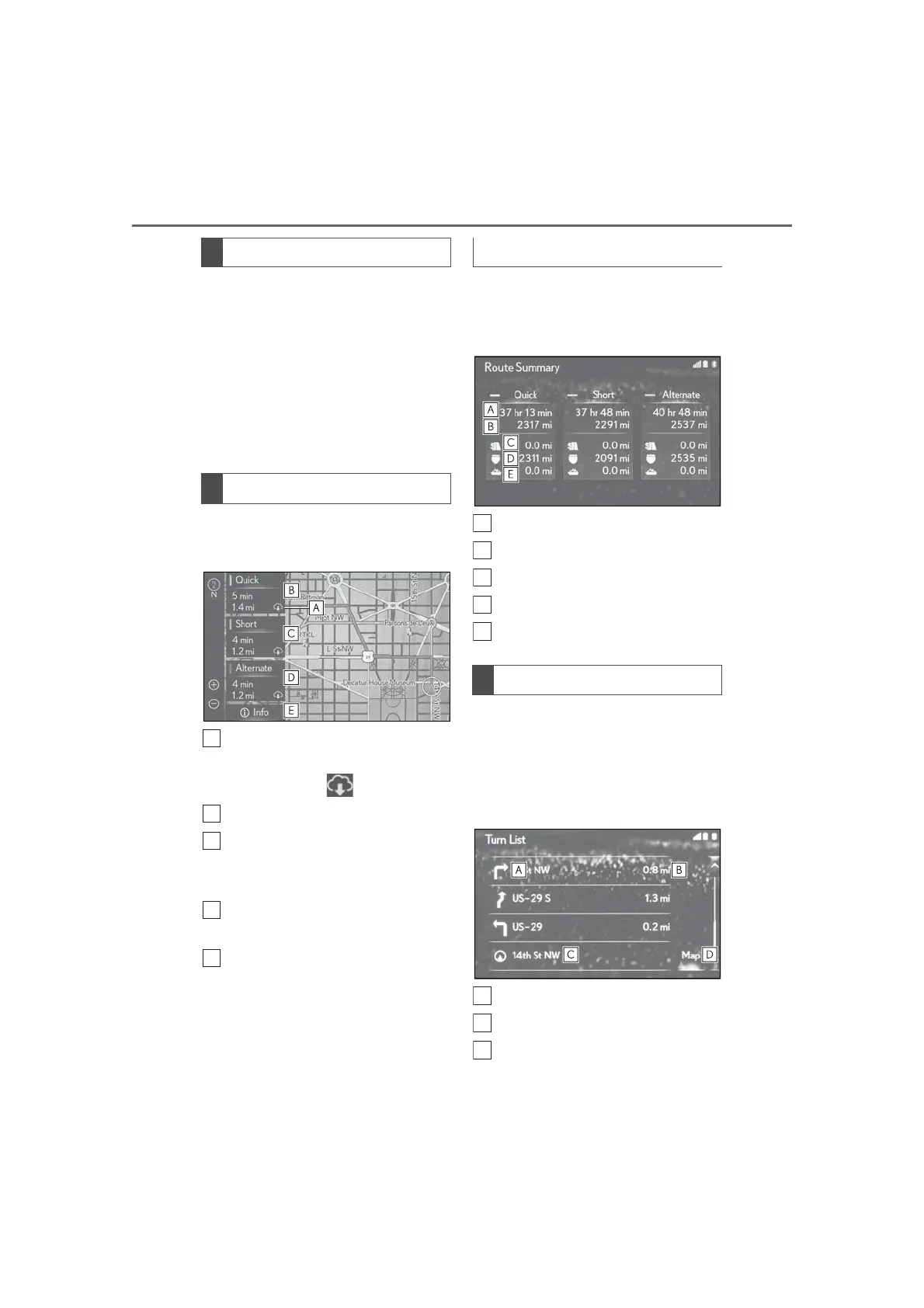
1 Select “3 Routes”.
2 Select the desired route.
Displayed when the route dis-
played is available from the Lexus
Enform center. ( )
Select to display the quickest route.
Select to display the route that is
the shortest distance to the set des-
tination.
Select to display the alternative
route.
Select to display the information
about the 3 routes. (P.100)
1 Select “Info”.
2 Check that the 3 routes informa-
tion screen is displayed.
Time necessary for the entire trip
Distance of the entire trip
Distance of the toll road
Distance of the freeway
Distance of the ferry trip
A list of turn information from the cur-
rent position to the destination can be
displayed.
1 Select “Turn List”.
2 Check that the turn list is displayed.
Turn direction at the intersection
Distance to the next turn
Current position
Starting demo mode
3 routes selection
Displaying 3 routes information
Displaying turn list



 To Next Page