109
3-4. Setup
3
Navigation system
If home has been registered, that infor-
mation can be recalled by selecting
“Home” on the destination screen.
(P.91)
To use this function, it is necessary to
register a home address first.
1 Display the navigation settings
screen:
“MENU” button “Setup”
“Navigation”
2 Select “Home”.
3 Select “Address” (P.94) or “Cur-
rent Location” to search for your
home.
4 Select “OK” when the editing home
screen appears.
If home has been registered, editing
home screen appears.
1 Display the navigation settings
screen:
“MENU” button “Setup”
“Navigation”
2 Select “Home”.
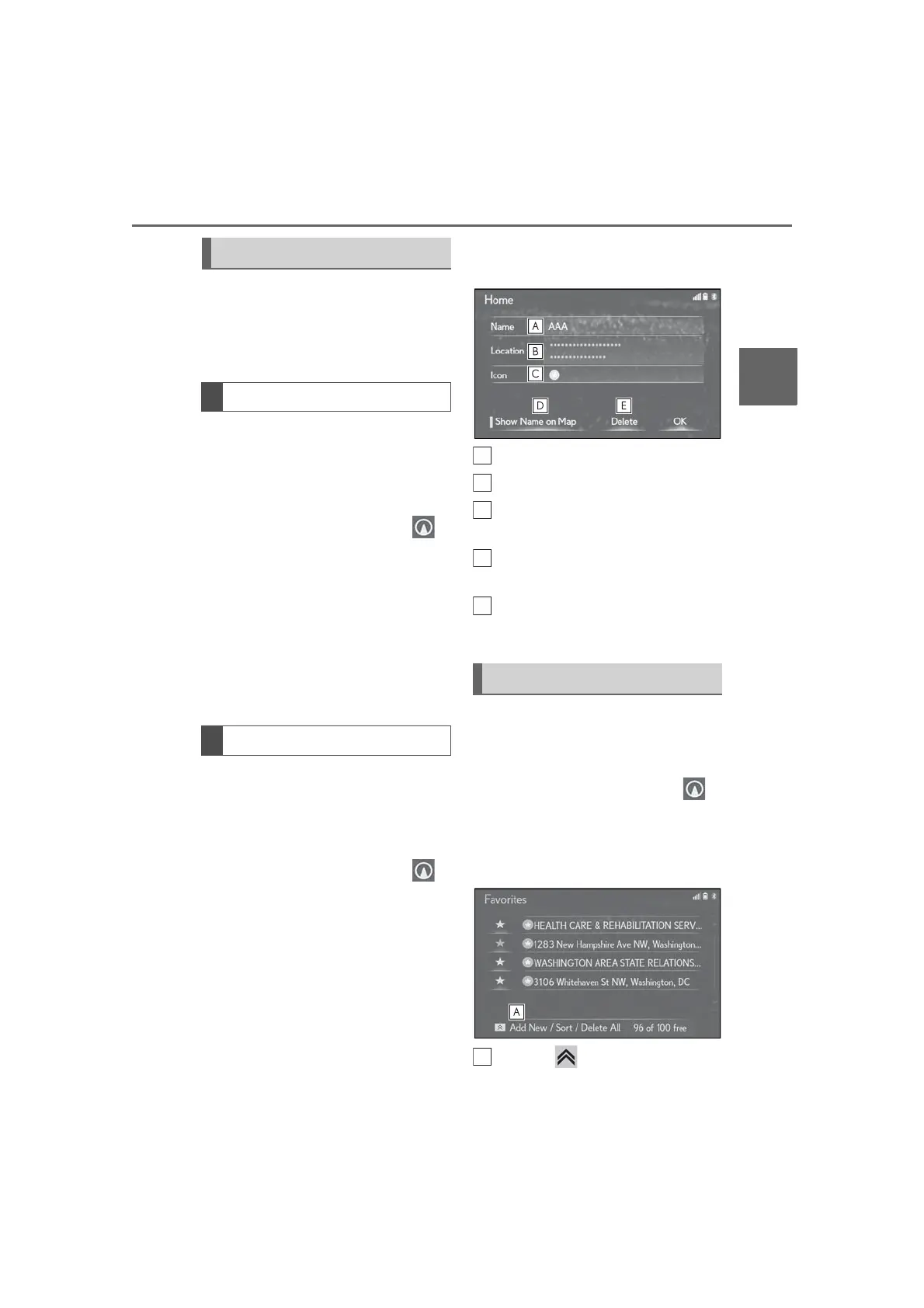
3 Select the desired item to be
edited.
Select to edit the home name.
Select to edit location information.
Select to change the icon to be dis-
played on the map screen. (P.111)
Select to set display of the home
name on/off.
Select to delete home.
4 Select “OK”.
Points on the map can be registered.
1 Display the navigation settings
screen:
“MENU” button “Setup”
“Navigation”
2 Select “Favorites”.
3 Select the desired item.
Press the button on the Remote
Setting up home
Registering home
Editing home
Setting up favorites list



 To Next Page