222
7-2. Panoramic view monitor
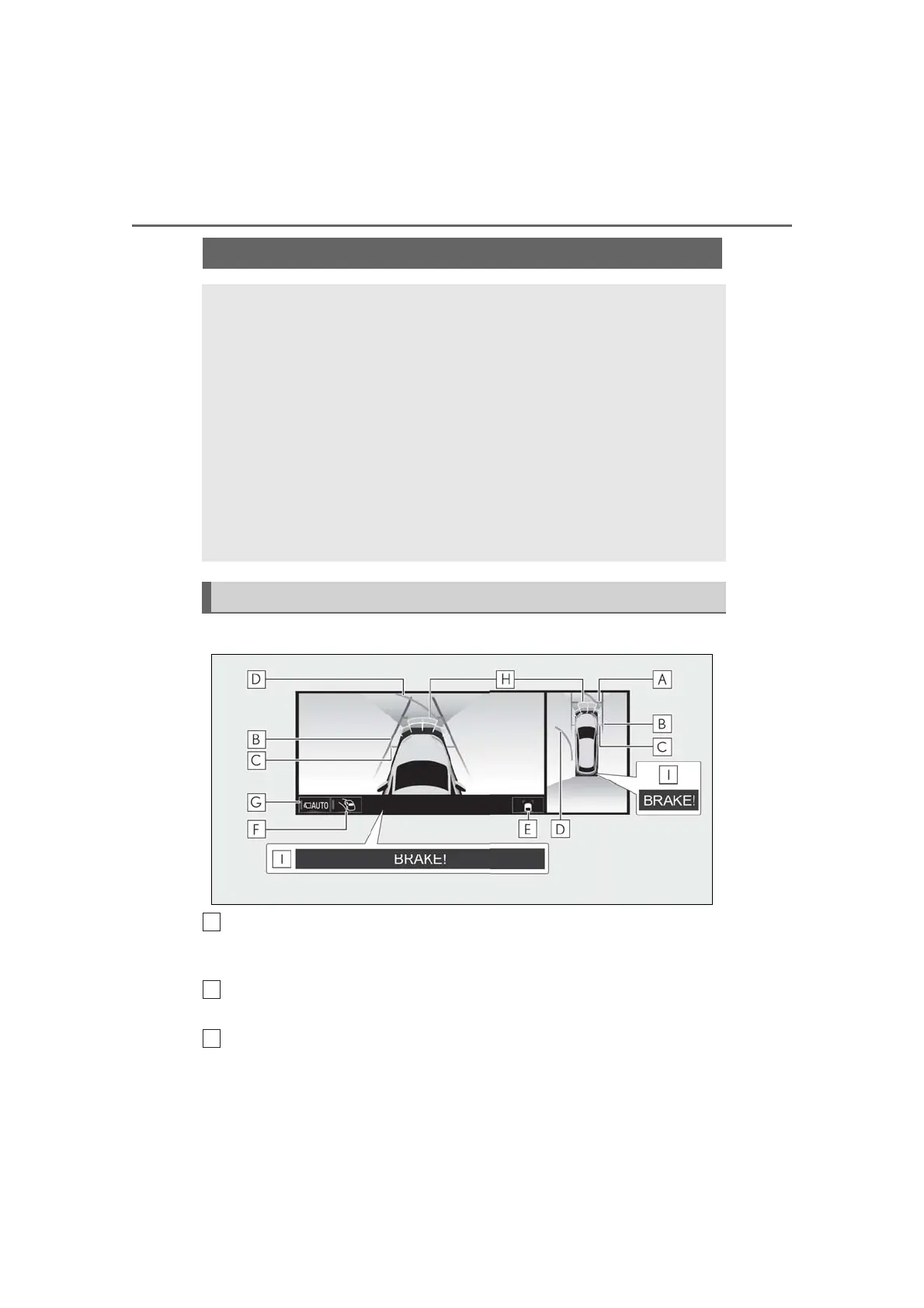
Side Clearance View & panoramic view
Distance guide lines
Show distance in front of the vehicle.
• Display points approximately 3 ft. (1 m) from the edge of the vehicle.
Vehicle width guide lines
Shows guide lines of the vehicle’s width including the outside rear view mirrors.
Front tire guide lines
Shows guide lines of where the front tire touches the ground.
Checking the sides of the vehicle
The Side Clearance View & panoramic view screen/Cornering View & pan-
oramic view screen provide support to check the areas around the sides of the
vehicle when driving on a narrow road.
To display the Side Clearance View & panoramic view screen, press the cam-
era switch repeatedly when the shift lever is in the “N” or “D” position with the
vehicle moving approximately 7 mph (12 km/h) or less.
The Cornering View & panoramic view screen will be displayed when the
steering wheel is turned by 180° or more from the center (straight-line) posi-
tion when automatic display mode of the Cornering View display is enabled.
When the turning angle of the steering wheel becomes 45° or less from the
center position, the screen will return to the Side Clearance View & pan-
oramic view screen.
Screen display



 To Next Page