73
2-4. Other settings
2
Basic function
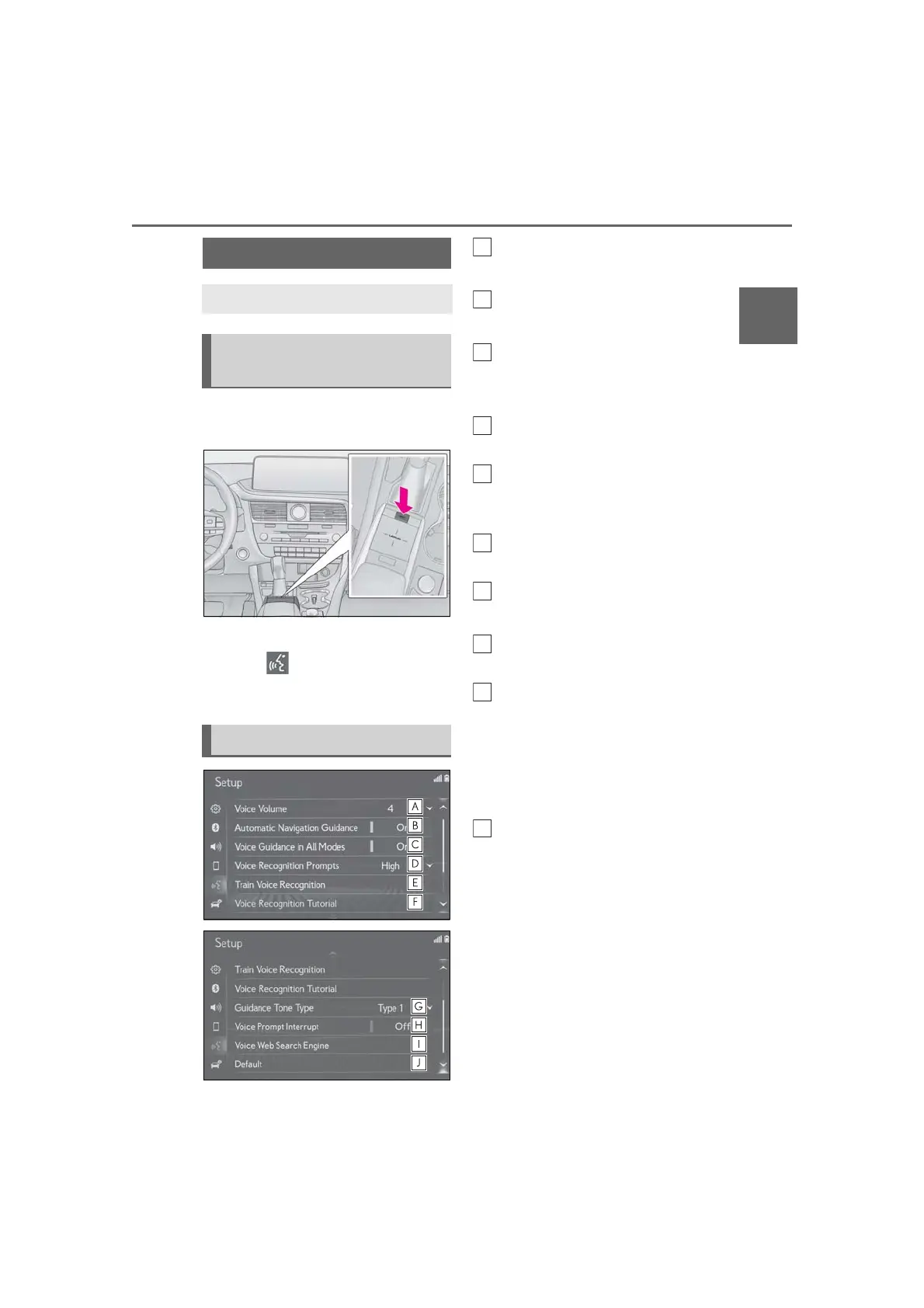
1 Press the “MENU” button on the
Remote Touch.
2 Select “Setup”.
3 Select “Voice” on the sub menu.
4 Select the desired items to be set.
Select to adjust the volume of voice
guidance.
*1
Select to set the voice guidance
during route guidance on/off.
*2
Select to set the voice guidance
during audio/visual and/or air con-
ditioning system use on/off.
*2
Select to set the voice recognition
prompts.
Select to train voice recognition.
The voice command system adapt
the user accent.
Select to start the voice recognition
tutorial.
Select to set the beep sound of nav-
igation guidance.
*2
Select to set the voice prompt
interrupt on/off.
Select to set the web search
engine. The search engines are
Lexus Enform App Suite 2.0 appli-
cations. This item is displayed when
two or more POI search applica-
tions are installed.
*2
(P.285)
Select to reset all setup items.
*1
: When an Apple CarPlay/Android Auto
connection is established, voice com-
mand system (Siri/Google Assistant)
and map application voice guidance vol-
ume can be changed.
*2
: With navigation function
Voice settings
Voice volume, etc. can be set.
Displaying the voice settings
screen
Voice settings screen



 To Next Page